跳到内容

Post Thumbnail Extras

v6.0

sewpafly · 2013年4月9日 上架

Make using post thumbnails easier for everyday wordpressing.

正在使用
200+
评分
5.0 / 5
累计下载
1.4 万
最近更新
2014年12月16日
2 条评价需要 WordPress 2.5+

贡献者

截图

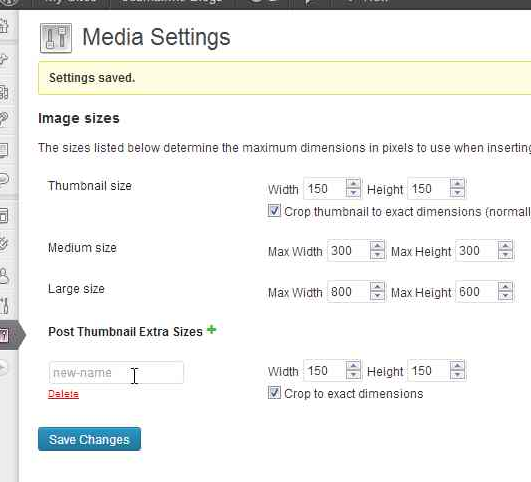
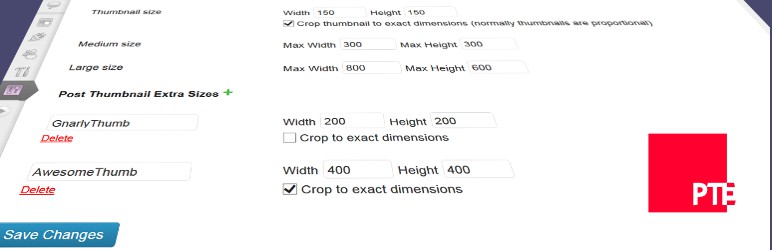
In Settings → Media, click the plus sign to add a new post thumbnail.
Update the width/height and whether or not the post-thumbnail should be cropped to an exact size. (If the width or height is set to 0, that boundary constraint is not enforced). Make sure you click the "Save Changes" button so that the changes are stored in the database.
In the media editor, you can choose to insert a shortcode of a single picture with the "Insert shortcode" button.

Features

  • Provides a shortcode for embedding post-thumbnails. Authors can quickly change pictures in posts without wading through HTML. This can be awesome in several ways: if your post-thumbnails change the width or height due to a theme change, or if you have cropped them with another tool — this will always pull wordpress’ latest image).
  • Includes a hook into the media library to create the above shortcode.
  • Add new post thumbnails via WordPress Settings → Media.

Future Plans

Submit any other ideas at https://github.com/sewpafly/post-thumbnail-extras/issues.

Plums

按场景查找 WordPress 插件。安装量、评分和兼容版本来自官方目录。

导航

说明

WordPress 是 WordPress Foundation 的商标。本站与 WordPress Foundation、Automattic 没有隶属关系。这里不托管插件文件,下载和安装以 WordPress.org 上的页面为准。

© 2026 Plums