跳到内容

Popcorn

v1.0

niravdave · 2015年2月24日 上架

Amazing Popups for Wordpress.

正在使用
10+
评分
5.0 / 5
累计下载
4,367
最近更新
2015年8月12日
3 条评价需要 WordPress 3.0.1+已测试到 4.1.42

截图

Dashboard - By default the popcorn is disabled, so in order to activate the popup just click on Activate radio button and save the changes. Select any type of popup amongst the 4 listed radio button, to show it on Pages.
Image Only - Here you can set an image and give a hyper-link to the image. For example if there is an offer on e-commerce website, you can upload the offer image and give the link to that page.
Ask a Question - This pop-up helps you to get some feedback from clients. For example if you want to ask any question to user, you can simply set the question and when user fills the form. An email will be shot to your email-id which has been set in Pop Dashboard.
Text Only - This pop-up helps you to show some static information on the website. For example there is a news website and they want to show the latest news on a pop-up. They can use this and show the news in the pop-up. As well as they can give a hyper-link to the particular news.
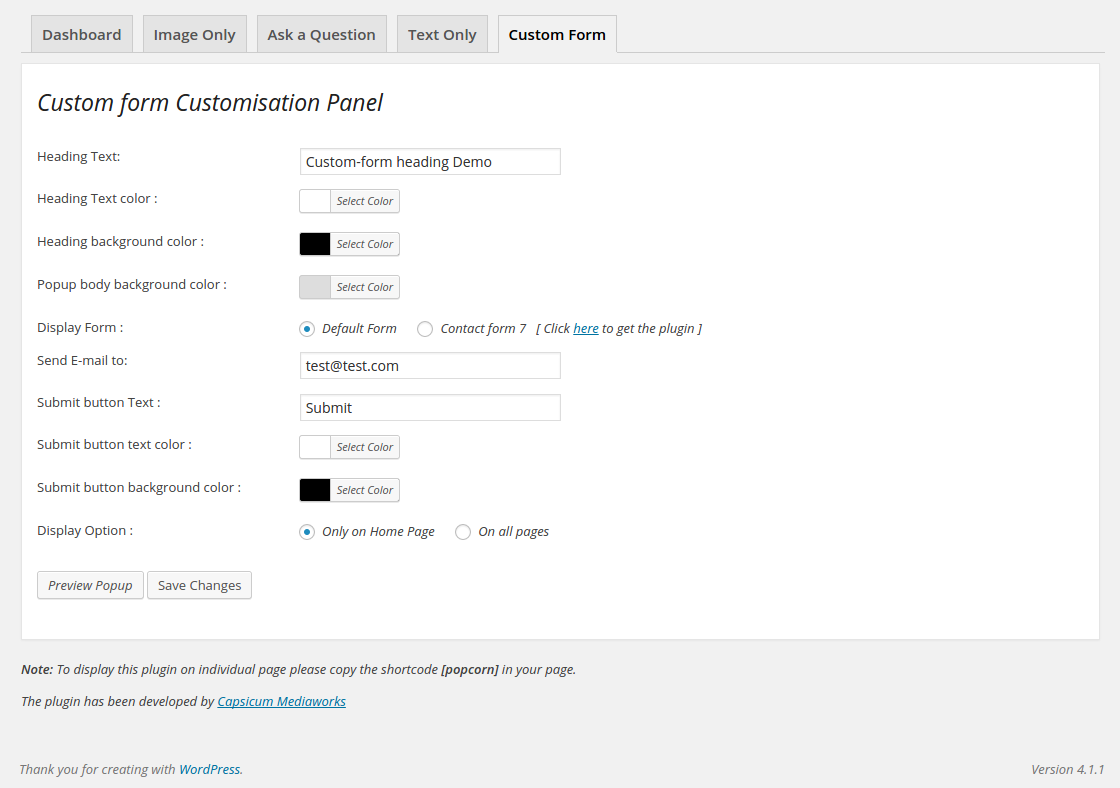
Custom Form - This pop-up is basically used to get information from the user. By default it has Name, Mobile, Email, Message fields in the form. But this feature has been extended by making it work with the Custom form 7 plugin short-code. You can simply set the short-code of the contact form 7 plugin and the form will be displayed in the pop-up. Note : If you use contact form 7 short code you need to make changes in the CSS code.
Front end Image Only Popup
Front end Ask a Question Popup
Front end Text Only Popup

This plugin has 4 types of Popups.

  1. Image only : Here you can set an image and give a hyper-link to the image. For example if there is an offer on e-commerce website, you can upload the offer image and give the link to that page.

  2. Ask a Question : This pop-up helps you to get some feedback from clients. For example if you want to ask any question to user, you can simply set the question and when user fills the form. An email will be shot to your email-id which has been set in Pop Dashboard.

  3. Text Only : This pop-up helps you to show some static information on the website. For example there is a news website and they want to show the latest news on a pop-up.
    They can use this and show the news in the pop-up. As well as they can give a hyper-link to the particular news.

  4. Custom Form : This pop-up is basically used to get information from the user. By default it has Name, Mobile, Email, Message fields in the form. But this feature has been extended by making it work with the Custom form 7 plugin short-code. You can simply set the short-code of the contact form 7 plugin and the form will be displayed in the pop-up.
    Note : If you use contact form 7 short code you need to make changes in the CSS code.

Plums

按场景查找 WordPress 插件。安装量、评分和兼容版本来自官方目录。

导航

说明

WordPress 是 WordPress Foundation 的商标。本站与 WordPress Foundation、Automattic 没有隶属关系。这里不托管插件文件,下载和安装以 WordPress.org 上的页面为准。

© 2026 Plums