
Polaroid on the Fly
v0.7Matt Martz · 2007年9月19日 上架
Creates polaroids of images on the fly for thumbnails in posts. Support for lightbox included. Built on modified Polaroid-o-nizer v0.7.2 sources.
- 正在使用
- 10+
- 评分
- 暂无
- 累计下载
- 1.3 万
- 最近更新
- 2009年6月20日
贡献者
 Matt Martz
截图
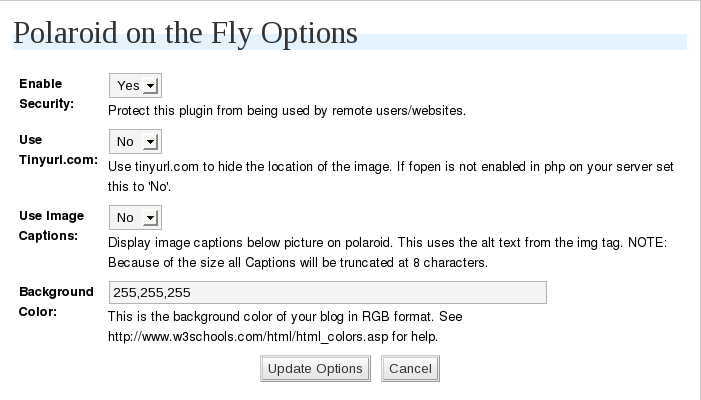


Creates polaroids of images on the fly for thumbnails in posts. Support for lightbox included. Built on modified Polaroid-o-nizer v0.7.2 sources.
I wanted to mimic the Polaroid look that you can achieve with Google Picasa to add thumbnails to my posts. I found a plugin titled WP-Polaroidonizer that did what I wanted to some extent but it didn’t have the right feel to it.
The other problem I have with Polaroid-o-nizer and WP-Polaroidonizer is the lack of security. When I mention lack of security there is by default no way to restrict external sites and users from generating Polaroid pictures using your installation of Polaroid-o-nizer.
The goal of this plugin was to use rel= style html img tags to transform a simple URL into a Lightbox URL in which there is a thumbnail image in your post which is linked to an image that can be loaded using Lightbox or any of the Lightbox clones/alternatives.
Requirements
- PHP GD Module
- Lightbox – Not really a requirement but a recommendation if you want to have a nice ajax/javascript image overlay on your page.
Upgrade
- Deactivate the plugin through the ‘Plugins’ menu in WordPress
- Delete the previous
polaroid-on-the-flyfolder from the/wp-content/plugins/directory - Upload the new
polaroid-on-the-flyfolder to the/wp-content/plugins/directory - Activate the plugin through the ‘Plugins’ menu in WordPress
Usage
-
Create an image link in your post in the following format:
-
Be sure to include
rel="polaroid"as this activates the plugin. - If
alt="Picture[album]"is included the portion listed here as Picture will be displayed as the image title in Lightbox and the portion listed as[album]will group multiple pictures into an album called album. The alt tag is not required and if used the[album]portion is not required. Read the Lightbox usage for more details on Titles and albums. - Be sure to place each html img tag on a separate line.
- This plugin supports the following image formats: jpg, png, gif
NOTE:
Do not use the visual editor for doing the above use the code editor.
To Do
- Add features for x and y offset
- Add features for rotation angle
- Add additional error reporting for the offset and angle
- Add functionality to options page to generate a URL for placement elsewhere on the site.
- Add functionality to cache the polaroid images.