

Podio Webforms
v1.2Clifford Paulick · 2013年10月30日 上架
Easily add your Podio Webforms anywhere in WordPress via shortcode.
- 正在使用
- 200+
- 评分
- 5.0 / 5
- 累计下载
- 7,406
- 最近更新
- 2019年3月7日
贡献者
 Clifford Paulick
截图


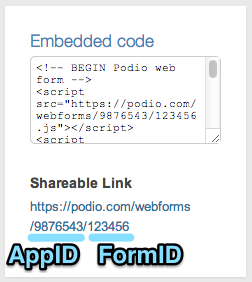


Easily add your Podio Webforms anywhere in WordPress via shortcode. Don’t worry about all that Podio Webform code, and you don’t have to switch to the HTML Editor to paste anything.
Just go to your Podio app’s webform page and find your code (no need to copy and paste). Look at the “Sharable Link” (e.g. https…podio.com/webforms/9876543/123456), and create a shortcode like this: [podioform appid=’9876543′ formid=’123456′]. That’s it.
Optionally, can add [podioform … showfooter=’no’].
List of Examples
- [podioform appid=’9876543′ formid=’123456′]
- [podioform appid=’9876543′ formid=’123456′ showfooter=’no’]
- [podioform appid=’9876543′ formid=’123456′ footerlink=’https://podio.com/r/enlaREvfxo9M-sl8uX4EtA’]
Don’t forget to whitelist your allowed domains in your Podio settings, otherwise your forms won’t show up.
Podio Webform Tips
- Sign up for Podio (it’s free!)
- How to create a Podio Webform
- Podio Apps Market (all apps are free, some come pre-configured as Webforms)
- Zapier Podio Integrations
FYI: This is a third-party plugin, not officially from the Podio company.
Developers may contribute at https://github.com/cliffordp/podio-webforms