

Swatch – Variation Swatches for WooCommerce
v1.0.27WPPoland (Mariusz Szatkowski) · 2026年9月20日 上架
Let shoppers pick colours and sizes with a click: swatches replace the variation dropdowns, and the chosen value shows in words.
- 正在使用
- 10 以下
- 评分
- 5.0 / 5
- 累计下载
- 690
- 最近更新
- 2026年11月22日
 WPPoland (Mariusz Szatkowski)
截图


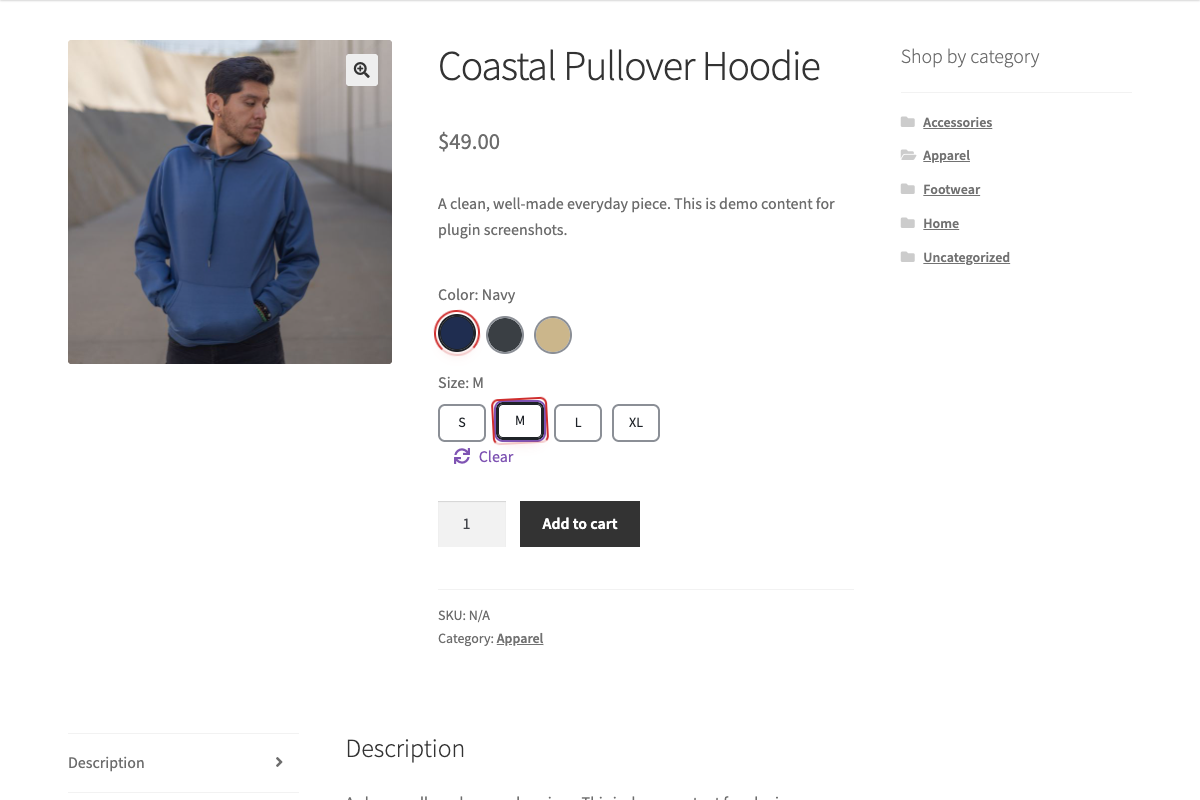
Swatch replaces WooCommerce’s default variation <select> dropdowns with visual, accessible swatches on single product pages. Choose a swatch type per attribute (colour dots or button/label pills) and assign a colour or label per term.
The swatches drive WooCommerce’s own variations form, so price, stock and the add-to-cart button update exactly as they do with the stock dropdowns. Selected and out-of-combination states are reflected automatically.
The full source lives on GitHub at github.com/wppoland/plogins-swatch if you want to read the code or report a problem.
Features
- Colour and button/label swatch types.
- Per-attribute type selection on the global attribute screen.
- The chosen value shows beside the attribute label, as in “Color: Navy”, and screen readers announce it.
- Per-term colour (
sanitize_hex_color) and custom label, stored as term meta. - Wires into WooCommerce’s native variations form, no jQuery, vanilla JS.
- Keyboard operable (radiogroup semantics, arrow keys) and screen-reader labelled.
- Focus-visible rings, sufficient contrast, reduced-motion friendly, no layout shift.
- Graceful fallback to the standard dropdown when an attribute has no swatch data.
- Swatches in shop and category listings too, off by default so your shop page does not change without you asking.
- Settings page under WooCommerce: enable/disable, default swatch type and the shop-listing switch.
Self-contained. No external services, no account, no third-party dependencies.
Works with other Plogins plugins
- Peek – Product Preview for WooCommerce – variable products opened in Peek’s quick view show the same swatches as the product page, with no setting.
Swatch Pro
Swatch Pro is a separate paid plugin that extends Swatch.
Included in Swatch:
- Colour and button swatches
- Type per attribute
- Colour and label per term
- Native variations form
- Keyboard operable
Swatch Pro adds:
- Image swatches
- Per-variation gallery
- Image swatches in the shop loop
- Rich tooltips
- Custom sizes and shapes
- Linked products
The free edition is not a trial and its features stay available without a time limit.
- Swatch Pro – plogins.com/plogins-swatch-pro/
- Compare editions and pricing – plogins.com/plogins-swatch-pro/pricing/
- PRO documentation – plogins.com/plogins-swatch-pro/docs/
External Services
Swatch does not connect to any external services. It makes no outbound HTTP requests, loads no remote scripts, fonts or CDN assets, and sends no telemetry or analytics. There is no account or API key.
Everything is stored in your own database: the swatch type per attribute, the global defaults and a schema version are kept in the swatch_attribute_types, swatch_settings and swatch_db_version options, and each term’s colour and label are stored as the swatch_color and swatch_label term meta on your WooCommerce attribute terms. The plugin sends no email.
Translations
Plogins Swatch is fully translatable and ships the plogins-swatch.pot template. Translations are delivered by WordPress.org language packs from translate.wordpress.org, which is where Polish, German and Spanish are being contributed; the package itself carries no compiled translation files.