

Plaxswap Crypto Payments for WooCommerce
v1.0.4plaxswap · 2026年10月25日 上架
Accept Bitcoin, USDT, USDC and Ethereum in WooCommerce. Your customer pays the 1.5% fee. No monthly fee and no chargebacks.
- 正在使用
- 10 以下
- 评分
- 暂无
- 累计下载
- 539
- 最近更新
- 2026年11月23日
贡献者
 plaxswap
截图


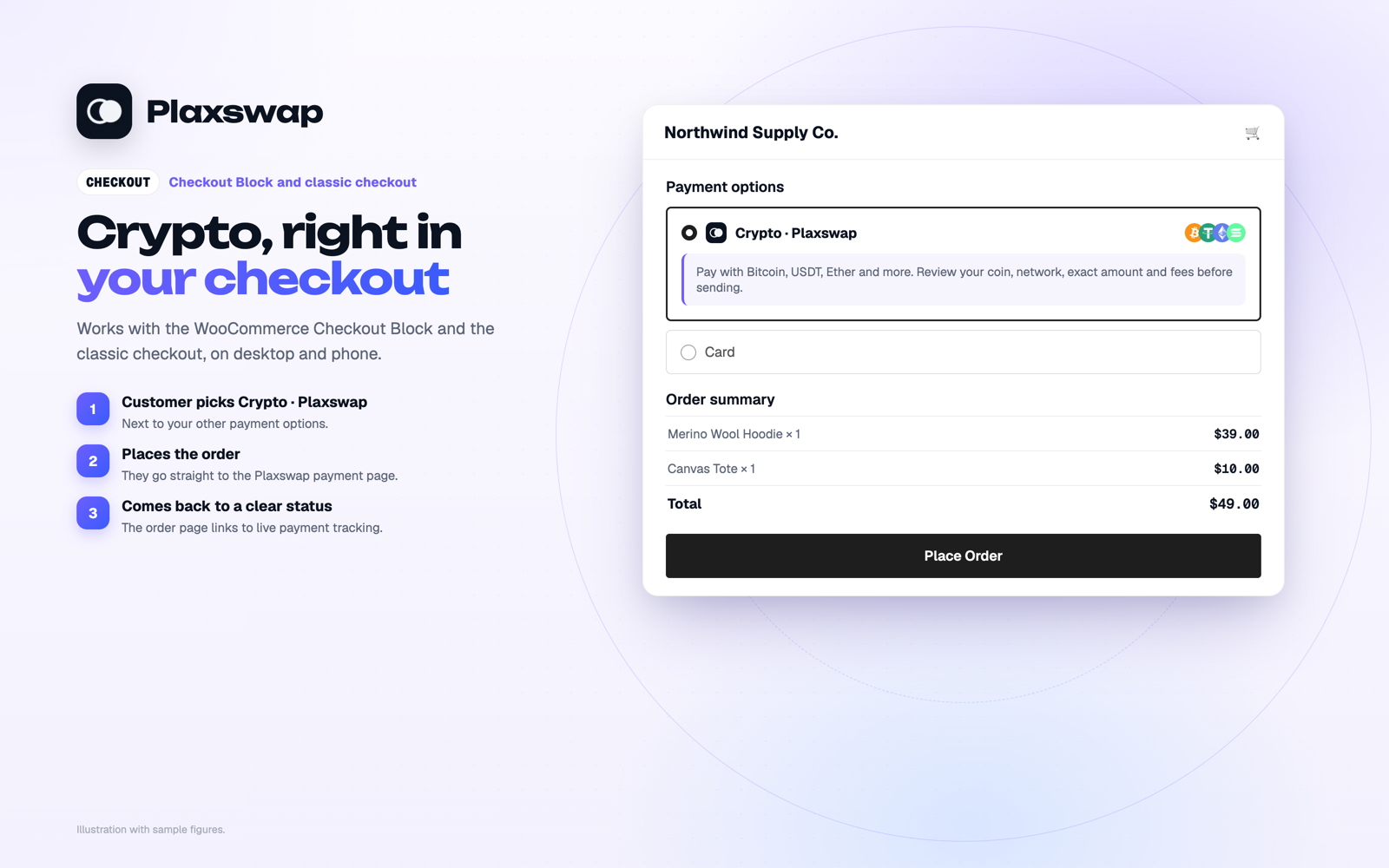



Plaxswap Crypto Payments adds a crypto payment gateway to WooCommerce. Customers can pay with Bitcoin (BTC), Ethereum (ETH), USDT, USDC, Solana (SOL), Tron (TRX), BNB, Litecoin (LTC), Dogecoin (DOGE), Bitcoin Cash (BCH), XRP, Avalanche (AVAX), Polygon (POL), DAI, Dash and more, on multiple coins and networks. USDT can be paid on Tron (TRC-20), Ethereum (ERC-20), BNB Chain (BEP-20), Solana, Arbitrum, Polygon and TON.
The customer chooses Crypto · Plaxswap at checkout, picks a coin and network on the Plaxswap hosted checkout, and sees the exact amount, address and QR code before sending anything. The order stays Pending payment until the coins arrive and moves to Processing only after the plugin has checked the payment with the Plaxswap API.
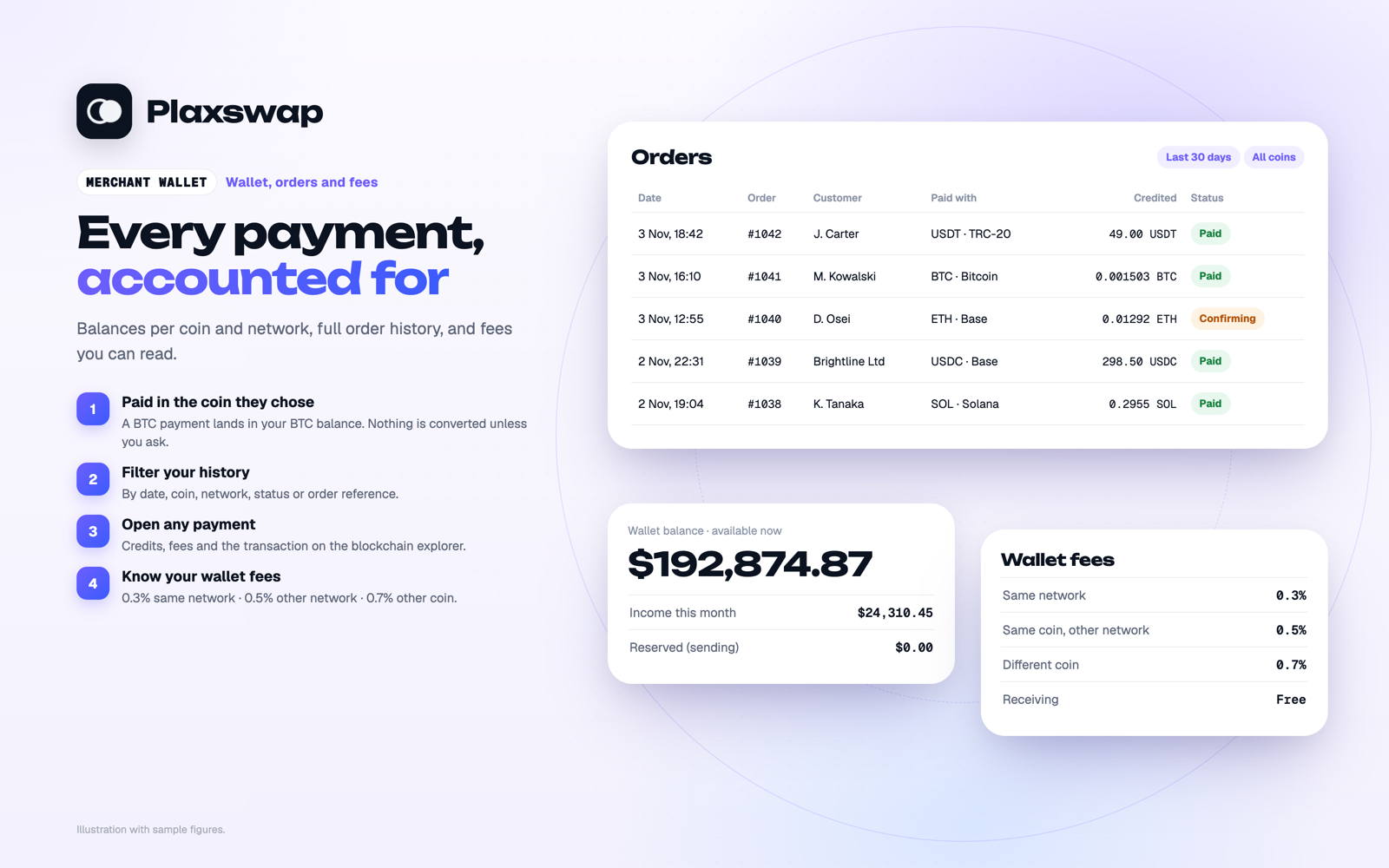
Payments are credited to your Plaxswap merchant balance in the coin and network the customer used. Plaxswap holds the coins until you withdraw them to your own wallet or swap them to another coin.
Setup guide with screenshots: plaxswap.com/integrations/woocommerce.
What it costs you
- Your customer covers the 1.5% platform fee. It is shown at checkout before they pay, so the full order price reaches your merchant balance.
- No monthly fee and no sign-up fee. Withdrawals cost 0.3% plus the network fee, both shown before you approve.
- No chargebacks. A confirmed crypto payment can’t be reversed by the payer.
- Test mode. Try paid, expired and failed payments with a test key before you take real money.
On a $100 order your customer pays a $1.50 platform fee, plus the conversion and network costs of the coin they choose. Fees for every product are on plaxswap.com/fees.
Watch how it works
A short cartoon about how a shop gets paid in crypto with Plaxswap:
Track payments on your phone
The Plaxswap Merchant app for Android shows each payment as it arrives and lets you withdraw from your merchant balance. Sign in with the same merchant account you connect to this plugin. Get Plaxswap Merchant on Google Play.
Features
- Built for WooCommerce. Works with the Checkout Block and the classic checkout, on desktop and phone, and with High-Performance Order Storage (HPOS).
- A clear checkout. Customers search for a coin (for example “usdt trc20”), pick the network, see the exact amount, address and QR code, and follow each confirmation live.
- Verified orders. A signed webhook and a separate API check confirm the payment before the order is marked paid. A scheduled check catches anything delayed. A customer coming back to your store is never treated as proof of payment.
- Withdrawals need a fresh code. Every withdrawal from your merchant balance needs an authenticator code or a passkey.
- Test mode. Store administrators and shop managers can place test orders and act out paid and expired payments with no real funds before going live.
New in 1.0.3: steadier orders
- Unpaid orders stay Pending payment. Stock is reduced and on-hold emails are sent only once coins arrive.
- A customer whose payment expired or failed can pay again from the order; a late payment to the earlier payment is still matched and reported to you.
- Customers go straight to the Plaxswap checkout page, and see a clear reason when a payment cannot open (for example an order below the minimum of about US$1).
- Background checks slow down over time and stop once a payment is final.
- Cancelling an unpaid order also cancels its Plaxswap payment.
- The settings page warns when your Plaxswap webhook URL is missing or points somewhere else, and when the store has no HTTPS.
Your Plaxswap merchant balance
The gateway is custodial: Plaxswap holds the coins from confirmed payments until you withdraw them. In your merchant dashboard you can:
- Withdraw to any address on the coin’s network. The payout starts as soon as you approve it with your authenticator code or a passkey.
- Swap between coins, with the rate and every fee shown before you approve.
- Receive coins to a deposit address for your merchant balance, with a QR code.
- Protect the account: your anti-phishing word appears in every Plaxswap email, and every security email has a link to lock your account, which freezes withdrawals and signs every device out. Withdrawals wait 24 hours only after the authenticator is moved with a recovery code.
How it works
- Your customer chooses Crypto · Plaxswap at checkout and places the order.
- Plaxswap checkout shows the coin, network, exact amount, address and QR code.
- The customer pays from any wallet or exchange and follows the confirmations live.
- The payment is verified, the order moves to Processing, and the payment is credited to your merchant balance.
Order statuses
- Pending payment: the order is waiting for the customer to pay. Stock is not reduced yet.
- On hold: coins arrived and are being confirmed, or only part of the amount arrived. WooCommerce reduces stock at this point.
- Processing: the payment is verified and credited (Completed for virtual, downloadable products, as WooCommerce decides).
- Cancelled: the payment expired with nothing paid. Plaxswap still accepts coins for 24 hours after expiry; a late payment is flagged for your review and emailed to you.
- Failed: the payment failed and any coins went back to the customer. The customer can pay again from the order.
Fees
- Payment fee: a 1.5% platform fee (or the fee set for your merchant account), paid by the customer. The checkout shows the customer every charge before they pay. The plugin adds no surcharge of its own.
- Withdrawals: 0.3% plus the network fee. Both are shown before you approve.
- Swaps in your merchant account: 0.3% on the same network, 0.5% for the same coin on another network and 0.7% for another coin on another network, plus the network fee.
Current fees for every coin and network: plaxswap.com/fees.
What it doesn’t do
- Subscriptions and automatic renewals. Each order is paid once at checkout.
- Automatic refunds. Marking an order Refunded in WooCommerce doesn’t send coins back; send them from your merchant balance.
- One payout coin. You receive the coin and network the customer paid with, and can swap it afterwards.
- Webhooks to localhost. A live store needs a public HTTPS address.
- Withdrawals. The plugin holds only an API key and a webhook signing secret, and cannot move your funds.
Orders, history and tracking
- WooCommerce order screen: Plaxswap payment status, coin and network, credited amount, payment reference, and a Refresh Plaxswap payment order action.
- Merchant dashboard: payments and balance activity with date, coin, network, status and reference filters.
- A unique payment and tracking link for each order.
Coin and network availability, minimum amounts and fees come from Plaxswap checkout. They are not fixed in the plugin.
Requirements
- WordPress 6.8 or newer and WooCommerce 9.0 or newer, in a version combination supported by WooCommerce.
- PHP 7.4 or newer with OpenSSL.
- A Plaxswap merchant account with an integration API key and webhook signing secret.
- HTTPS on your public store, outbound HTTPS access to plaxswap.com, and a publicly reachable payment callback.
- Working WordPress scheduled tasks for payment reconciliation.
Local testing is supported with isolated simulated payments. Public Plaxswap webhooks cannot reach a private localhost store without a separately configured, secure test route.
External Service and Privacy
This plugin connects to Plaxswap at plaxswap.com to create, verify and (when you cancel an unpaid order) cancel crypto payments. It transmits the order amount, currency, an opaque order reference, verification metadata, a description, and store return/cancel URLs (https only). A customer billing email is sent only when the store enables the optional email-sharing setting.
The hosted checkout receives the customer’s own web request. The plugin’s API integration credentials are encrypted on the WordPress server using its security salts; they are not included in the customer’s checkout page. Preserve the WordPress salts when restoring a backup, or re-enter the credentials afterward. Order payment references and a limited payment summary are stored in WooCommerce for reconciliation.
Plaxswap is operated by SAMZAL LLC. Review its terms and privacy policy. Service availability information is at plaxswap.com/compliance.