
PipelineOn
v1.0.0pipelineon · 2026年8月23日 上架
See likely homeowners who visit your WordPress site and leave without filling out a form, focused on the ZIP codes you serve.
- 正在使用
- 10 以下
- 评分
- 暂无
- 累计下载
- 251
- 最近更新
- 2026年8月24日
贡献者
 pipelineon
截图


Your website traffic should not disappear when a visitor leaves without calling or filling out a form.
PipelineOn helps home-service contractors see likely homeowner visitors from the ZIP codes they serve, together with available contact details and the pages they viewed. That gives your team more context to decide which opportunities deserve follow-up.
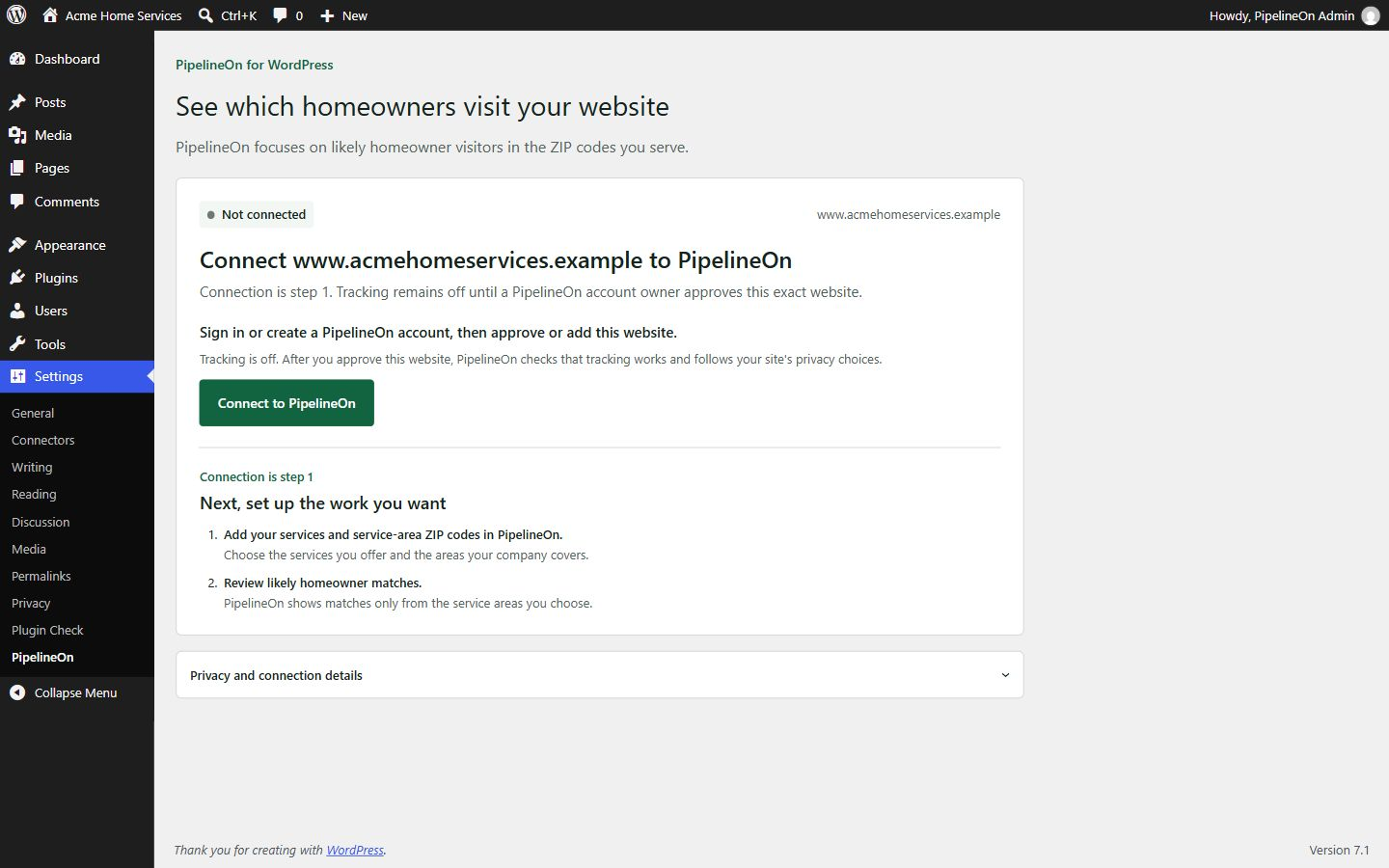
The official PipelineOn plugin connects your WordPress website in a few clicks – no tracking code to copy or maintain. Approve your exact website, verify that tracking is live, then review matches and manage follow-up in PipelineOn.
With PipelineOn, you can:
- Focus on likely homeowners inside the service-area ZIP codes you choose.
- See U.S. website activity and estimated homeowner matches in your PipelineOn dashboard.
- Review available contact details and website activity before deciding how to follow up.
- Verify, pause, resume, or disconnect tracking from WordPress.
A PipelineOn account is required. Match availability varies, and PipelineOn does not identify every visitor.
How it works
- Install and activate the plugin. Nothing is tracked on a fresh installation.
- Choose Connect to PipelineOn and approve the exact website in your PipelineOn account.
- Confirm that tracking is live, then add the services and ZIP codes your company serves.
- Review eligible matches and website activity in PipelineOn.
PipelineOn service
On a fresh installation, installing or activating the plugin does not contact PipelineOn. An Administrator must choose Connect to PipelineOn first.
After Connect to PipelineOn, requests use these routes under https://app.pipelineon.com/api/integrations/wordpress/: authorization/init, authorization/status, connection/start, connection/complete, and connection/status.
WordPress sends a random installation ID, public website and WordPress addresses, return and temporary check addresses, one-time security values, and plugin and WordPress versions. PipelineOn uses them to confirm the website and return the Administrator safely. Private values stay in WordPress and expire. No PipelineOn password is sent or stored.
When connected, enabled, and allowed by the site’s privacy choices, the plugin loads https://pp-n.com/p.js, which is part of the PipelineOn tracking service. PipelineOn may process page and referring addresses, browser, device, IP and network details, visitor and visit IDs, website activity, and recognized form fields to identify likely homeowner visitors and measure results.
Page addresses exclude sign-in details and retain only approved advertising details. PipelineOn does not read unrelated cookies or browser storage. Only clearly recognized email, phone, name, and company form fields are sent—never passwords, hidden fields, payment or banking details, security codes, or unrecognized values.
Before enabling, review PipelineOn’s Privacy Policy and Terms.
Privacy and consent
The plugin adds suggested disclosure text under Settings > Privacy. Site owners must review that text, their PipelineOn settings, applicable law, and their site’s privacy choices.
Logged-in WordPress Administrators are not tracked during normal visits. Verify tracking now allows one Administrator test visit.
PipelineOn supports the WP Consent API and registers po_vid and po_sid as marketing cookies. When available, both statistics and marketing must be allowed. Turning either off stops tracking and clears PipelineOn cookies and browser storage; restoring both starts a new visit. Privacy tools may also use pipelineon:consent-granted or pipelineon:consent-revoked. Developers can stop tracking with:
add_filter( 'pipelineon_should_load', '__return_false' );
The filter cannot bypass the connection, local tracking setting, Administrator exclusion, or exact website-address checks.
Local data
The plugin stores a random installation ID, approved website address, versions, connection and tracking status, website ID, safe status messages, and recent-activity dates. WordPress holds private one-time values while a connection step finishes or expires. It stores no PipelineOn password, customer profile, account details, or reusable sign-in details.
Deactivation stops the plugin from adding tracking to newly generated pages but keeps the saved connection; reactivation can resume tracking. Purge any WordPress or CDN page cache after pausing or deactivating.
To remove the remote connection, choose Disconnect and wait until Settings > PipelineOn shows Disconnected before uninstalling. Disconnecting stops new plugin output locally while PipelineOn confirms the request. Uninstall deletes only local data; uninstalling before confirmation may leave the remote association.