

PCIO VIS Member Event
v1.7.0Niels Olsen · 2026年7月18日 上架
Member and event management for voluntary organizations: members register, event calendar with signups, mailings, newsletters, documents and finance.
- 正在使用
- 10 以下
- 评分
- 暂无
- 累计下载
- 768
- 最近更新
- 2026年11月17日
贡献者
 Niels Olsen
截图
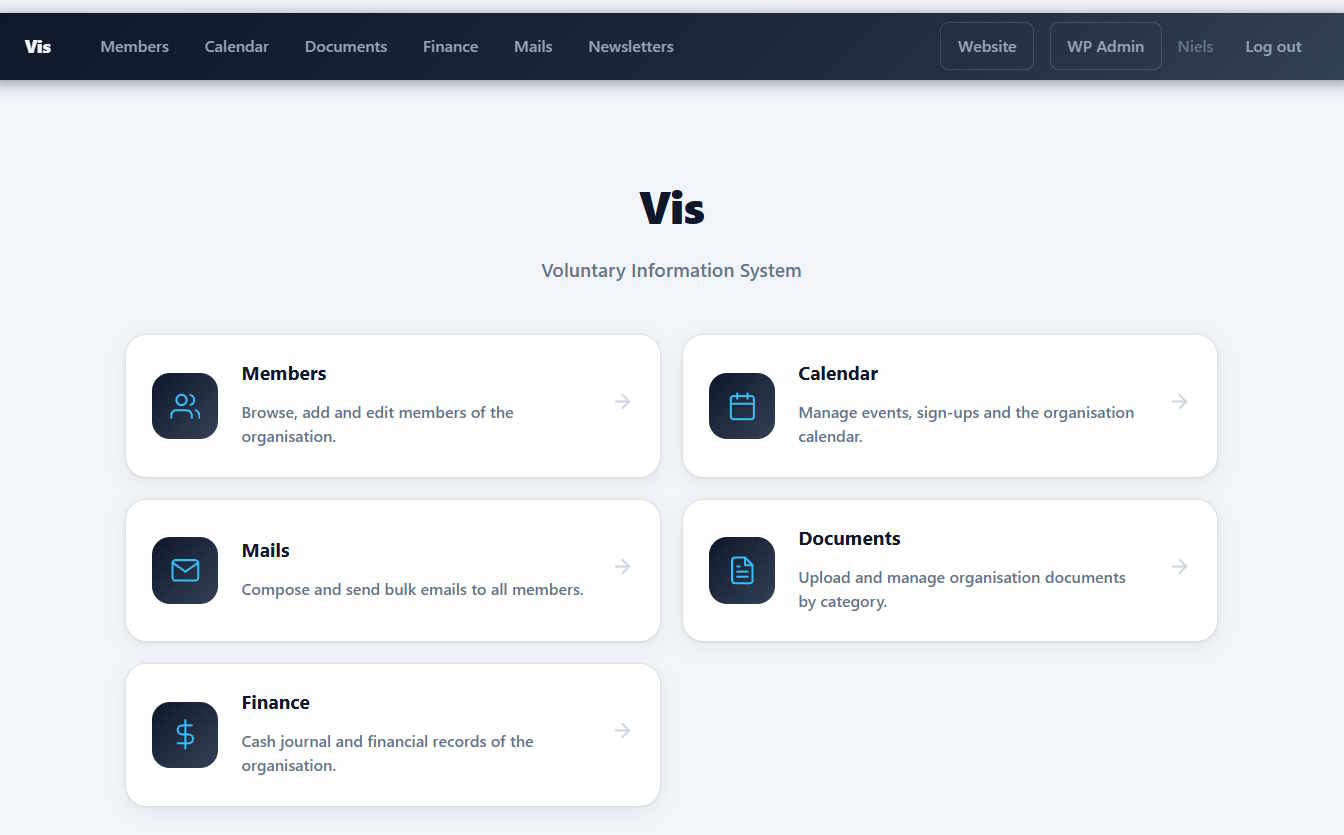
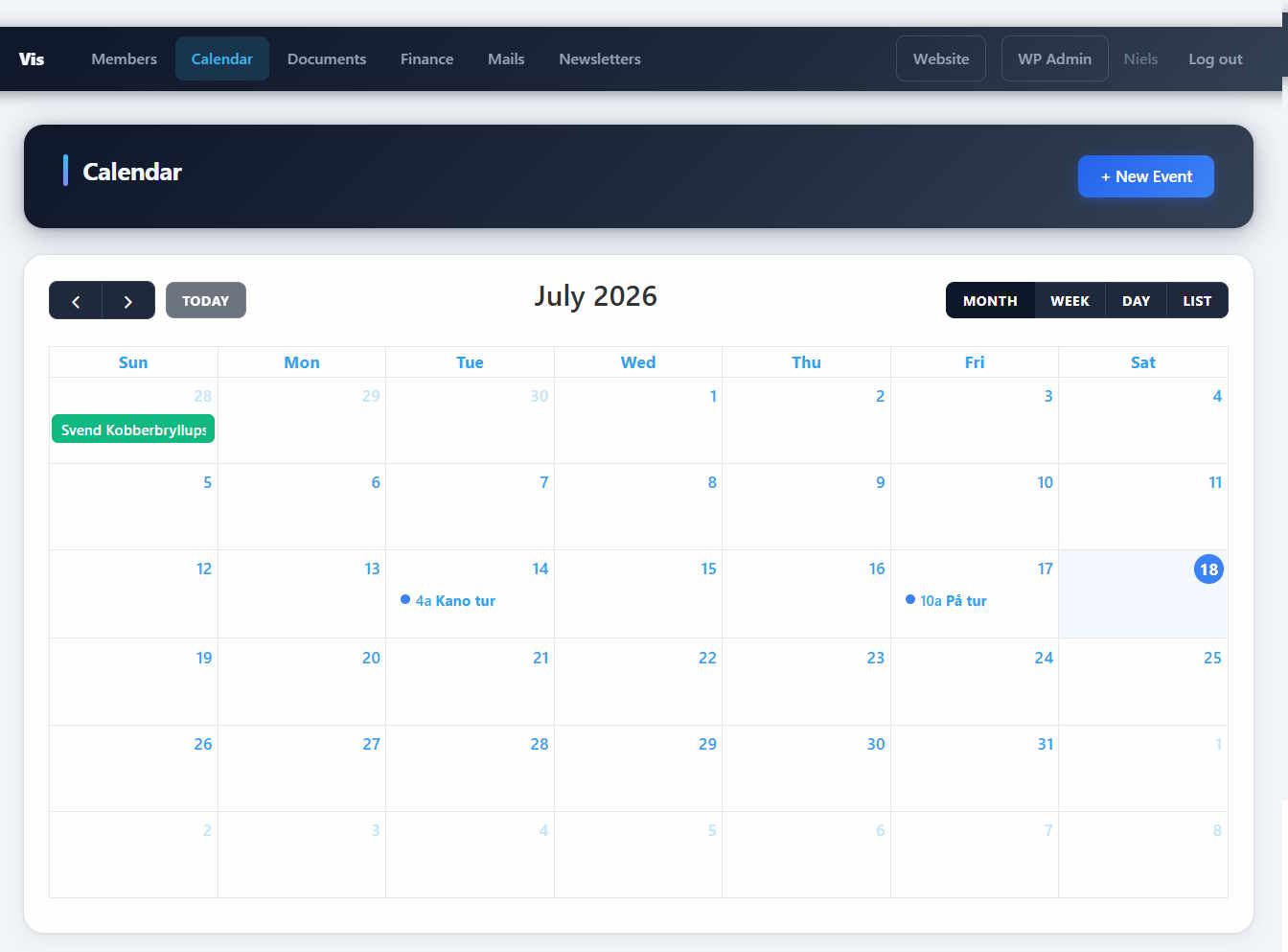
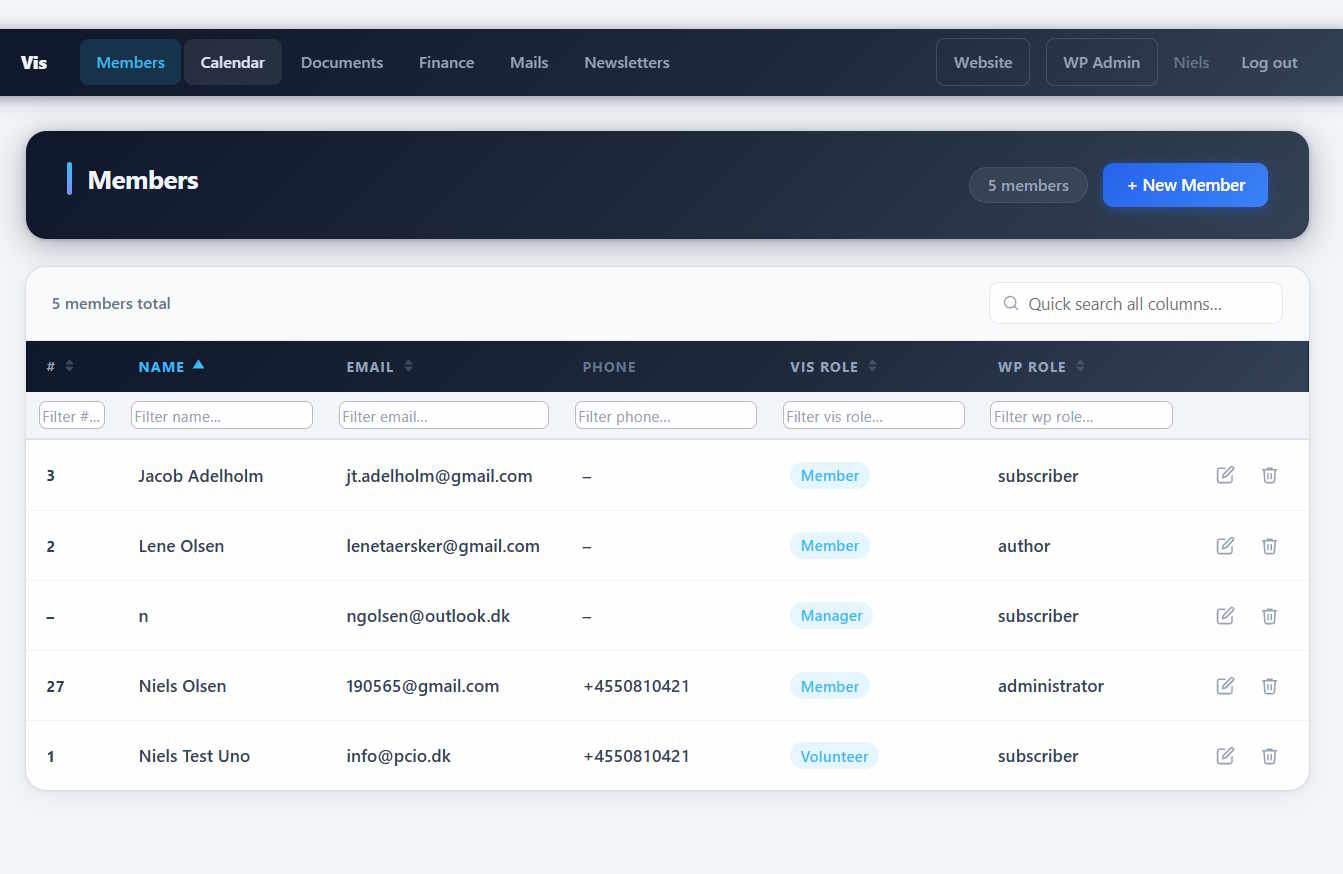
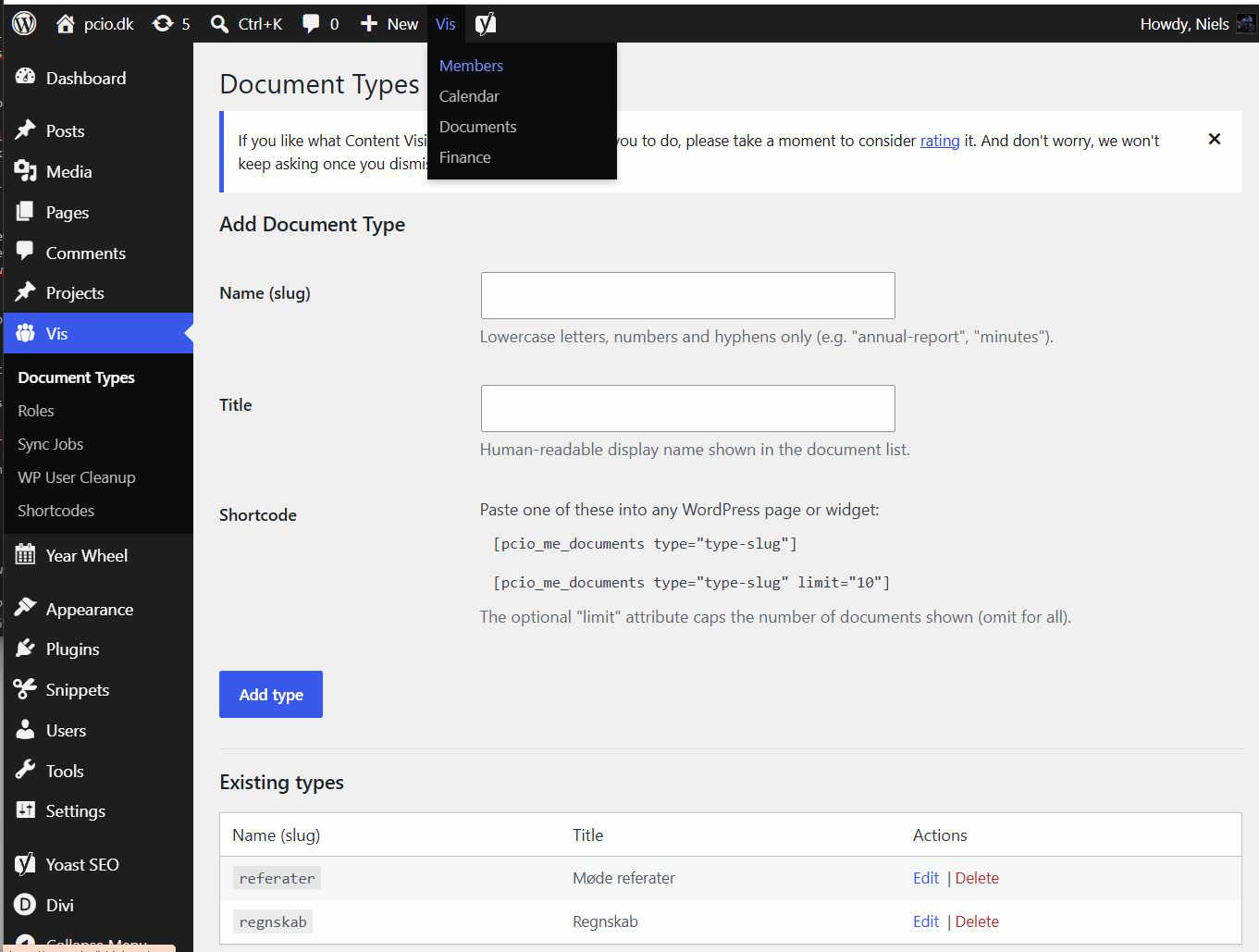
PCIO VIS Member Event turns your WordPress site into a complete back office for a voluntary organization or association.
It provides a members register, an event calendar with public sign-ups, e-mail and newsletter tools, a document library and a simple finance journal — all built on native WordPress capabilities so access control works with the roles you already use.
Public pages are served automatically under /vis/; no WordPress pages or shortcodes are required to get started. The public event permalinks are the one exception: the plugin creates a single Event page (slug event, containing the [pcio_me_event] shortcode) that /events/{slug}/ links to, so those pages render through the theme’s page template and use your site’s header and footer:
- Home (
/vis/) — landing page for volunteers and staff. - Members (
/vis/members) — searchable members directory for volunteers and staff. - Member (
/vis/members/{id}) — member detail page with a Settings tab and, for administrators, a History tab. - Calendar (
/vis/calendar) — upcoming events with sign-up for volunteers and staff. - Event (
/vis/events/{id}) — member event detail page with banner, description and sign-up box. - Public event (
/events/{slug}) — indexable, no-login event page rendered through the Event page. - Mails (
/vis/mails) — member mailings. - Newsletters (
/vis/newsletters) — public newsletter archive. - Documents (
/vis/documents) — document library grouped by type for volunteers and staff. - Finance (
/vis/finance) — finance overview for authorized users. - Statistics (
/vis/statistics) — member growth chart, page-view and login counters, and sponsor link click tracking.
Roles and capabilities. The plugin defines a cumulative set of logical roles — Member, Volunteer, Event Manager, Publisher and System Admin — that grant additional capabilities to Vis members. Define these roles under Vis Roles and assign them to member records. Default management capabilities are also granted to built-in WordPress roles.
The vis_member capability is a separate membership marker granted to individual WordPress accounts when they are linked or provisioned as Vis members, and revoked when membership is removed. Plain members with only vis_member can see published public and members events, sign up for them, and use the [pcio_me_members] shortcode when the member directory is enabled. They cannot open the /vis/ landing page or the shared lists. Volunteer and staff access to /vis/ is granted by vis_volunteer, vis_boardmember, vis_edit_all_events, vis_publish_events, vis_manage_users, vis_manage_settings, vis_manage_finance, vis_shop_manage or vis_shop_delivery.
In member lists, the Vis Role column displays Member when the linked WordPress account has vis_member and no explicit Vis role is assigned. This is a display-only fallback: stored assignments and permissions are unchanged, and explicitly assigned roles remain visible. It is not a subscription-status indicator.
Signup abuse protection. Public member signup is limited to 5 attempts per IP address and 3 per email address per hour. Existing WordPress accounts are not linked automatically: the person must sign in or contact the club. New registrations receive the standard welcome/set-password email, so only the mailbox holder can activate the account.
Sponsor click tracking. Public sponsor-click tracking deduplicates identical client/URL clicks for 30 seconds and accepts at most 30 clicks per client per minute. Use the pcio_me_signup_ip_limit, pcio_me_signup_email_limit, pcio_me_sponsor_click_limit and pcio_me_sponsor_dedupe_seconds filters to tune these limits.
Menu visibility. Each item in the classic Appearance Menus editor has an optional Required capability field. Leave it empty to show the item to everyone; otherwise the item is shown only when the visitor has that capability (for example vis_member, vis_volunteer or manage_options). A restricted parent also hides its submenu items. This only hides navigation links — it does not protect the destination page, which must enforce its own access check. Sites using a full-page cache must not share cached pages between visitors with different capabilities. The older vis-member-only CSS class is no longer supported; it is removed from menu items once during the update, and menu visibility must be configured with the capability field.
Additional role capabilities include:
- Volunteer
- Create own events
- Edit own events
- Edit all events
- Publish events / manage documents
- Manage members
- Manage settings & mails
- Manage finance
Shortcodes. For themes that prefer to embed content in ordinary pages, the plugin also ships shortcodes: [pcio_me_members], [pcio_me_documents], [pcio_me_edit_profile], [pcio_me_event], [pcio_me_events], [pcio_me_event_roller], [pcio_me_upcoming_events], [pcio_me_calendar], [pcio_me_newsletters], [pcio_me_member_count], [pcio_me_member_signup] and [pcio_me_rolling_text]. The [pcio_me_calendar] shortcode embeds a calendar configured under Vis Google; use name="…" to choose between multiple calendars and height to set the iframe height. The [pcio_me_event] shortcode renders a compact event card when given id or slug, and the full-width detail layout when left bare on the Event page (where it resolves the event from /events/{slug}/). The [pcio_me_edit_profile] shortcode renders a pre-filled profile form (membership number, name, email, phone, address) for the logged-in member, validates in the browser and saves over REST; the membership number is shown read-only. The [pcio_me_members] shortcode renders a searchable member table — volunteers and staff always see it, and plain members see it only when Vis General Member Directory allows members to view other members. The table includes each member’s email address and phone number. The search box filters rows live and shows a message when nothing matches, and ?member_number=… in the page URL pre-fills the membership-number filter. The [pcio_me_member_count] shortcode displays an animated total member count and can be used in any page builder (e.g. a Divi Text Module); each render increments the front-page-view counter visible on the Statistics dashboard. The [pcio_me_member_signup] shortcode renders a public member registration form that creates the member, provisions a WordPress account and sends an automated welcome email. The [pcio_me_rolling_text] shortcode outputs a scheduled scrolling banner. A Shortcode reference page in the Vis admin documents every shortcode with its attributes and examples, and a Sponsor Links page documents the pcio-sponsor-link class used for click tracking.
Change history and undo. Every change to Vis data (members, events, sign-ups, roles, workgroups, documents, mails, journal entries and extension data) is logged with the time, the user and a readable description. Vis History lists all changes newest first, and the event and member pages have their own History tab. Users with the vis_undo_changes capability (System Admin) can undo a change; the undo is itself logged and can be undone again. Undo restores database rows only — sent e-mails, payments and WordPress accounts are not reverted, and changes with such side effects are logged as not undoable. Long text fields (event descriptions, mail content) are summarised by length in the log instead of storing every version in full.
WordPress user cleanup. Vis WP User Cleanup lists WordPress accounts not linked to a Vis member. WordPress administrators with user-deletion permissions can select accounts and choose Delete selected, or use Delete All for the eligible accounts on this list only. Accounts with any authored posts, pages, attachments, custom post types or revisions (including drafts and trash), registered-user comments, or legacy WordPress links are kept and marked in the Status column. Administrators, accounts with manage_options, super administrators and the current account are protected. The server rechecks eligibility when the action is submitted, uses WordPress user-deletion APIs and reports deleted, skipped and failed accounts. Deletion is permanent and unavailable on Multisite, where accounts and content may belong to other sites.
Unsaved dialog changes. Data-entry dialogs in the core, boat and products extensions stay open when clicking outside them. Cancel, the close button and Escape ask before discarding changed fields, including checkboxes, selected files and rich text. Navigating away with unsaved dialog changes triggers the browser’s standard warning. Successful saves and checkout redirects do not trigger a discard warning. This protection keeps edits in the current page only; it does not store drafts or recover data after a browser crash.
Event types and categories. Event types are behaviour bundles: they set access, default resources, colour, cafe-time filtering and special poster handling. The Event Types tab at /vis/calendar/#event-types includes protected system types with stable slugs cafe, art, holiday, general and poster-note. Their display labels follow the site language and are translated at render time, so changing the site language no longer creates English/Danish duplicates. The event-type API rejects a new type when its normalised name or a known alias (for example Kunst, Ferie or Café) already resolves to an existing type. System types cannot be deleted or renamed through the API.
Event categories are descriptive labels for filtering only. They do not change access, resources, colour or cafe hours. Manage them at /vis/calendar/#event-categories, choose one per event on the event editor, and filter by them in the personal calendar filter. The one-time upgrade converts every non-system event type into a category; imported fg-type-* rows and title-only types with default behaviour are then folded into the matching system type, so no descriptive label is lost. New labels should be added as categories rather than event types.
Regression tests live outside the plugin in the repository’s tests/pcio-vis-member-event/ folder and are not part of the distributed plugin. Run the PHP tests with php tests/pcio-vis-member-event/<name>.test.php. For the browser tests, serve the repository root locally and open tests/pcio-vis-member-event/modal-guard.html; its application fixtures mock REST requests and do not change WordPress data.
Extensions. PCIO VIS Member Event is the core plugin for a family of optional add-ons (gallery, products, tickets, project management, home-owner association tools and Conventus sync). The bundled Dompdf and php-qrcode libraries are shared with those extensions for PDF and QR generation.
Google Calendar sync. The optional Sync Google Calendar job (Vis Sync Jobs, disabled by default) pushes Vis events from one year back to one year ahead into one or more Google calendars. Each calendar takes either all events (including unpublished drafts) or only homepage-approved events whose event type has public access. Configure it under Vis Google: paste a Google Cloud service-account key (JSON, Calendar API enabled), share each Google calendar with the service-account e-mail (“Make changes to events”), and add the calendars. The job creates missing Google events, updates changed ones (a failed update is retried on the next run) and deletes Google events in the window that no longer match a Vis event. Chosen event types can be shown as single-day events ending at 22:00, so long-running events such as exhibitions do not fill the calendar.