
PageSpot
v0.1.4nickpdx · 2009年6月19日 上架
PageSpot facilitates more complex layout options for Pages, and dynamically assignable sidebar content on a per-Page basis.
- 正在使用
- 10+
- 评分
- 暂无
- 累计下载
- 3,739
- 最近更新
- 2009年6月20日
贡献者
 nickpdx
截图


PageSpot uses private Pages as groups of content to be inserted in various
other places in your Page or theme. By default it creates two special
private Pages:
PageSpot Snippets are pieces of another Page. To create a new snippet,
just
create a child Page of the [PageSpot] Page Snippets page. PageSpot will
ensure your new snippet remains Private and inaccessible on its own.
PageSpot then expects you to assign the snippet to a Spot on one of your
public Pages.
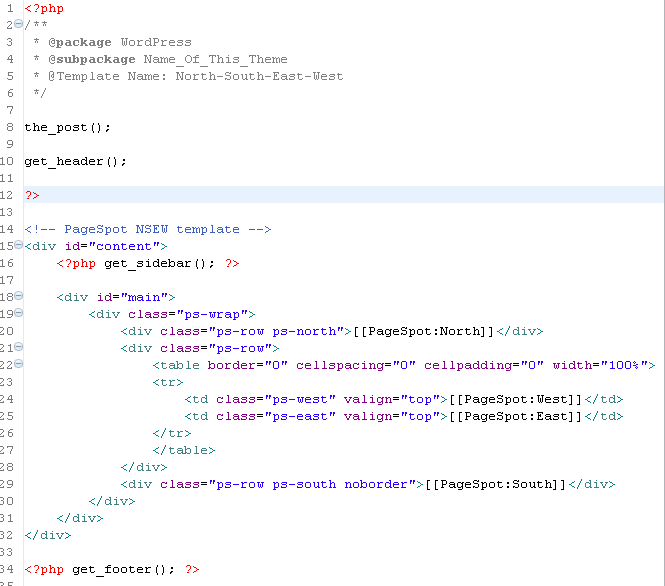
To do that, you will first need to create custom templates in your theme
directory. If you create a template with “pagespot” in the name, and select
it in the Page editor, the PageSpot admin box will become active for that
Page. PageSpot will parse the template for annotations that look like
“[[PageSpot:Foo]]”, and allow you to assign a PageSpot Snippet to the
“Foo” spot.
The final result is that when viewed from the front end, your Page will have
the assigned snippet Page’s content inserted in place of your [[PageSpot]]
annotation. This lets you build up complex layouts for a Page, composed of
other Pages. content which you can edit and replace independent of each
other.
Sidebar Items are pages that together comprise a sidebar for your theme.
To create a sidebar, just create a private Page named “[Sidebar] Foo”. All
child pages of that page constitute the Foo sidebar. PageSpot will add a
meta-box in the Page Edit screen to select the sidebar to use for the
current Page. Adding some simple PHP code to your sidebar template is all
you then need to bring this functionality into your custom theme:
<?php PageSpot::print_sidebar(); ?>