
Product Categories Widget for Elementor
v1.0.2Agreem Technologies · 2025年4月2日 上架
Display WooCommerce product categories in Elementor with images, titles, product counts, and responsive layouts.
- 正在使用
- 10 以下
- 评分
- 暂无
- 累计下载
- 817
- 最近更新
- 2026年8月21日
 Agreem Technologies
截图


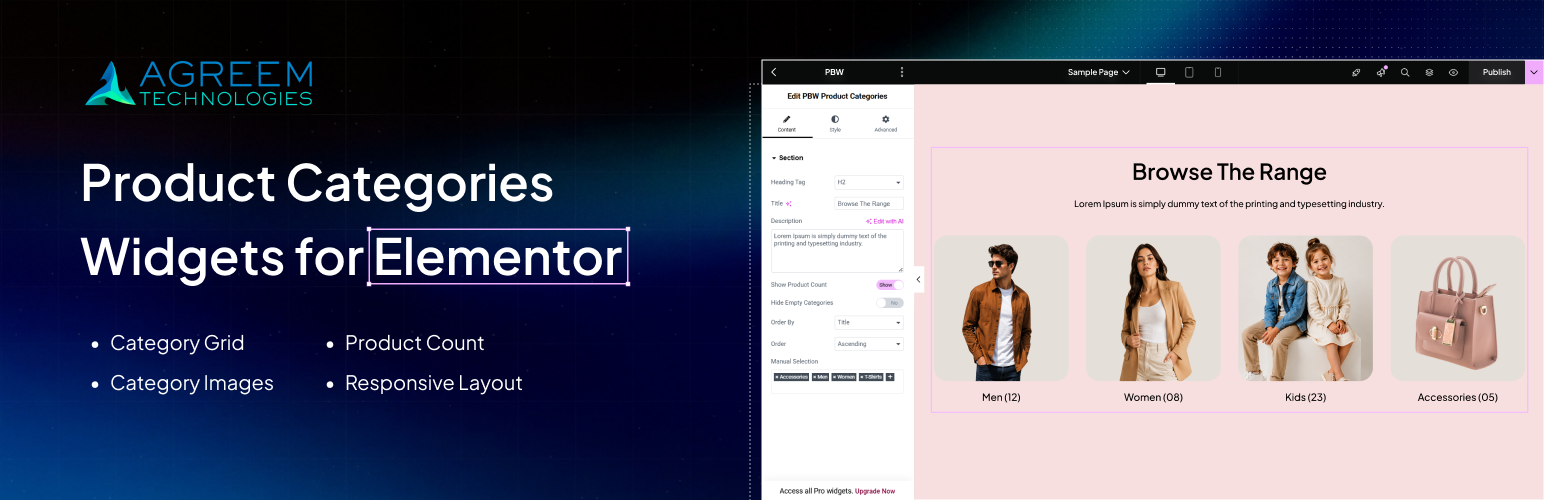
WooCommerce Categories Widget – Elementor lets you display WooCommerce product categories inside Elementor using a simple drag-and-drop widget. Show category images, names, product counts, and responsive category grids without writing code.
Instead of manually creating category sections, simply drag the widget into your Elementor page, choose the categories you want to display, and customize the design using Elementor’s controls.
Whether you are building a fashion store, electronics shop, furniture website, grocery store, or any WooCommerce website, this widget makes it easy to highlight important product categories and help customers find products faster.
The plugin is lightweight, easy to use, and works directly inside the Elementor editor.
Why Choose This Plugin?
- Display WooCommerce product categories anywhere in Elementor.
- Show category images automatically.
- Display category names and product counts.
- Create responsive category grids.
- Hide empty categories.
- Select only the categories you want.
- Style everything using Elementor controls.
- Lightweight and beginner friendly.
- Works with Elementor Free and Elementor Pro.
Features
- Display WooCommerce Categories
- Display Category Images
- Show Category Titles
- Show Product Counts
- Select Specific Categories
- Hide Empty Categories
- Responsive Design
- Easy Styling Controls
- Lightweight Performance
- No Coding Required
Perfect For
- Fashion stores
- Electronics stores
- Furniture stores
- Grocery stores
- Beauty stores
- Jewellery stores
- Sports stores
- Book stores
- Pet stores
- Multi-vendor marketplaces
Common Use Cases
- Homepage category sections
- Featured collections
- Shop landing pages
- Brand pages
- Seasonal collections
- Product category navigation
Requirements
- WordPress
- WooCommerce
- Elementor
Usage
- Drag the PBW Product Categories widget onto your Elementor page.
- Configure the following options:
- Heading Tag: Select heading tag h1 to h6 for title.
- Title: Add a title to display above the categories.
- Description: Add a short description below the title.
- Show Product Count: Show/Hide product count
- Hide Empty Categories: Choose if you want to hide categories that doesn’t have any product assigned.
- Order By: Sort listing by Title, Date & Menu Order.
- Select Categories: Choose the WooCommerce categories you want to display.
- Style the widget using Elementor’s styling options.
License
- This plugin is licensed under the GPLv2 or later.