
Outdated Plugin Notifier
v1.0.8Carl Gross · 2019年10月15日 上架
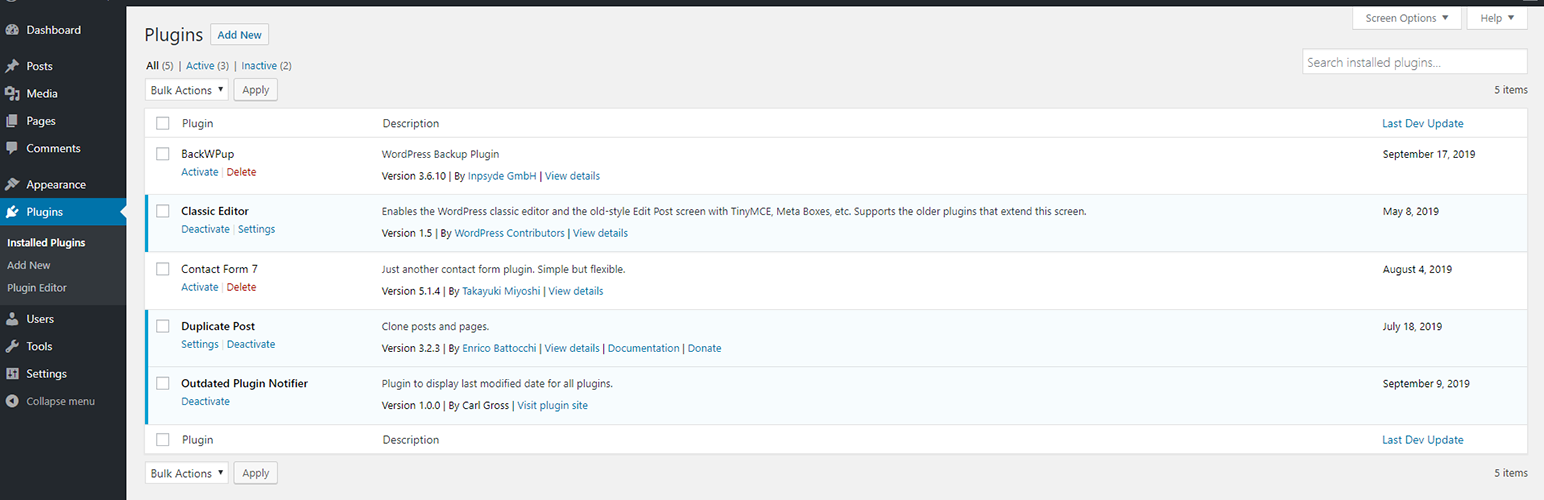
To the plugins admin table, adds a new column indicating the last time the plugin developer released an update.
- 正在使用
- 500+
- 评分
- 5.0 / 5
- 累计下载
- 5,924
- 最近更新
- 2026年9月24日
贡献者
 Carl Gross
截图

WordPress plugins frequently become abandoned by their developers, and in-turn, develop security vulnerabilities. If one of these plugins is installed on your site, it will put your site at risk, without any warning or indication. Outdated Plugin Notifier is a lightweight and unobtrusive plugin that helps you stay aware of these situations. Outdated Plugin Notifier monitors your plugins and tells you exactly when each plugin was last updated by its developer. If a plugin has been expelled from the WordPress plugin repository, Outdated Plugin Notifier will display that information as well.
To use, simply install and activate the plugin. There is no additional configuration required. After, open the plugin admin page from your WordPress dashboard and you will see a new column displayed in the table: Last Dev Update. This column will indicate the last date the plugin was updated by its developer. If it has been several months–or years–since the developer last updated the plugin, you may want to contact the developer to confirm the plugin is still maintained. If the plugin is no longer in the WordPress plugin repository, Outdated Plugin Notifier will indicate so on the plugins admin page, and suggest you remove and/or replace the plugin.