Ninhle AI Sales Assistant – AI Chatbot for WooCommerce
v2.7.0Ninh Le · 2026年10月15日 上架
Free AI chatbot for WooCommerce: answers from your catalog, adds to cart in chat and tracks orders. Use your own OpenAI, Claude or Gemini key.
- 正在使用
- 10 以下
- 评分
- 暂无
- 累计下载
- 791
- 最近更新
- 2026年11月16日
 Ninh Le
 Ninh Le
截图


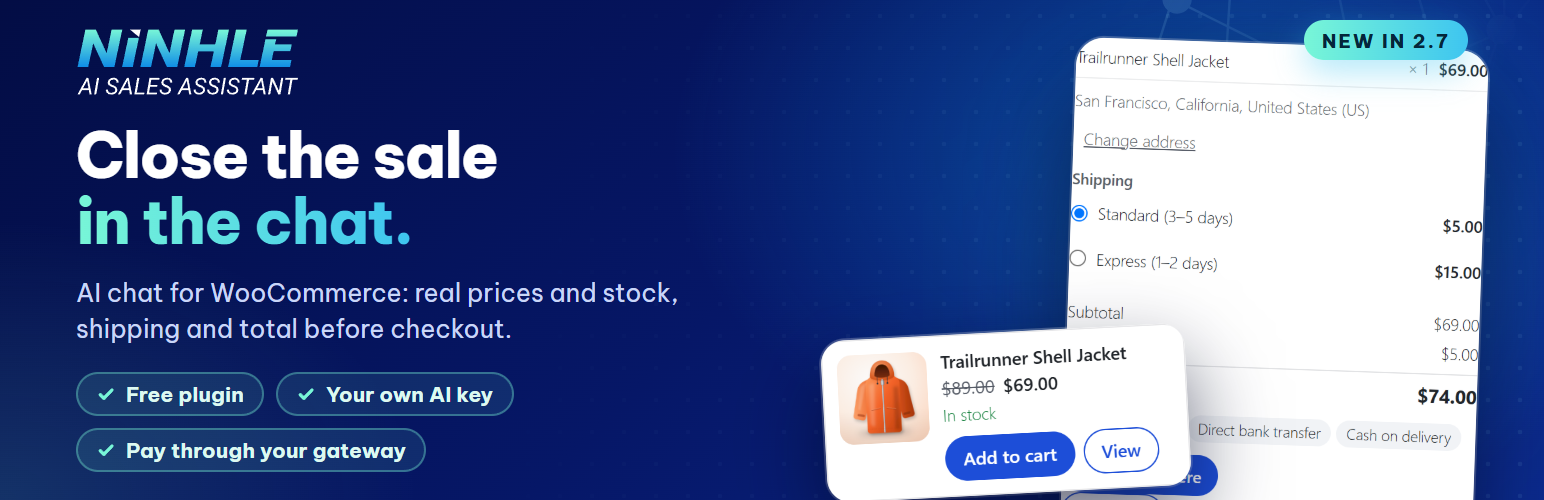
Ninhle AI Sales Assistant is a free AI chatbot and shopping assistant for WooCommerce. It answers shoppers from your real catalog, recommends products as cards with an Add to cart button, shows shipping and the order total before checkout, tracks orders, and passes the chat to a person when needed. It runs on your own OpenAI, Anthropic (Claude) or Google (Gemini) API key, or on the AI connection built into WordPress 7.0 and later, so there is no per-conversation fee from us and no middleman server.
Shoppers ask the same things all day: Is it in stock? How much is shipping? Where is my order? The assistant answers from live lookups in your store, and says so when it does not know.
Quick facts
- Made for: WooCommerce stores that sell through chat (conversational commerce), small teams without full-time support staff, and stores with shoppers in several languages.
- Price: free, with no message cap or time limit from us. Optional Starter and Pro plans add features.
- AI providers: OpenAI, Anthropic Claude or Google Gemini with your own API key, or the provider connected in WordPress 7.0+ (Settings > Connectors). Local-only mode needs no key.
- AI cost: billed by your provider at its own rates. The AI Value & Performance tab shows what your store spent.
- Languages: a multilingual chatbot that replies in the shopper’s language, detected without an AI call: English, Vietnamese, Thai, Indonesian, Malay, Chinese, Japanese, Korean, Arabic, Russian, Ukrainian, Spanish, Portuguese, French and German.
- Your data: conversations, contacts and leads stay in your WordPress database.
- Works with: WordPress 6.3+, PHP 8.1+, WooCommerce with HPOS and the Cart and Checkout blocks. The chat and lead capture also work without WooCommerce.
Get started in three steps
- Connect an AI provider. Paste your API key from OpenAI, Anthropic or Google, or choose the WordPress AI connection. You pay the provider directly. Or start in local-only mode with no key.
- Sync your catalog. One click, or
wp ninhle-ai-sales-assistant sync-products, and the assistant knows your products, prices and stock. - Go live. The chat appears on your store with your name, logo, colour and suggested questions.
Answers from your store, not guesses
- Product facts come from your WooCommerce store: prices, stock, product details, store policies and your own pages.
- The AI can only propose products from your catalog, and products you hide from the catalog are never shown.
- Product cards read the current price and stock from WooCommerce when the reply is shown.
- When a search finds nothing, the assistant suggests the nearest categories and asks one question instead of guessing.
What shoppers can do in the chat
AI product recommendations. The assistant recommends products that match the question, as cards with photo, current price, stock and rating.
Add to cart without leaving the chat. WooCommerce updates the cart in the shopper’s own browser, so your prices, stock rules and discounts apply. Products with options link to the product page; the Starter plan adds options, quantities and allowed discount codes on the card.
See shipping and the total before checkout. WooCommerce calculates the shipping options for the shopper’s address, tax and total, and the chat lists your payment methods. Payment happens on your checkout page through your gateway; the chat never takes card details.
Track an order. “Where is my order?” gets an order card with the status, items, total and tracking number, and the delivery status when your shipping plugin reports it. Guests must prove they own the order first.
Reach a person. “Talk to a person” is always visible. Complaints, explicit requests and questions your store data cannot answer go to your team’s Inbox in WP Admin.
What you see as the store owner
Sales Insights: why shoppers don’t buy. The questions the assistant could not answer, grouped and ranked; type your answer there and the assistant uses it from the next reply. It also shows what shoppers searched for but could not find, and which products they wanted while out of stock. Contact details are hidden. In the Starter plan, an AI labels each night why chats did not lead to an order (price, shipping, size, stock and more), with quotes and an optional weekly email.
AI Value & Performance. What the AI cost, how many orders followed a chat and how conversations ended, each with its sample size, from the day you install.
Also in the free version:
- Order status for the order’s owner, digital downloads, store policies and site content.
- Sales playbook and rules: persona, qualifying questions, objection handling, closing and keyword rules.
- Lead capture in the chat, stored in your database and exportable to CSV.
- Human handoff and Inbox: a clear status for visitors, take over and hand back, an optional webhook.
- Voice input (optional, off by default).
- Personal-data export and erasure, and translation-ready.
Match your store’s brand
Set the assistant’s name, logo, colour and font (the default system font, or Inter, Roboto, Open Sans, Montserrat or Poppins), the tagline under the chat and the suggested questions, and check them in the live preview. Shoppers see your brand, with no “Powered by” link.
Add WhatsApp, Messenger, Zalo, Telegram and hotline buttons to the chat, so shoppers can also reach you where they prefer. A notice tells visitors the chat may be assisted by AI; it is on by default and you can write your own text. You can hide the chat on the checkout page.
Ready for AI agents (MCP)
On WordPress 6.9 and later, turn on “AI agents” in Settings to register read-only abilities with the WordPress Abilities API: product search, product details and store policies. The MCP Adapter plugin can offer them to MCP clients. Only published, visible products and your store policies are shared, never orders, carts or customer data. Off by default, limited to 60 requests per hour per IP address.
Compared with a hosted ecommerce chatbot
- No per-conversation fee from us. You pay your AI provider directly, and answers your store data can give need no AI call.
- No middleman server. Every provider call is made from your server, and conversations stay in your database.
- Built on WooCommerce. The cart, shipping and totals are calculated by WooCommerce, and orders and tracking are read from your store.
Optional paid plans
Ninhle AI Sales Assistant is free to install and use. Optional paid plans add extra code to the plugin; nothing in the free version is locked or time-limited.
Starter — cash-on-delivery and bank-transfer orders in the chat; “payment received” messages, with payment checks for your team when a shopper says they paid; VietQR for Vietnamese dong; orders your team creates in the Inbox with a payment link; shipment updates in the chat (off by default); options, quantities and allowed discount codes on product cards; nightly AI labels of why shoppers did not buy, with a weekly email summary; a customer card in the Inbox; product variations with per-variation add-to-cart links; Telegram notifications for new leads and handoffs; a sales dashboard; cached answers for repeated questions; the revenue of orders that followed a chat, per currency, on the AI Value & Performance tab; and signed webhooks with automatic retries (Standard Webhooks) for n8n, Make, Zapier and CRMs.
Pro — everything in Starter, plus coupon validation, automatic failover to a second AI provider, daily and monthly AI budget caps, rule-based lead scoring with advanced analytics, price-output verification, payment method order by country or customer group in the chat, and sales abilities for your own AI agent (conversations, leads, orders after chats, checkout links and draft replies that your team reviews in the Inbox).
AI usage is never included: OpenAI, Anthropic and Google bill you directly for your own API key, on every plan including Free. Plans and prices: https://ninhle.com/en/woocommerce-ai-sales-assistant/
External services
The plugin connects to the services below. Except for the AI provider you configure, each one is used only when you turn the related setting on.
AI provider (the one you configure) — receives the visitor’s chat messages, recent conversation history, your sales playbook and business information, and product data from your own store, each time a visitor sends a message. Nothing is sent in local-only mode. If you choose “WordPress AI connection” (WordPress 7.0+), the same data goes through WordPress to the provider you connected in Settings > Connectors, under that provider’s terms.
- Anthropic (Claude) — https://www.anthropic.com/legal/privacy — https://www.anthropic.com/legal/consumer-terms
- OpenAI — https://openai.com/policies/privacy-policy — https://openai.com/policies/terms-of-use
- Google (Gemini) — https://policies.google.com/privacy — https://ai.google.dev/gemini-api/terms
Sales Insights AI labeling (Starter plan only, optional, off by default) — the free version contains no code for this. If you turn it on, once a night the text of finished chats that did not lead to an order is sent to your AI provider, with email addresses and phone numbers replaced by placeholders, so the AI can label why the shopper did not buy. A monthly spending limit you set stops the job.
Link reading (optional, off by default) — when you enable “Let the bot read links customers send”, a URL a visitor pastes into the chat is sent to r.jina.ai to fetch its text (https://jina.ai/legal/). YouTube links are read from youtube.com instead, to get the video title and public transcript (https://policies.google.com/privacy, https://www.youtube.com/t/terms). Leave this off if visitors might paste private links.
Google Fonts (optional) — only if you pick a Google font for the widget in the settings. Visitors’ browsers then load that font from fonts.googleapis.com (https://policies.google.com/privacy). The default font loads nothing from Google.
Voice input (optional, off by default) — only if you turn on “Let visitors speak their message”. The microphone button uses the speech recognition built into the visitor’s own browser (Web Speech API). Depending on the browser, the audio may be sent to the browser maker’s speech recognition service, for example Google for Chrome (https://policies.google.com/privacy), Apple for Safari (https://www.apple.com/legal/privacy/) or Microsoft for Edge (https://privacy.microsoft.com/privacystatement). The plugin never receives, records or stores audio; it only receives the text the visitor chooses to send.
Handoff webhook (optional) — only if you enter a webhook URL. On a handoff the plugin sends the conversation ID, contact ID and handoff level to that URL, which you control.
Telegram (paid plans only, optional) — the free version contains no Telegram code. In the Starter and Pro plans, if you enter a Telegram bot token and chat ID, new leads (name, email, phone) and handoff requests (priority, issue, summary, conversation number) are sent to api.telegram.org (https://telegram.org/privacy, https://telegram.org/tos).
Automation webhooks (Starter and Pro plans, optional) — the free version contains no code for this. If you enter a webhook URL, the events you choose are posted to that URL, which you control, signed with your secret: leads and handoffs, and, if you turn them on, cart, checkout and order events. Order events cover orders placed after a chat and include the buyer’s name, email and phone number, the items and the total.
Freemius (licensing, upgrades and affiliate program) — the plugin bundles the Freemius SDK. Nothing is sent to Freemius from your storefront. The plugin contacts Freemius only when an administrator does one of the following:
- Opts in to usage data: the WordPress user’s name and email, site URL and title, WordPress, PHP and plugin versions, site language, and whether the plugin is active or uninstalled. The list of plugins and themes is sent only if that permission is left on.
- Opens the Upgrade (pricing) page, starts a trial, buys a plan or activates a license. With an active license, the paid version then checks Freemius for updates and license status.
- Opens the Affiliation page in the plugin menu: the affiliate program terms are loaded from Freemius.
- Submits the affiliate application form: the name, email, PayPal email, website domains and promotion details entered in the form are sent to Freemius. If the site is not connected to Freemius yet, it is connected with the email entered, with usage tracking off.
- Clicks “Contact Us”: the Freemius contact form opens in a new browser tab.
Freemius terms: https://freemius.com/terms/ — privacy policy: https://freemius.com/privacy/ — affiliate program terms: https://freemius.com/plugin/39395/ninhle-ai-sales-assistant/legal/affiliate-program/
Security
API keys are stored server-side and never sent to the browser; the settings screen shows only a masked value. Every provider call is made from your server through the WordPress REST API.
Database queries use $wpdb->prepare(). Every REST route declares a real permission_callback, and the endpoints the AI uses as tools are internal-only: they cannot be reached from outside the site. Visitor sessions use hashed tokens and chat messages are rate limited per session. When a background AI reply is started through a loopback request, that request is signed and expires after 60 seconds.
The plugin server never changes a shopper’s cart: “Add to cart” in the chat calls the WooCommerce Store API from the shopper’s own browser. Chat messages are rendered as DOM elements rather than injected HTML, and only http and https links are made clickable, so content returned by the AI cannot inject markup.
Please report security issues privately to the author rather than in a public forum.
Privacy
Conversations, contacts and leads are stored in your own WordPress database, and no data is sent anywhere except the services listed under External services. The plugin registers with Tools > Export Personal Data and Tools > Erase Personal Data, adds a suggested paragraph to Settings > Privacy, and purges message attachments on a retention schedule you choose.
What else the plugin stores about shoppers, and what the chat keeps in the visitor’s browser, is listed in the FAQ. All of it is included in the personal-data export and removed by the eraser.
Orders placed in the chat (Starter) are normal WooCommerce orders; the plugin also records consent to the notice under the phone field as a fingerprint of the text shown. Shipment updates (Starter, off by default) go only to the chat of that order and, if enabled, by email to shoppers who agreed, with a stop link. AI agents use their own WordPress user and application password.