
Nested Comments Unbound
v1.0CK MacLeod · 2017年2月25日 上架
Enable open-ended maximum depth for nested comments, preserve comment-reply-links for all comments, keep the results readable.
- 正在使用
- 10+
- 评分
- 暂无
- 累计下载
- 1,833
- 最近更新
- 2017年2月26日
贡献者
 CK MacLeod
截图


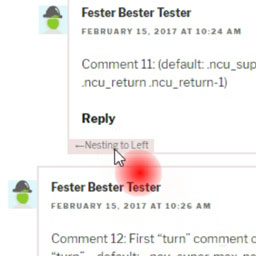
Nested Comments Unbound enables unlimited “max-depth” and unlimited direct replies in nested (aka “threaded”) comments, and also allows for formatting the results for readability and sustained discussion.
Commenters at busy sites often encounter the problem of comment threads that become unwieldy, either because a single column format makes tracking or joining a complex conversation virtually impossible, or because, after reaching the extreme far side of a nested thread, comments revert to a single-column format, with reply-links disappearing. Properly configured, NCU will eliminate these two obstacles to discussion – preserving reply-links for all comments, and allowing for virtually unlimited depth. Through the addition of a set of CSS classes, NCU also provides the potential for unique, more readable or convenient custom formatting of nested conversations.
After full activation of NCU in a standard WordPress installation, the built-in default limit of 10 for maximum depth, set in “Discussion,” will be automatically changed to 10,000 – effectively unbounded. The user will then be able to adjust the “breakpoint” after which nesting will begin, enabling the easy creation of comment threads that “bounce” or “snake” instead of jamming up.
Nested Comments Unbound works with standard WordPress themes. Commenting templates that vary substantially from standard WordPress can usually also be adjusted, but not without moderately advanced-level work.
NCU should not be installed with the expectation that nothing further will be required to get it to work satisfactorily. A little bit of experimentation from the plug-in options page may suffice, but themes vary too widely for any “one-size-fits-all” approach to be satisfactory. You will probably at least have to know, or be willing to learn, how to set margins using CSS.
See the plugin’s options page and plugin documentation for further discussion, and also for examples of ways to make an unbounded thread stand out.
Additional Info
Part of a growing suite of “Commentariat” plug-ins designed to enhance the usefulness and enjoyability of WordPress comment threads for site operators and authors as well as for commenters.
On the development roadmap:
- Enhanced thread organizing/ordering tools
- Collection of additional use cases
- Templates for unique threaded comment displays
Thanks to all of the Open Source developers and designers on whose freely shared work I’ve depended.