跳到内容

WP-Myposeo

v0.7.1

Myposeo · 2019年2月20日 上架

The Myposeo plugin is an extension that allows you to track your SEO monitoring projects directly in your WordPress back-office.

正在使用
10+
评分
暂无
累计下载
1,541
最近更新
2021年1月9日
已测试到 5.4.26PHP 5.6+

贡献者

截图

Login to your Myposeo account.
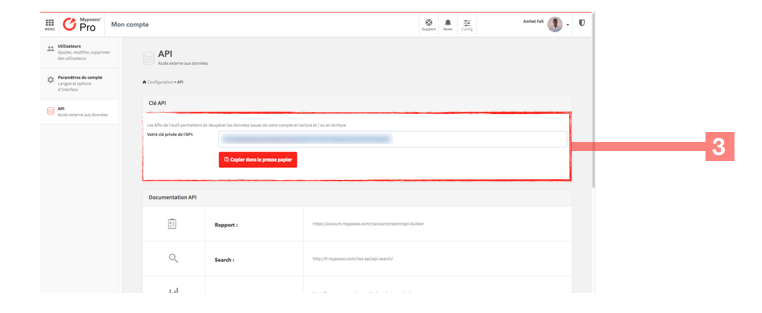
Click the "Configuration" button at the top right of the screen, then click on the "API" tab.
Copy your API key by pressing the "Copy to clipboard" button.
Go to the "admin" of your WordPress and click on "the Myposeo" tab then "Settings" on the menu on the left of the screen.
Copy the API key in the "API Key" field
Then select "a campaign" being tracked in your Myposeo user account then press the "validate" button (You can also refer to the project ID to select your campaign).
WP-Myposeo
WP-Myposeo

The Myposeo plugin is an extension that allows you to track your SEO monitoring projects directly in your WordPress back-office. To do this you must connect the extension to your Myposeo user account via the API key. To install the plugin, please follow the 6 steps in the installation tab.

This extension is only available to Myposeo users.
Note that updates of the extension are planned over time.
If you encounter any problems during installation, please contact our technical support.

Plums

按场景查找 WordPress 插件。安装量、评分和兼容版本来自官方目录。

导航

说明

WordPress 是 WordPress Foundation 的商标。本站与 WordPress Foundation、Automattic 没有隶属关系。这里不托管插件文件,下载和安装以 WordPress.org 上的页面为准。

© 2026 Plums