

MWT Search Steer – Hide from Search & Search Keywords
v1.0.1Cornel Raiu · 2026年11月7日 上架
Hide posts from site search, or steer search per post: keywords bring a post into the results, stop keywords keep it out.
- 正在使用
- 10 以下
- 评分
- 暂无
- 累计下载
- 373
- 最近更新
- 2026年11月7日
贡献者
 Cornel Raiu
截图

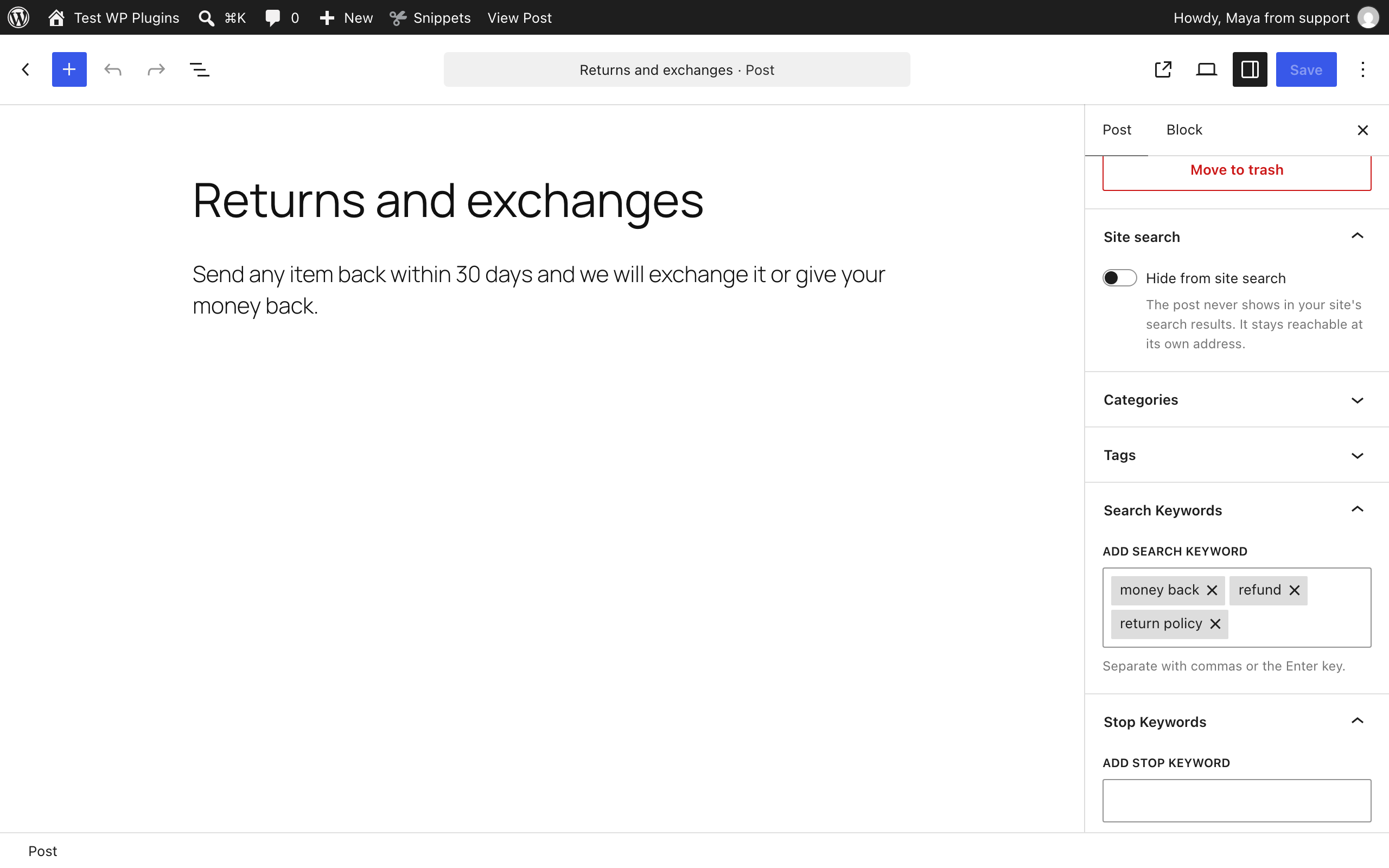



WordPress search only looks at a post’s title, excerpt and content. MWT Search Steer gives you three controls, post by post:
- Hide from site search keeps a post out of every search. Use it for thank-you pages, landing pages, old announcements and anything else visitors should not find by searching.
- Search keywords bring a post into the results. Give “Returns and exchanges” the keywords refund and money back, and a search for “refund” finds it, even though the word is nowhere in the post.
- Stop keywords keep a post out of the results for some searches only. Give an old “Refund policy (2019)” the stop keyword refund, and a search for “refund” never shows it, even though its title matches.
Set them in the editor sidebar, in quick edit, or for many posts at once with bulk edit and the “Hide from site search” bulk action. A Search column and a filter on the post lists show which posts have search settings.
Moving from another plugin
MWT Search Steer imports the posts that Search Exclude, Hide from Search and Hide Posts hide from search, with one click under Settings > MWT Search Steer. The other plugin’s data is not changed, so you can import, check, and then deactivate it.
Built to stay out of the way
- Only the search query is changed. Menus, archives, widgets, related posts and every other query on the page are left alone.
- Nothing is hidden in wp-admin. Hidden posts stay in the post lists and in admin searches, so editors can always find them.
- No search index, no custom tables, no migrations. Settings live in post meta and private taxonomy terms that WordPress already indexes, so they scale to thousands of posts and nothing is lost on update.
- No ads, no dashboard widgets, no upsells, no outside service.
- Safe SQL. Every column is qualified with its table, so search keeps working when another plugin joins post meta.
- Private. Visitors never see a post’s keywords or that it is hidden: no archive pages, feeds, sitemaps or CSS classes, and the REST API only shows them to people who can edit posts.
Settings
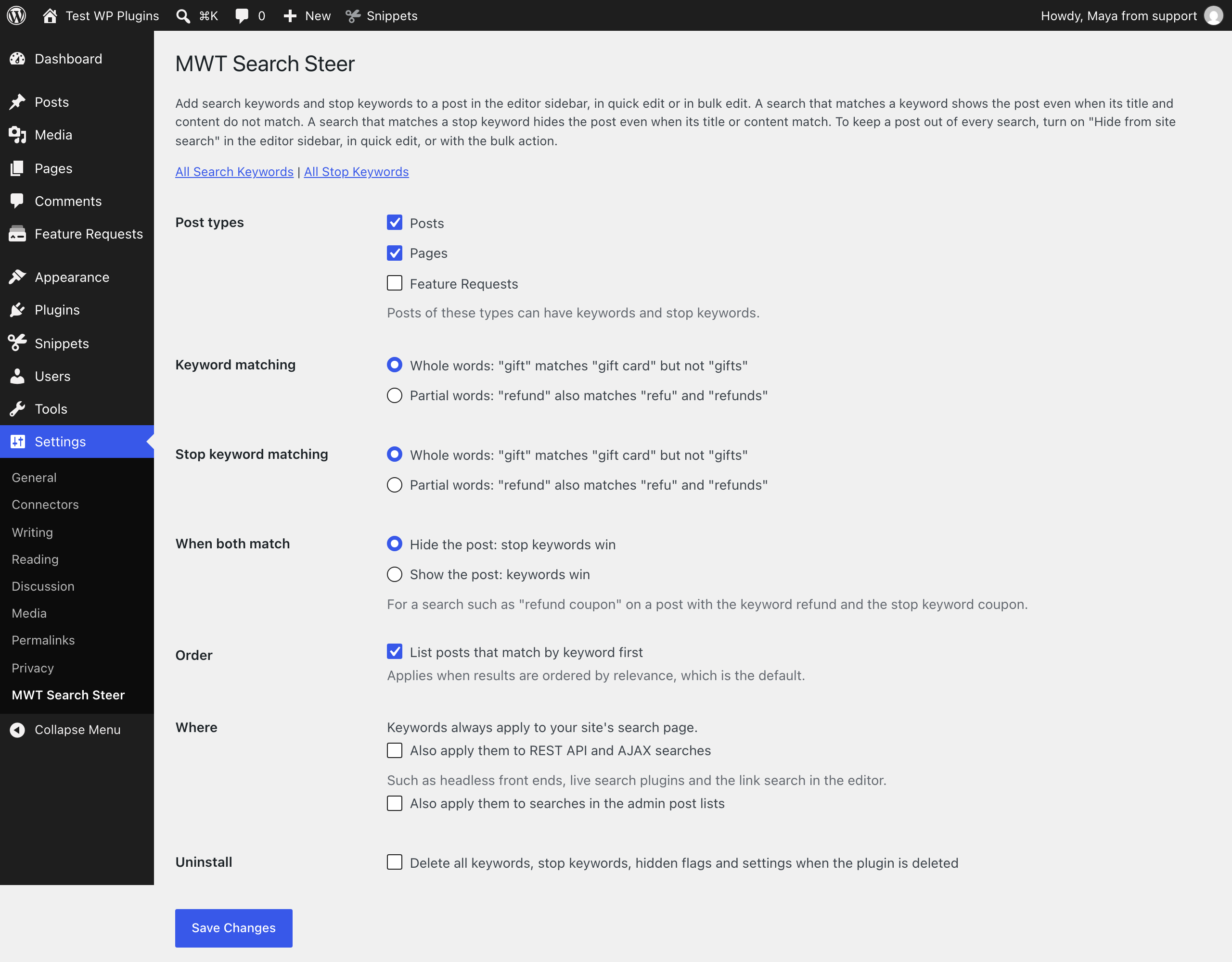
Under Settings > MWT Search Steer you choose:
- Post types that can have search settings. Posts and pages by default.
- How keywords match, separately for keywords and stop keywords:
- Whole words (default): “gift” matches “gift card” but not “gifts”.
- Partial words: “refund” also matches “refu” and “refunds”.
- Which list wins when a search matches both a keyword and a stop keyword of the same post. Stop keywords win by default.
- Order: list posts that match by keyword first.
- Where search settings apply: always on the search page, and optionally in REST API and AJAX searches and in the admin post lists.
Case and accents are ignored, so “Café”, “cafe” and “CAFE” are the same keyword.
For developers
Search settings apply to the main search query on the front end. To apply them to another query, use the filter:
add_filter( 'mwtss_applies_to_query', function ( $applies, $query ) { return $applies || $query->get( 'my_live_search' ); }, 10, 2 );
To turn them off for one query, pass 'mwtss_skip' => true to WP_Query.