
Multistore Multivendor
v1.1.2CodingMall.com · 2021年8月11日 上架
This plugin allows you to show WooCommerce products on different domains or subdomains to make a multistore WooCommerce website.
- 正在使用
- 10+
- 评分
- 暂无
- 累计下载
- 3,435
- 最近更新
- 2024年2月18日
贡献者
 CodingMall.com
截图
This plugin allows you to make multiple front end eCommerce websites with WordPress and WooCommerce, from just a single, simple installation of WordPress.
Suppose you have a WordPress site example.com. It contains 100 products. You want to show some of them on garments.example.com, some on my-eshop.com and some products on mobiles.example.com. See? you can show your WooCommerce products across multiple subdomains and even on separate domains.
How to do it? Very simple. To setup a new subdomain for example, mobiles.example.com, do the following:
-
Install this plugin and activate it.
-
Point mobiles.example.com to your main website server. This may require changing of DNS records. On many hosting providers this process is called creating a “Domain Alias” or Add-on domain. The target is that if you browse your new domain or subdomain, it should show the content as you see on your main site.
-
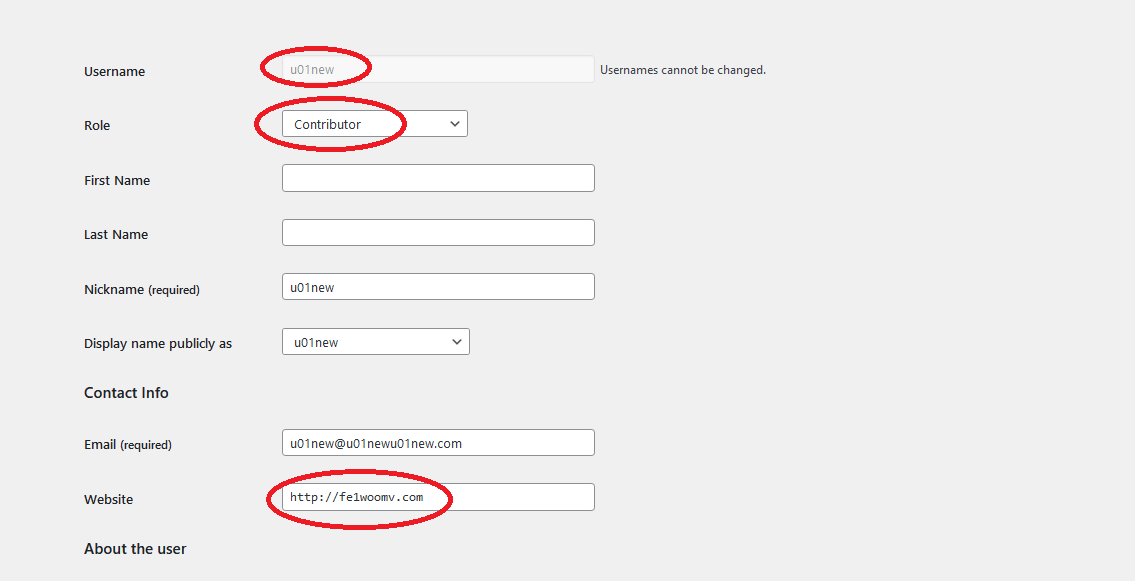
Create a new ‘Contributor’ type user.
-
Put https://mobiles.example.com in his site url field and save.
-
Now, go in Products and set that author to those products in WooCommerce, which you want to show on mobiles.example.com.
-
That’s it. Now browse https://mobiles.example.com and you will see products made by the contributor user of this site.
For more information or support, you can contact us at
https://codingmall.com/contact-us
MORE FEATURES:
If you want to create a true Multistore, multi-vendor experience and if you want more features, please have a look here;
https://codingmall.com/wordpress/203-multi-sites-for-wordpress-and-woocommerce
Premium version features heighlights:
- Sharing of posts and products on different domains
- Show a different page on home page
- Setting up WordPress differently for each site. For example, different permalink style for each website
- Having a different theme for each domain or subdomain
- Showing different menus on each site
- Providing different Widgets on different sites
- Showing different WooCommerce products on each store or vendor site to have a multistore platform where different domains or subdomains showing completely different websites (or similar ones if you want).
- Different WooCommerce settings for each store. For example, different shipping and tax rates for each store.
and many many more…