

Multiple Post Passwords
v1.1.4Andreas Münch · 2018年10月25日 上架
Set multiple passwords for your protected pages so you can give them to different users.
- 正在使用
- 2,000+
- 评分
- 5.0 / 5
- 累计下载
- 2.7 万
- 最近更新
- 2026年1月18日
贡献者
 Andreas Münch
截图
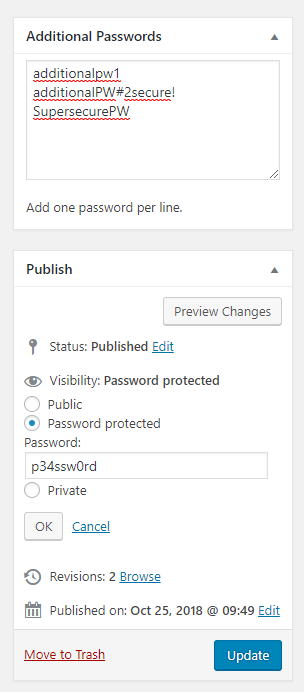


This is a simple Plugin that lets you set multiple passwords for your password protected posts and pages.
On posts/pages with password protection it will show an extra Metabox with a field to input additional passwords, one in each line.
Note that if you just changed a post/page to password protection you have to save once so that the extra field appears.
Expire passwords
You can also make passwords expire after x hours when being used. You can find the settings under Settings -> Multiple Post Passwords.
Note that the actual deletion of the passwords is triggered by a cronjob which is run every 30 minutes. So even if you set your expiry time to very short, it may still take 30 minutes until the password really expires.
Also note that the expiration only works for the additional passwords, not for the standard WordPress page/post password.
Using lots of passwords on one page
If you are using lots of passwords on one page and the password check takes a long time, you should activate the alternative password check in the settings to speed up the password check.