

MisticGate
v1.0.0MistiCuantum · 2026年11月7日 上架
MisticGate puts a gate in front of your login page without changing its URL. Without the gate only you know, reaching the login page is very hard.
- 正在使用
- 10 以下
- 评分
- 暂无
- 累计下载
- 328
- 最近更新
- 2026年11月7日
需要 WordPress 6.4+已测试到 7.1.5PHP 7.4+
贡献者
 MistiCuantum
截图
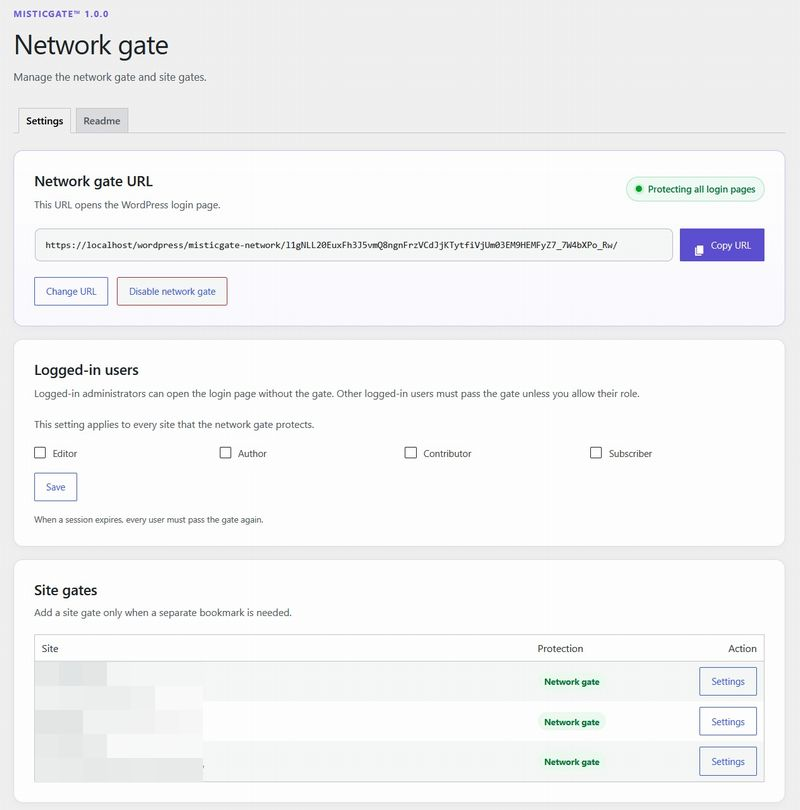

Keep your login URL. Keep the bots out.
MisticGate™ places a private gate in front of the standard WordPress login page. You reach the login form from your gate bookmark. Brute-force bots never get that far.
As soon as you install MisticGate, the screen for setting your gate URL opens. After you bookmark it, check the box and enable the gate, and setup is complete.
What MisticGate does
- Puts a private gate in front of your login page.
- Administrators with a valid session skip the gate. You choose which other roles may skip it too.
- Supports Multisite, with one gate for the whole network or a gate for each site.
- After you pass through the gate with a single-use pass, reusing that pass returns a 404.
- The gate URL is built so you can switch it periodically while you keep using the gate.
- The settings screen also has documentation that explains recovery and more.
Recommended setup
MisticGate is the first layer. We recommend combining it with:
- Two-factor authentication (2FA) from a security plugin.
- A login challenge, such as a math question or CAPTCHA.
- HTTPS and strong, unique passwords.