

Meta Generator and Version Info Remover
v17.1Pankaj Mondal · 2013年4月9日 上架
This plugin will remove the version info appended to enqueued style and script urls along with Meta Generator in the head section and in RSS feeds.
- 正在使用
- 9,000+
- 评分
- 5.0 / 5
- 累计下载
- 24 万
- 最近更新
- 2025年9月24日
贡献者
 Pankaj Mondal
截图

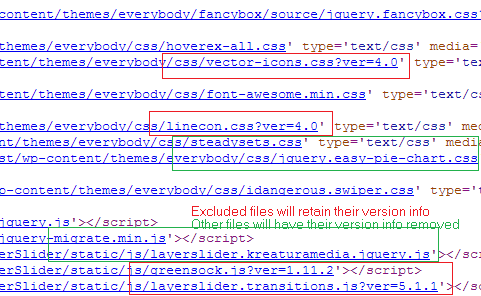
This plugin will remove the version information that gets appended to enqueued style and script URLs. It will also remove the Meta Generator tag in the head and in RSS feeds. Adds a bit of obfuscation to hide the WordPress version number and generator tag that many sniffers detect automatically from view source. Option available to selectively exclude any style or script file from version info removal process.
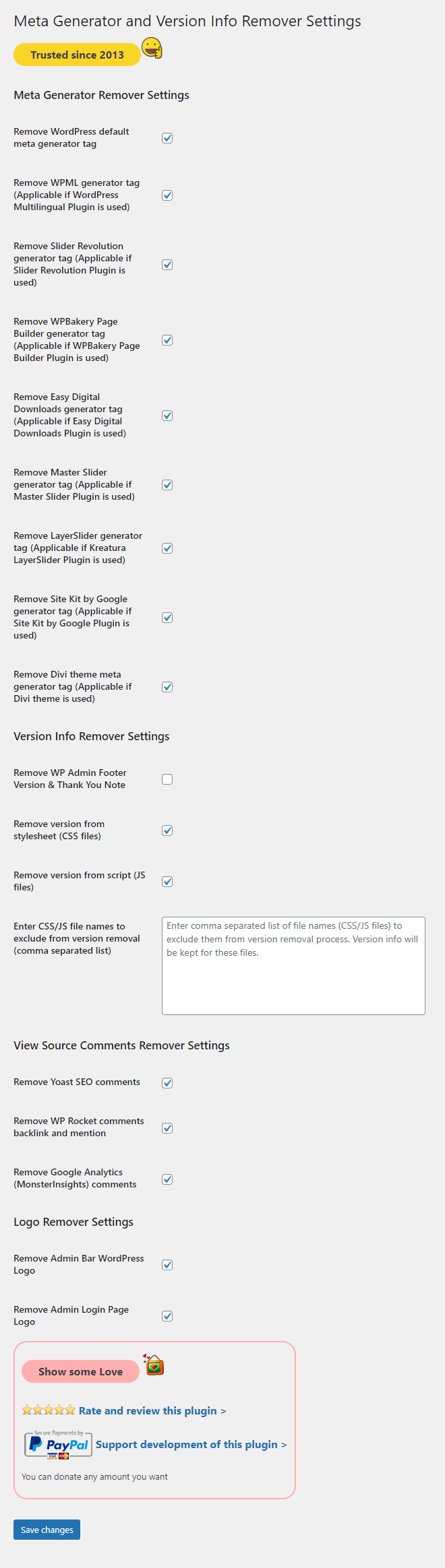
You can enable/disable each removal options from admin dashboard:
- Remove WordPress Meta Generator Tag
- Remove WPML (WordPress Multilingual Plugin) Meta Generator Tag
- Remove Slider Revolution Meta Generator Tag
- Remove WPBakery Page Builder Meta Generator Tag
- Remove Easy Digital Downloads Meta Generator Tag
- Remove Master Slider Meta Generator Tag
- Remove LayerSlider Meta Generator Tag
- Remove Site Kit by Google Meta Generator Tag
- Remove Divi Theme Meta Generator Tag (By default disabled; if required enable from Settings)
- Remove Elementor Website Builder Meta Generator Tag (By default disabled; if required enable from Settings)
- Remove Image Placeholders Meta Generator Tag
- Remove Performance Lab Meta Generator Tag
- Remove Performant Translations Meta Generator Tag
- Remove WEBP Uploads (Modern Image Formats) Meta Generator Tag
- Remove WP Admin Footer Version & Thank You Note (By default disabled; if required enable from Settings)
- Remove Version from Stylesheet
- Remove Version from Script
- Exclude files from version info removal process (by providing comma separated file names)
- Remove Yoast SEO comments
- Remove WP Rocket comments backlink and mention
- Remove Google Analytics (MonsterInsights) comments
- Remove Admin Bar WordPress Logo
- Remove Admin Login Page Logo
- Remove WordPress Text from Admin Login Page Title
- Remove WordPress Text from Admin Pages’ Titles
- Remove Admin Dashboard Help Tab
You have any suggestions to make this plugin better? Please share your thoughts in the support thread.
Dashboard > Settings > Meta Generator and Version Info Remover
This plugin is trusted since 2013.
If you like this plugin, please rate and review this plugin. If you want to support development of this plugin, please Donate.