
Measure Viewport Size
v1.0.3beantin · 2010年8月3日 上架
Captures the viewport size of visitors' browser window and stores it as events in Google Analytics
- 正在使用
- 10+
- 评分
- 暂无
- 累计下载
- 1.1 万
- 最近更新
- 2013年8月29日
贡献者
 beantin
截图
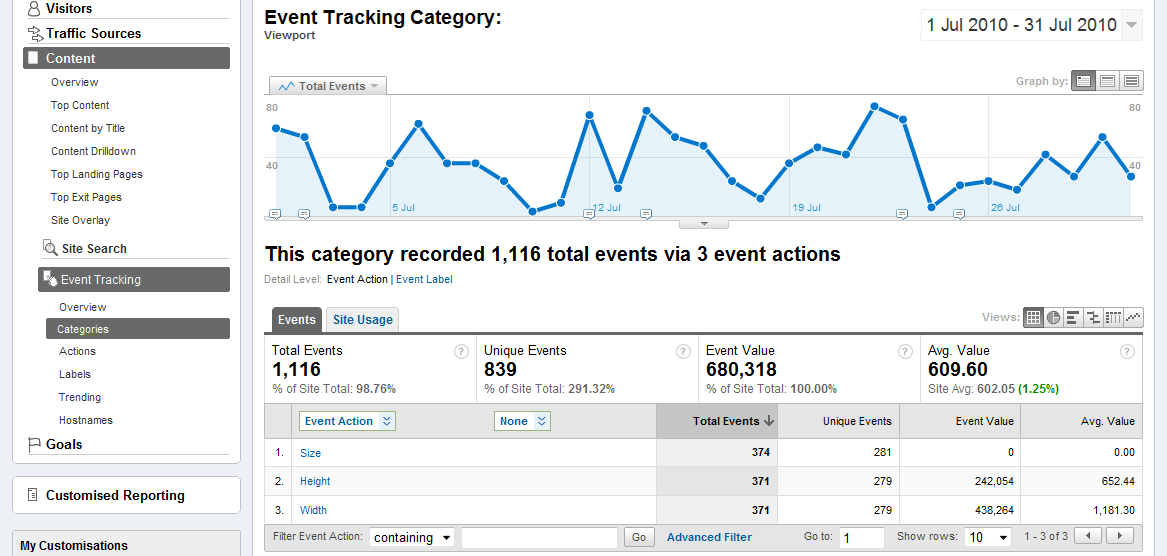
Monitoring and analysing the size of the browser windows of your visitors is crucial for you to optimise the experience, design and conversion rate of your site. More than ever with the advent of responsive web design. This plugin gathers viewport data and stores it in Google Analytics.
Using a javascript event triggered by the onload event, this plug in measures the browser viewport size of your visitor’s browser and sends the result to your Google Analytics account as an event.
You must have the asynchronous Google Analytics tracking script installed on your site and use _gaq as the object name.
The template you are using must support the body_class filter hook introduced in wordpress 2.8
Details on the technique behind this solution can be found here http://beantin.se/post/354097397/track-viewport-google-analytics
To view the results, log in to your Google Analytics account (but wait a day for GA to process the data) and look at Content -> Events -> Top Events.
In that report you will see and event called “Viewport” with three actions; “Width”, “Height”, and “Size”. The label within the action “Size” shows the exact dimensions of the browser viewport size of each visitor to your site.