跳到内容

MC Good-bye Howdy

v2.7.2

Mike Hickcox · 2020年10月22日 上架

Seven ways to replace Howdy: Random Lists, Day/Date, Daypart, or Remove.

正在使用
100+
评分
5.0 / 5
累计下载
4,394
最近更新
2026年9月9日
1 条评价已测试到 7.1.5PHP 7.1+

贡献者

截图

Samples of the seven modes available. Your choice: 1-Just Remove "Howdy". 2-Write Your Own greeting. 3-Your Own Random Greeting List (not shown). 4-Greet by Daypart. 5-Today's Day and Date. 6-Random international greetings. 7-Random positive phrases.
After you load the plugin, it appears on your installed plugin list. You do not have to search for settings; the link is right there.
If you go to the Settings list in your Menu, you will also find a settings link there.
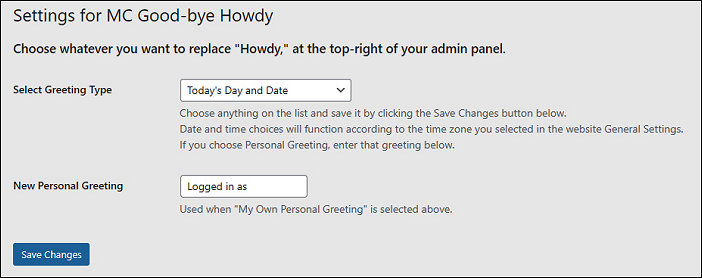
On the settings page, choose the type of greeting you want to provide on the website.
  • So many choices, seven of them! This is the versatile way to replace “Howdy” as the greeting to those who log in as users of your website.
  • Your choices include:
    • Write your own greeting
    • Create your own random list of greetings
    • Just remove “Howdy”
    • Greet by daypart (Good Morning, Good Afternoon, Good Evening)
    • Show today’s day and date
    • Use the pre-filled list of random international greetings
    • Use the pre-filled list of random positive, feel-good phrases

Plums

按场景查找 WordPress 插件。安装量、评分和兼容版本来自官方目录。

导航

说明

WordPress 是 WordPress Foundation 的商标。本站与 WordPress Foundation、Automattic 没有隶属关系。这里不托管插件文件,下载和安装以 WordPress.org 上的页面为准。

© 2026 Plums