

Mailster AmazonSES Integration
v3.0.0EverPress · 2017年1月10日 上架
Deliver Mailster newsletters with Amazon SES via WEB API or SMTP, with region choice and Amazon SNS bounce handling.
- 正在使用
- 1,000+
- 评分
- 5.0 / 5
- 累计下载
- 6.4 万
- 最近更新
- 2026年10月14日
 EverPress
 Mailster Newsletter Plugin
 Xaver
截图
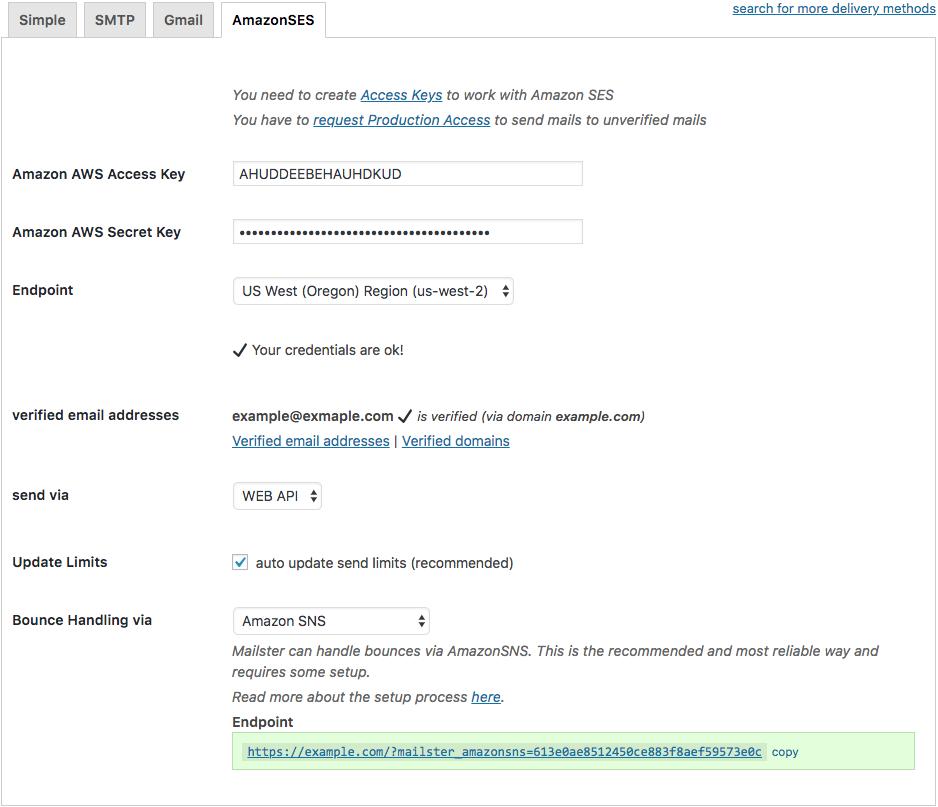
Mailster AmazonSES Integration connects Amazon Simple Email Service (Amazon SES) to the Mailster Newsletter Plugin for WordPress so you can send campaigns and transactional mail through AWS instead of your web host’s mail server.
Use it when you want scalable, pay-as-you-go newsletter delivery on Amazon SES while keeping Mailster’s campaign editor, lists, and automation.
This plugin requires Mailster 4.0 or newer and an Amazon Web Services (AWS) account with Amazon SES (and optionally Amazon SNS for bounce notifications). Outgoing email content and delivery metadata are sent to Amazon SES. When Amazon SNS bounce handling is enabled, bounce and complaint notifications are received from AWS.
Why send Mailster newsletters with Amazon SES?
- Amazon SES delivery for Mailster — Register AmazonSES as a delivery method under Newsletter Settings Delivery.
- WEB API or SMTP — Send via the recommended SES WEB API, or use the SES SMTP interface with TLS or SSL when you prefer SMTP credentials.
- AWS access keys and regions — Configure your Access Key and Secret Key and choose from supported SES regions (for example N. Virginia, Ireland, Frankfurt, Tokyo, and others listed in the settings).
- Verified identities — Check whether Mailster’s From, Reply-To, and Bounce addresses are verified in SES, and start email identity verification from the settings screen.
- Auto-update send limits — Optionally sync Mailster’s send limits with your Amazon SES sending quota (recommended).
- Bounce handling — Use Mailster’s built-in bounce settings, or handle bounces and complaints via Amazon SNS for more reliable feedback.
How it works
- Install and activate Mailster AmazonSES Integration alongside Mailster 4.0+.
- Create IAM access keys for SES and verify your sending domain or email identities in the AWS SES console. New SES accounts start in sandbox mode until you request production access.
- Open Newsletter Settings Delivery, select the AmazonSES tab, enter your credentials and region, and save.
- Choose WEB API or SMTP, optionally enable automatic send-limit updates, and configure bounce handling (Mailster or Amazon SNS).
- Send a test email, then run your Mailster campaigns through Amazon SES.
Setup walkthrough: Send your newsletters via Amazon’s SES. Addon overview: mailster.co.