
LiteSurveys
v2.1.1Frank Corso · 2023年12月22日 上架
Learn from your site visitors using quick, popup surveys.
- 正在使用
- 10 以下
- 评分
- 暂无
- 累计下载
- 2,337
- 最近更新
- 2025年5月4日
需要 WordPress 6.3+已测试到 6.8.13PHP 8.0+
贡献者
 Frank Corso
截图
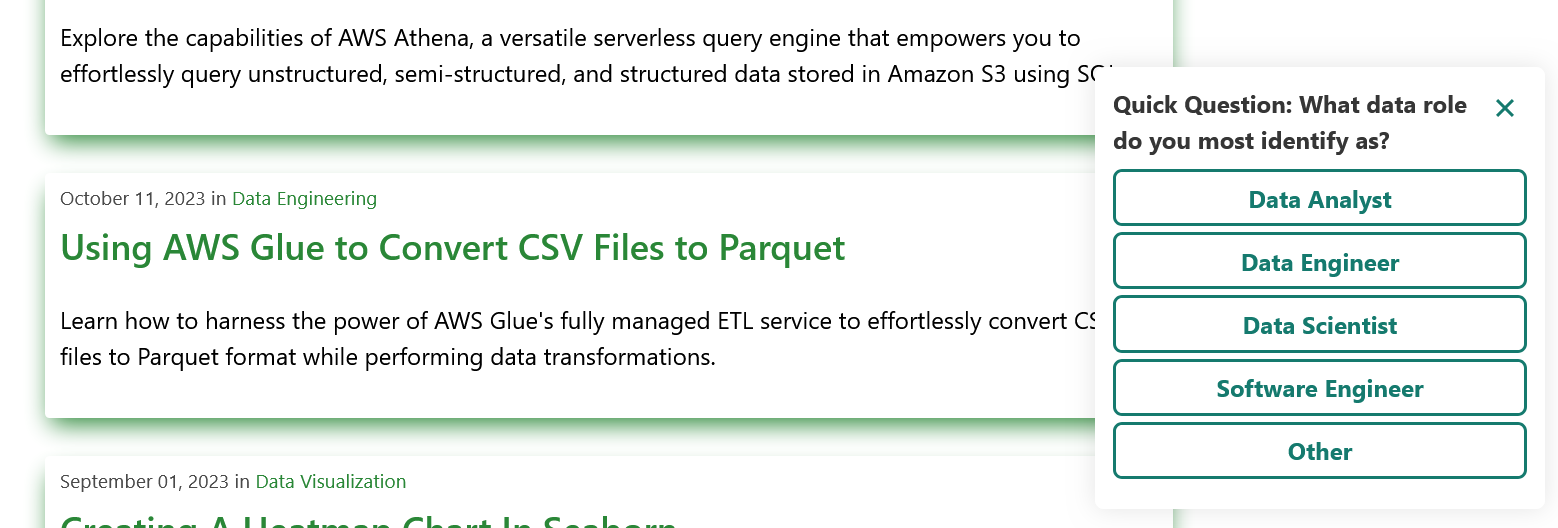


Learn from your site visitors using quick, popup surveys.LiteSurveys is a lightweight WordPress plugin that helps you gather feedback from your website visitors through simple, unobtrusive surveys. With LiteSurveys, you can easily create and manage single-question surveys that appear as slide-in popups on your website.
Key Features
- Simple Survey Creation – Create surveys directly in your WordPress admin with just a few clicks
- Multiple Question Types – Choose between multiple choice or open-ended questions
- Customizable Display – Control when and where your surveys appear
- Easy Response Management – View and manage survey responses right in your WordPress dashboard
- Unobtrusive Design – Surveys appear as subtle slide-in popups that won’t disrupt the user experience
- Mobile Friendly – Surveys work great on all devices
Use LiteSurveys to:
- Conduct User Research – Using small slide-in surveys, users can quickly provide information about who they are or what they are looking for
- Identify Pain Points – Adding quick surveys during the sales funnel allows site visitors to provide feedback about concerns and issues
- Get Marketing Insights – Using surveys at key points during the user experience can provide details about the user’s decisions and thoughts which can influence your copy and strategy
- Gather Customer Feedback – Collect real feedback from actual users about their experience with your site or product
Some Features of LiteSurveys:
- Question Type Variety – Select from multiple choice or open-ended questions to best suit your needs
- Timing Control – Set when your survey should appear to visitors
- Position Control – Choose whether your survey appears in the bottom left or bottom right
- Active/Inactive States – Easily activate or deactivate surveys as needed
- Submissions Per Page – Easily see what page the website visitor was on when they submitted the survey