
- 正在使用
- 1,000+
- 评分
- 4.8 / 5
- 累计下载
- 2.3 万
- 最近更新
- 2026年9月8日
 rbaer
 Osthafen
截图
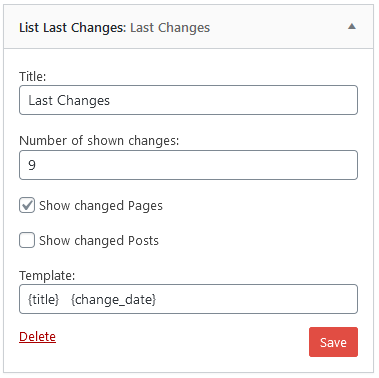
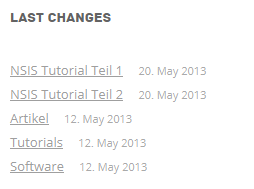
Shows a list of the last changes in the widget area, via shortcode or in the gutenberg block editor.
This can include changed pages and/or posts (configurable).
Additional features include:
- Select the number of entries in the list
- Define pages to be excluded
- Show the author or the last editor of the page/post
- Select and order by date modified or date published
Exclude page or post
To exclude a page or post from being listed in the widget do the following steps:
- Open the page or post you want to exclude for editing.
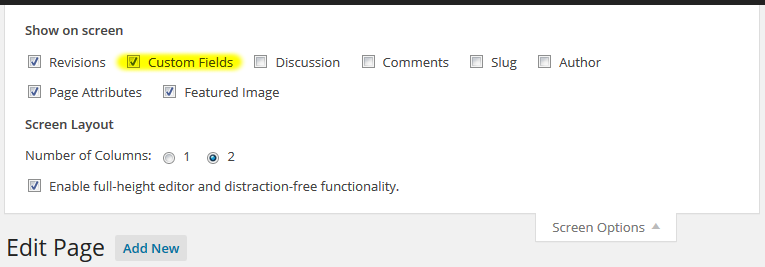
- Open the “Screen Options” (on the top right of the page)
- Ensure that “Custom Fields” is checked (see Screenshot #3)
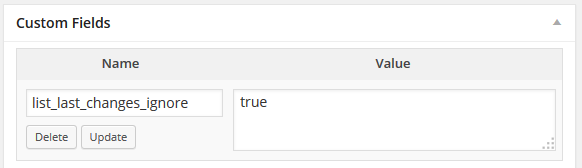
- In the “Custom Fields” further down the screen add the following custom field (see Screenshot #4):
- name: list_last_changes_ignore
- value: true
To include it again set the value to false or remove the custom field completely.
Block Editor (Gutenberg)
The block can be found in Widgets -> List Last Changes.
The block can be configured in the block settings (panel on the right side)
In difference to the widget, with the block no title is written. If a title is needed it has to be defined in an own block in front of the List Last Changes block.
Shortcode
To show the list of the last changes via shortcode use the following syntax:
[list_last_changes number='7' showpages='true' showposts='true' showauthor='false' usedatepublished='true' template='{title} {change_date} {author}' /]
The attribute ‘number’ defines the number of entries shown.
With the attributes ‘showpages’ and ‘showposts’ changed pages and/or posts are included.
To show also the author set the attribute ‘showauthor’ to true (deprecated, use template mechanism instead).
With the attribute ‘usedatepublished’ set to ‘true’ the date when the page or post was first published, if set to ‘false’ (or not set at all) the date the page or post was modified is used.
The ‘template’ attribute defines the content of the entries. If the ‘template’ attribute is defined the attribute ‘showauthor’ is ignored.
In difference to the widget, with the shortcode no title is written. If a title is needed it has to be defined by hand in front of the shortcode.
Templates
In the template string the following fields can be used: {title}, {change_date}, {published_date}, {author} and {editor}.
{title} : the title of the page or post with a link to it
{change_date} or {change_date[format]} : the date the page or post was changed (“modified date”)
{published_date} or {published_date[format]} : the date the page or post was published (“post date”)
{author} : the author of the page or post
{editor} : the last editor of the page or post
With the optional [format] the date format of change_date and published_date can be defined. The date format is in the php date formatting.
Without definition the wordpress system date format is used.
Sample templates:
{title} {change_date} : the default template
{title} {change_date[Y-m-d H:i]} : like the default template but with date and time defined by the given format
{title} {change_date} {author} : behaves as in versions before 0.9 when show author was enabled
{change_date} : shows only the change_date, can be used with number = 1 as last modified date of a WordPress Site