
LinkTender – Broken Link Checker, Local & Lightweight
v1.2.1linktender · 2026年10月19日 上架
Lightweight broken link checker: find and fix dead links, 404s and broken images on your own server. No cloud, no account, no link limits.
- 正在使用
- 10+
- 评分
- 暂无
- 累计下载
- 362
- 最近更新
- 2026年11月20日
贡献者
 linktender
截图
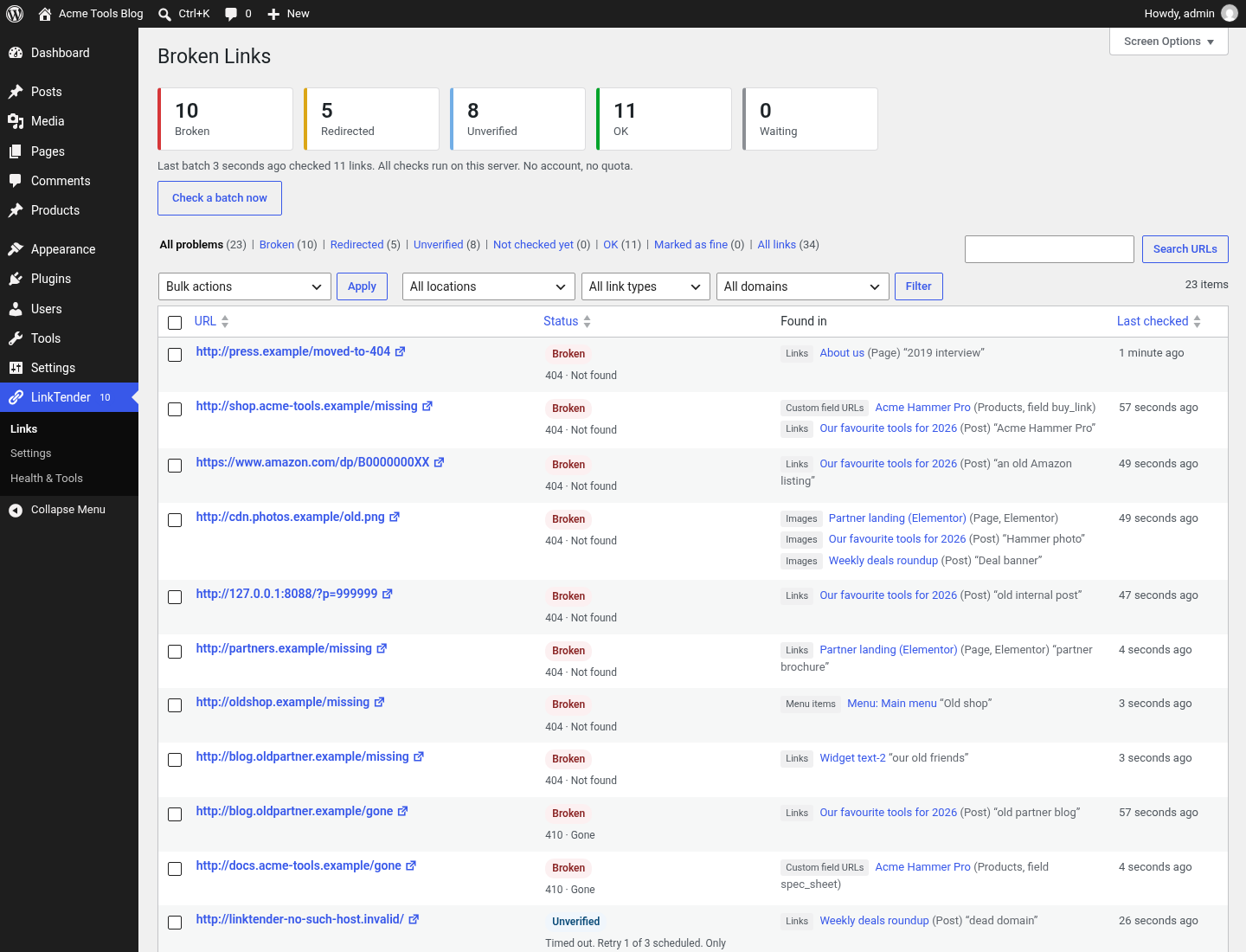
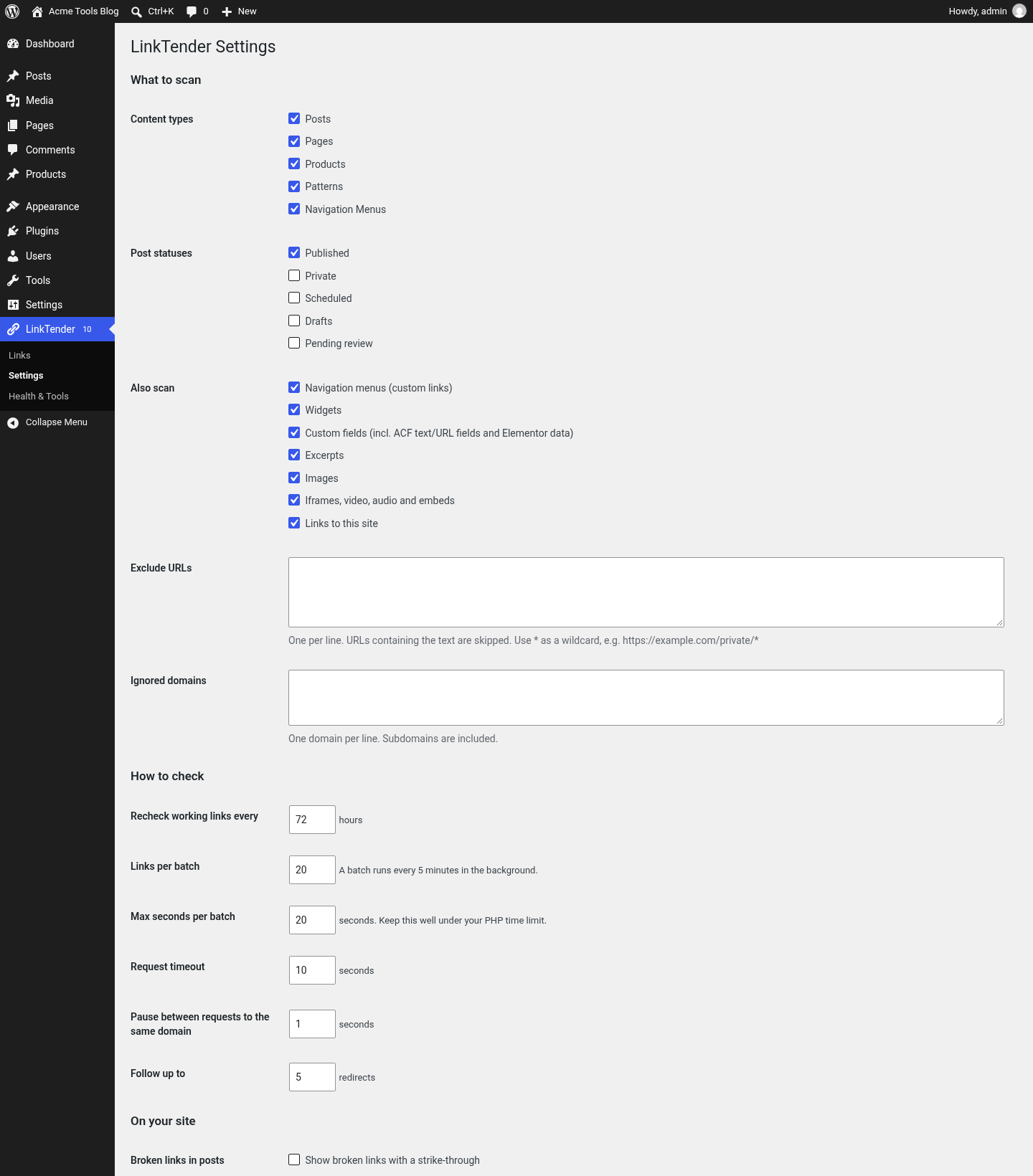
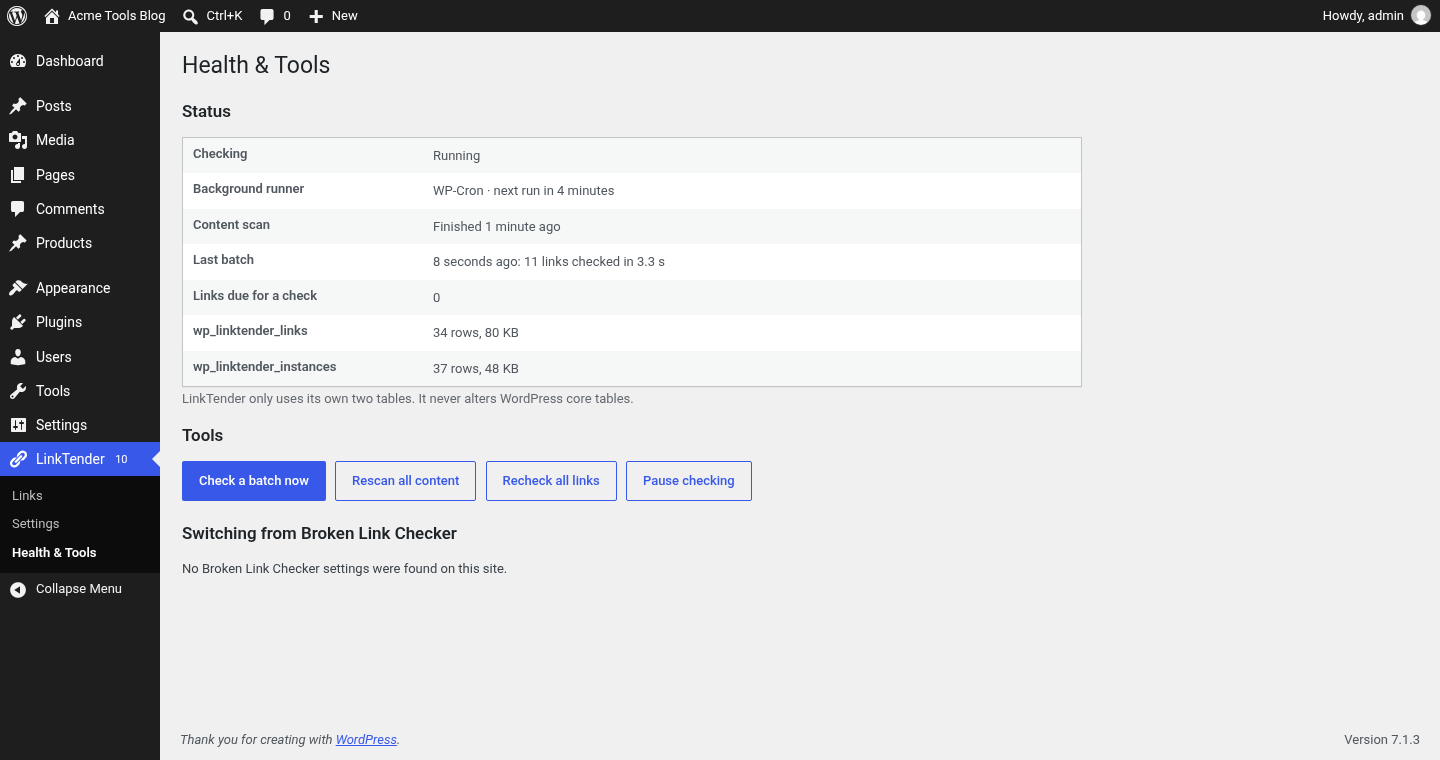
LinkTender is a free, lightweight broken link checker for WordPress. It finds dead links, 404 errors, redirects and broken images in your posts, pages, menus, widgets, comments and custom fields, and lets you fix them in one click.
Unlike link checkers that send your URLs to a cloud service or cap free scans, LinkTender checks every link from your own server, in small, throttled background batches built to stay light on shared and managed hosting. No account, no API key, no monthly quota.
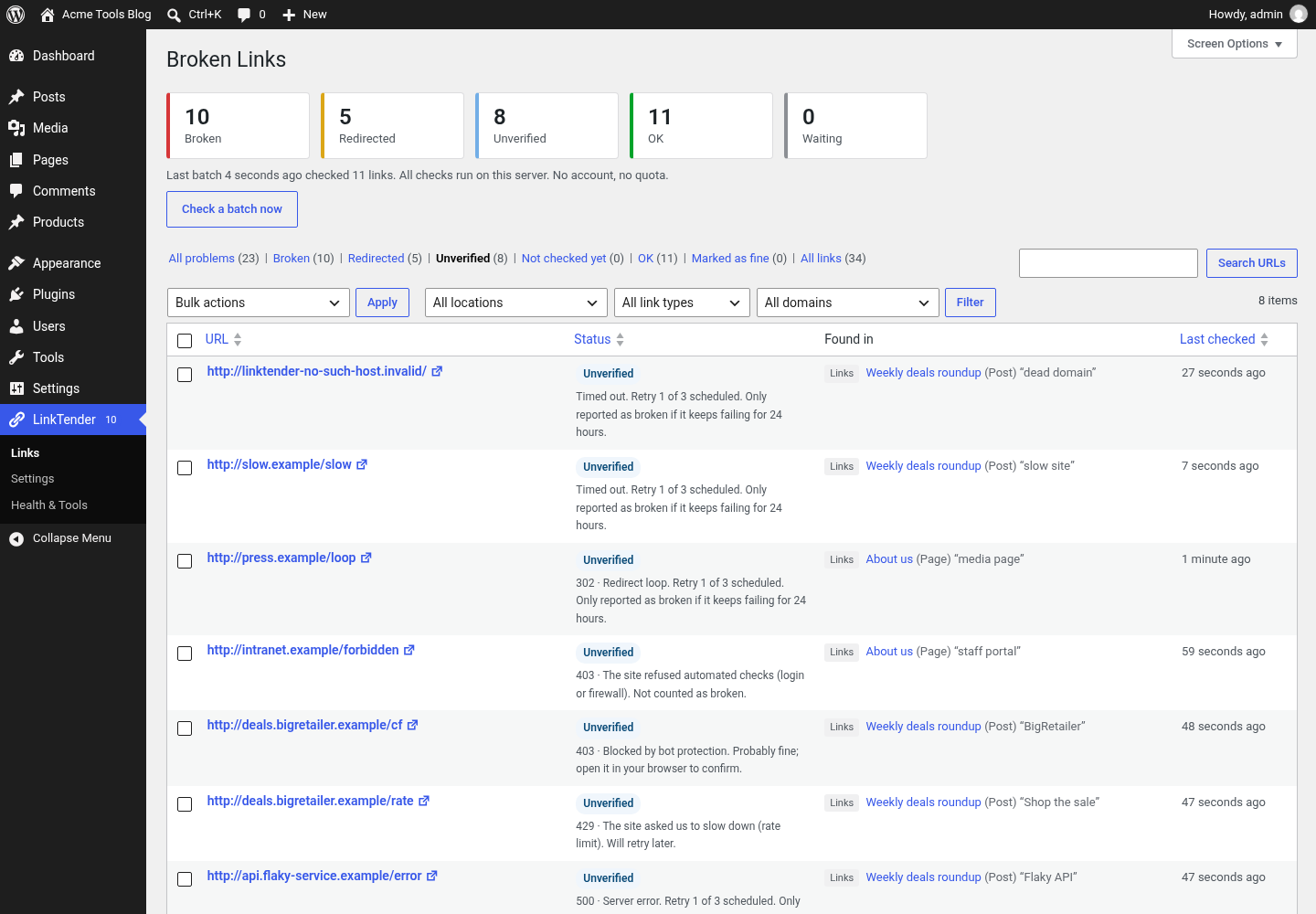
Each link is listed as broken, redirected or unverified (when a site blocks automated requests), with a clear reason. Your content is not sent to any outside service.
How link results are decided
- A link is marked Broken when the server answers 404 (Not Found) or 410 (Gone). The result is re-checked over the next 24 hours.
- Temporary problems (timeouts, 5xx server errors, DNS or connection failures) are retried three times over 24 hours (after 2, 10 and 24 hours). The link is marked Broken only if it still fails after the last retry.
- When a site blocks automated requests, the link is marked Unverified instead of Broken. This covers bot challenge pages (for example Cloudflare or Amazon’s captcha page), 401, 403 and 429 answers, and the 400 and 999 codes that Facebook and LinkedIn return to automated requests. You can open these links in your browser and click Ignore if they work.
- If your own server cannot reach the internet, or cannot reach its own site, the affected links are marked Unverified (or keep their earlier status) and are checked again later.
- Links to your dashboard (wp-admin) and login page are not checked.
Gentle on your server and database.
- Checks run in time-boxed background batches (WP-Cron, or Action Scheduler when another plugin provides it) with a lock, so two batches never overlap.
- A few links are checked at the same time, always on different domains. Requests to the same domain are spaced out, and each request has a timeout.
- Tested on a site with 20,000 posts and over 90,000 unique links: each batch stays under about 1,300 database queries and 65 MB of memory.
- HEAD requests are tried first, with a GET fallback for servers that answer HEAD badly. Up to 5 redirects are followed.
- Data lives in two small tables of its own. WordPress core tables are never altered.
- A “Pause checking” switch and a Health screen showing table sizes, the last batch and the queue.
What gets scanned
- Posts, pages and every public custom post type, plus synced patterns and navigation blocks
- Gutenberg blocks (links, buttons, images, embeds, navigation links)
- Elementor page data (text, buttons, images)
- Shortcode-based page builders such as Divi, WPBakery and Avada: URLs in shortcode settings (buttons, images, video,
link="url:...") are read as text. No shortcode is run to do this. - Approved comments (links in the comment text) and, optionally, commenters’ website links
- Custom fields, including ACF text and URL fields
- Navigation menus (custom links) and widgets, both classic and block widgets
- Excerpts, images, iframes, video, audio and embeds
Fix links in one click
- One row per URL, listing every place it appears.
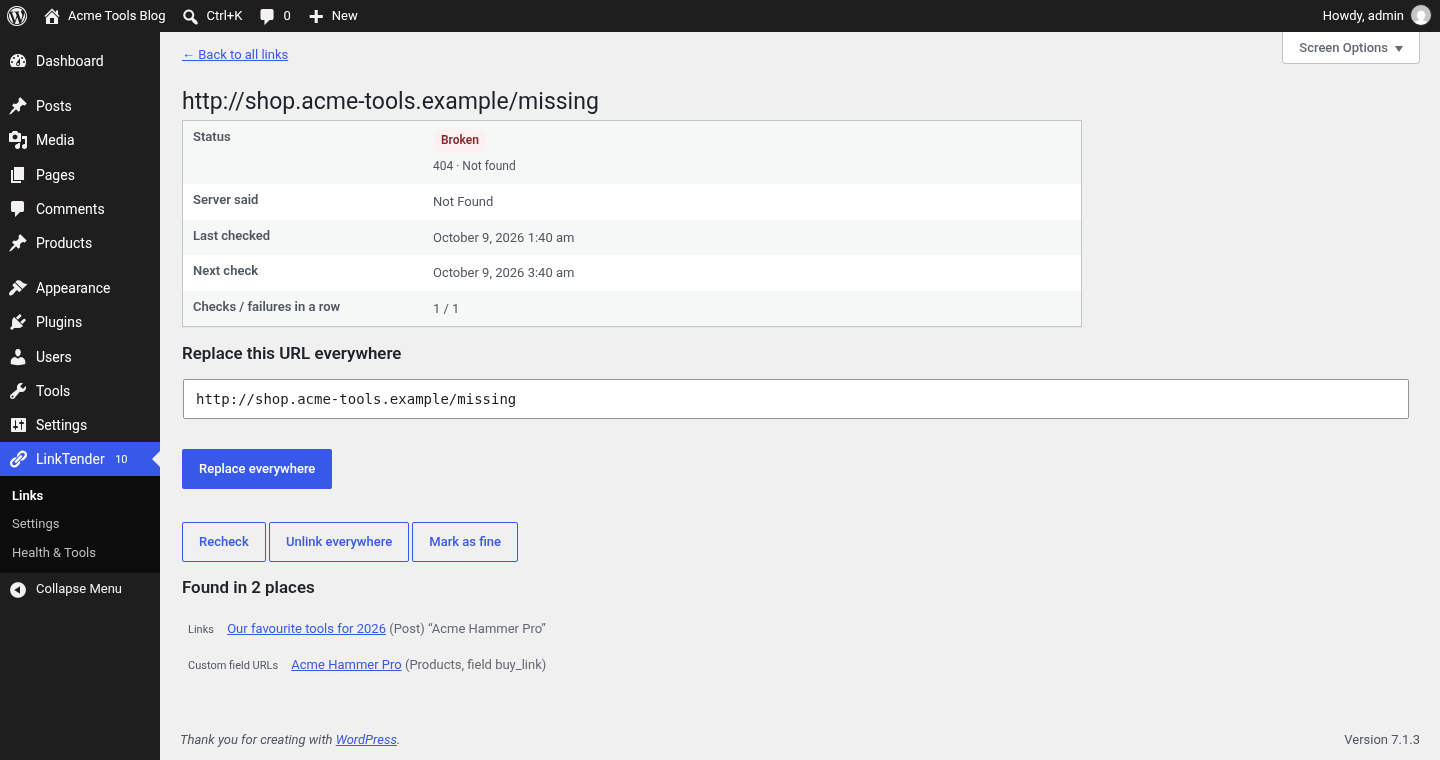
- Edit URL replaces it everywhere: post content (including shortcode settings), custom fields, Elementor data, comments, menus and widgets.
- Unlink removes the link and keeps the text.
- Use final URL updates redirected links to their destination. It is not offered when a redirect ends on a login, consent or captcha page.
- Recheck, Ignore or Ignore domain.
- Filter by status (broken, redirected, unverified), location, link type or domain, and search by URL.
Import settings from another link checker
If the Broken Link Checker plugin was used on the site before, LinkTender Health & Tools can import its exclusion list, check interval, timeout, front-end options and dismissed links. That plugin’s data is only read, never changed.
Broken links are not changed on your public site unless you turn on the optional strike-through or rel=”nofollow”.
LinkTender Pro
LinkTender Pro is an optional paid add-on. The free plugin is complete without it: everything above works with no account and no payment.
- Email reports. Daily or weekly, to any addresses, and only when there is something to report if you prefer.
- Product and affiliate links. Store pages that still load but say the product is gone, unavailable or out of stock (including Amazon, eBay, Etsy, Walmart, Best Buy, Target and your own store domains), and product links that now redirect to the store’s home or search page.
- CSV export. Any view or selection, with the posts each link appears in. On multisite, a network-wide export.
- WP-CLI.
wp linktender scan,check,list,export,fix-redirects,report,licenseandsites. - Multisite. One network activation, a network overview of every site, and network export and rescan.
- Links built by shortcodes (optional, off by default). Runs the shortcodes in your content during the scan and checks the links in their output, for shortcodes that build links from their own data. Forms, carts, checkouts, login forms and media players are never run. URLs written in shortcode settings are already found by the free plugin.
- Redirect clean-up. Updates redirecting links to their final address in one go, with a preview. Affiliate and tracking links, cloaked links, links that end on a login page, and links that now lead to another site are never changed.
Pro runs on your own server and does not send your links anywhere. Its only outside connection is a licence and update check (the licence key, the site address and the plugin version).
The free plugin does not contact LinkTender Pro or that site. The link below is only a link.
Privacy and outgoing requests: LinkTender sends no data to us or anyone else, and it has no update checks, licence calls or tracking. Activating the plugin only creates its two tables; it prints nothing, schedules nothing and makes no outgoing requests, and front-end page views are not changed. Link checking starts only after an administrator clicks Start checking links on the LinkTender screen. Deactivating the plugin stops checking; after re-activation it waits for the button again. From then on, the only outgoing requests are the link checks themselves, which go to the URLs found in your content. An optional “Connectivity check” setting (off by default) lets LinkTender send one HEAD request to wordpress.org, at most every 10 minutes, when checks fail at the network level, to find out whether your server is online. No data is sent with it.
External services
LinkTender does not rely on any external service, and it sends no data about your site or its visitors to us or to anyone else.
- Link checks. After an administrator clicks Start checking links, LinkTender sends a HEAD request (or a GET request when a server answers HEAD badly) to each URL found in your own content, to see whether it still works. Each request goes only to the address of that link, and carries only standard browser-style request headers (no cookies, and no information about your site or its visitors). Nothing is requested before the button is clicked, and checking stops when you pause or deactivate the plugin.
- Optional connectivity check (wordpress.org), off by default. Only if you turn on the connectivity check under LinkTender Settings (“ask wordpress.org whether this server is online”), and only when a link check fails at the network level (DNS error, refused connection or timeout), LinkTender sends one HEAD request to https://wordpress.org/ (at most once every 10 minutes) to find out whether your server is online. No data is sent with it. WordPress.org terms of service and privacy policy.