

Instinctor – Page Builder with Booking, Online Store & AI Chat
v2.1.09Instinctor · 2026年7月14日 上架
Build your business site and run it from one plugin: visitors get answers, book a time and pay a deposit. SEO and a store included.
- 正在使用
- 10+
- 评分
- 5.0 / 5
- 累计下载
- 1,298
- 最近更新
- 2026年11月7日
贡献者
 Instinctor
截图
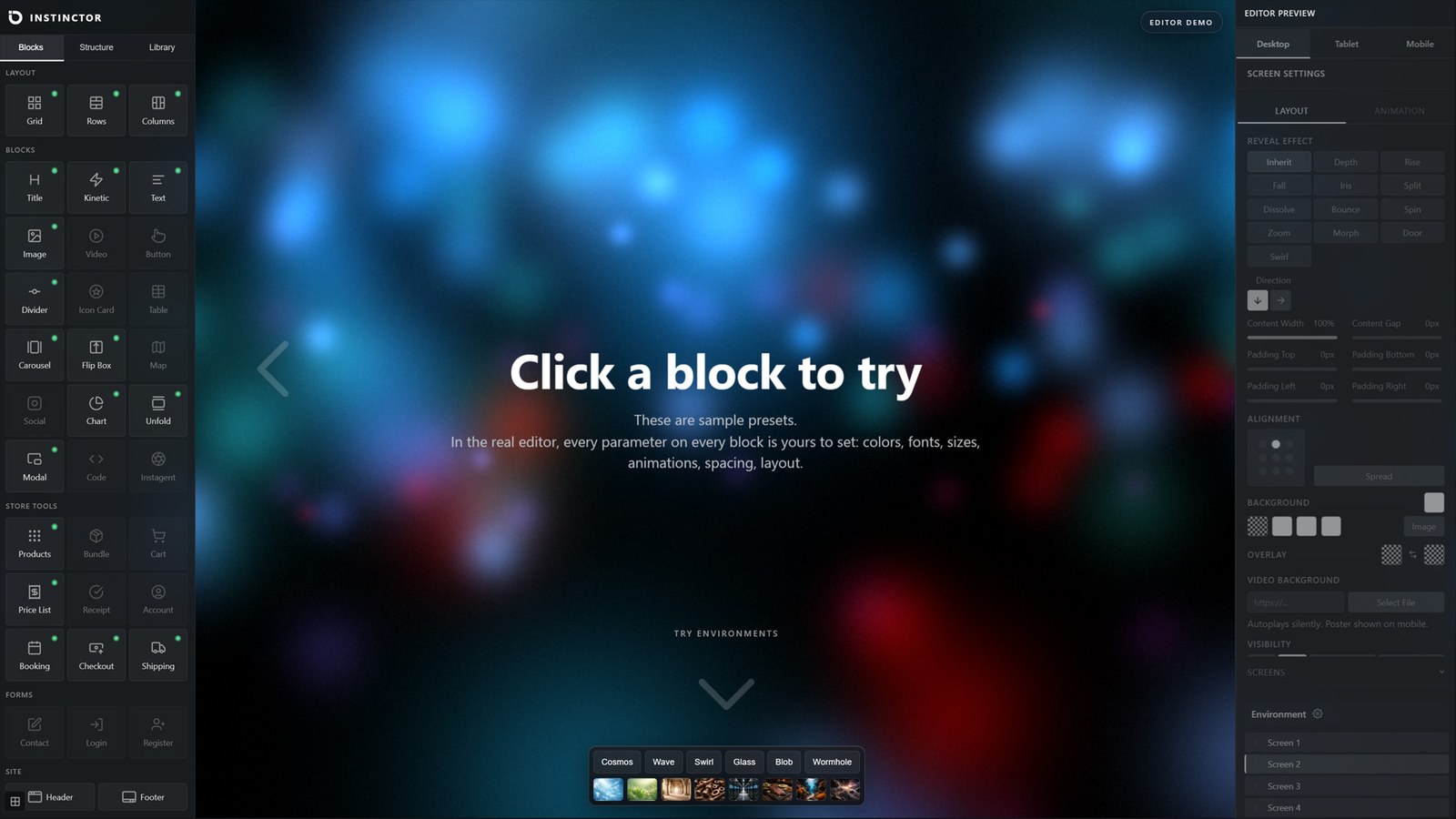




Instinctor is a page builder that runs the business behind the page. You build the site, and the same plugin answers your visitors, books them into an open time, takes the deposit and gets the pages found. It replaces the page builder, the booking plugin, the chat widget, the SEO plugin and WooCommerce with one install.
Every question gets an answer
Live chat on every page. Each conversation is kept as a lead and sent to your email. With Pro, the chat answers on its own and texts you the lead.
Customers book themselves
They pick a service and an open time on your site, any hour of the day. No calls back and forth to find a slot.
Paid when they book
Each service can take a deposit through Stripe at the moment of booking, so a no-show still leaves you paid.
Found on Google
Titles, descriptions, sitemaps and redirects for every page, with a preview of how it looks in search.
Pages that look like nobody else’s
Headlines that move, sections that reveal as visitors scroll and, with Pro, 3D depth on your own photos. Desktop, tablet and phone are each set on their own.
Products too, when you sell them
A full store is built in: products, gift cards, discount codes and checkout through Stripe, PayPal or Authorize.net. Subscriptions and memberships with Pro. No WooCommerce needed.
Try it on one page
Instinctor renders only the pages you build with it and leaves your theme and existing pages alone, so you can start with one page without rebuilding the rest of your site. Free, with no page limit.
What it does
Bookings and appointments. Customers pick a service and a time on your site. Each service can carry its own deposit, taken through Stripe when the booking is made, so a no-show still leaves you paid.
A real store. Unlimited physical and digital products with variants, discount codes, quantity discounts, stock control, tax rules, gift cards and loyalty points. Checkout through Stripe, PayPal or Authorize.net. Returns, refunds, packing slips, order tracking and editable order emails are included. No WooCommerce required.
Live chat. Visitors message you from any page. You answer from the dashboard, and every conversation is kept as a lead with an email alert.
SEO. Per-page titles and descriptions, canonical URLs, noindex control, a search preview and a page health score, XML sitemaps and redirects.
One editor for the whole site. Sections, Grid, Rows and Columns layouts, and every content block: text, images, video, maps, forms, navigation, header, footer, posts, tables, reviews, price lists, team, flip boxes, charts, plans and ecommerce blocks. Desktop, tablet and mobile are controlled separately.
Classic or Cinematic pages. Classic pages scroll normally. Cinematic pages move screen by screen with per-screen transitions and optional looping.
The animation engine. A kinetic text engine with 34 compositions and 62 motions, twenty section reveal effects, animated headlines, text reveals, animated dividers, gradient borders, animated gradient backgrounds, WebGL environments, 3D depth, Motion Walls and 3D carousels. Reveals, headlines, dividers, borders and gradient backgrounds publish on the free version, and so does 3D depth on images that already carry a depth map; processing your own photos into 3D depth, and the rest, run in the editor free and publish with Pro.
Free and Pro
Instinctor is free to install and build with, with no page limit. Instinctor Pro is a separate plugin from instinctor.com, installed alongside this one. Pro adds:
- WebGL environments, kinetic headings, Motion Walls and section effects on published pages, and 3D depth for your own photos
- Automatic smart chat replies, and SMS and WhatsApp alerts
- Open Graph, Twitter cards and structured data output
- Product bundles
- A custom-designed checkout
- Industry business types (restaurant, salon, instructor, home services, automotive, 3D-printing quotes)
Source code
The plugin ships as source. The .js files in assets/js/ are the canonical, hand-written source: no transpiler, bundler, or build step is involved. A few engine files (impulse-3d-effects.js, impulse-motion-lava.js, impulse-fx-engine.js, impulse-wave.js, impulse-animations.js) are written densely on single lines for performance, but each statement is normal readable JavaScript. PHP is unobfuscated. Third-party libraries under assets/js/vendor/ ship in their original minified form; see assets/js/vendor/README.txt for versions, licenses, and source URLs. For a copy of the development repository, contact instinctor@instinctor.com.
External Services
This plugin connects to the following external services. Each connection is described below including what data is sent and when.
Stripe
Used for payment processing when Stripe is enabled in Settings Payments. Customer payment data is submitted directly to Stripe and is not stored on your server.
- Service: https://stripe.com
- Terms: https://stripe.com/legal
- Privacy: https://stripe.com/privacy
PayPal
Used for payment processing when PayPal is enabled in Settings Payments. When a customer chooses PayPal at checkout, the order amount and currency are sent to PayPal’s REST API at api-m.paypal.com (or api-m.sandbox.paypal.com in test mode) to create and capture the order. No data is sent unless PayPal is enabled and selected at checkout.
- Service: https://paypal.com
- Terms: https://www.paypal.com/us/legalhub/useragreement-full
- Privacy: https://www.paypal.com/us/legalhub/privacy-full
Authorize.Net
Used for payment processing when the Authorize.Net gateway is enabled in Settings Payments. When a customer pays, the checkout page loads Authorize.Net’s Accept.js library from js.authorize.net (or jstest.authorize.net in test mode) to tokenize the card in the browser, and the resulting payment token plus the order amount and billing details are sent to Authorize.Net’s API at api.authorize.net (or apitest.authorize.net in test mode) to process the transaction. No card data touches your server, and no data is sent unless the Authorize.Net gateway is enabled and selected at checkout.
- Service: https://www.authorize.net/
- Terms: https://www.authorize.net/about-us/terms.html
- Privacy: https://www.visa.com/en-us/legal/privacy-policy
AI features (via Instinctor Platform relay)
Used by Instagent (smart live chat) and the SEO workspace features. When these features are used, page content, product data, and chat messages are sent to the Instinctor Platform relay at platform.instinctor.com, which forwards them to an AI provider on the plugin’s behalf. No AI provider API key is entered or stored on your site. These features are opt-in via the platform consent notice (see the Instinctor Platform section below).
- Service: https://platform.instinctor.com
- Terms: https://instinctor.com/terms
- Privacy: https://instinctor.com/privacy
SMS notifications (via Instinctor Platform relay)
Used for SMS notifications (Instinctor Pro feature). Notification content and recipient phone numbers are sent to the Instinctor Platform relay at platform.instinctor.com, which delivers the message through its downstream SMS carrier (Telnyx). The plugin does not contact the carrier directly and no carrier credentials are entered on your site.
- Service: https://platform.instinctor.com
- Terms: https://instinctor.com/terms
- Privacy: https://instinctor.com/privacy
Transactional email (via Instinctor Platform relay)
Used for transactional email delivery when the relay mailer is selected in Settings Email. Email content and recipient addresses are sent to the Instinctor Platform relay at platform.instinctor.com, which delivers the message through its downstream email provider. The plugin does not contact the email provider directly and no email-provider credentials are entered on your site.
- Service: https://platform.instinctor.com
- Terms: https://instinctor.com/terms
- Privacy: https://instinctor.com/privacy
ExchangeRate-API
Used by the multi-currency feature to fetch exchange rates when an API key is configured in Settings Currency. The base currency code is sent to the API. Off by default; only used when an API key is configured.
- Service: https://www.exchangerate-api.com/
- Terms: https://www.exchangerate-api.com/terms
- Privacy: https://www.exchangerate-api.com/privacy
USPS Shipping API
Optional. Used by the order-tracking feature to fetch tracking events for shipments routed via USPS. Requests are sent to the USPS Web Tools API at secure.shippingapis.com with the tracking number. Off by default; only used when USPS credentials are configured in Settings Shipping.
- Service: https://www.usps.com/business/web-tools-apis/
- Terms: https://www.usps.com/business/web-tools-apis/general-api-developer-guide.htm
- Privacy: https://www.usps.com/privacy-policy/
AfterShip
Optional. Used by the order-tracking feature to fetch tracking events across multiple carriers. Tracking number + carrier slug are sent. Off by default; only used when an AfterShip API key is configured in Settings Shipping.
- Service: https://www.aftership.com/
- Terms: https://www.aftership.com/legal/terms-of-service
- Privacy: https://www.aftership.com/legal/privacy
Google PageSpeed Insights
Used only when you click Measure in SEO a page Page Speed. The page’s public URL is sent to Google, which loads that URL and returns its performance score. No personal or visitor data is sent, and nothing is sent automatically: the call happens only on that click, and the result is cached for 24 hours.
- Service: https://developers.google.com/speed/docs/insights/v5/get-started
- Terms: https://developers.google.com/terms
- Privacy: https://policies.google.com/privacy
IndexNow (search-engine index notification)
Optional. Used by the SEO tools to tell participating search engines (via the IndexNow protocol, used by Bing and Yandex) when your pages are published or updated, so they recrawl sooner. When an IndexNow key is configured in Settings, the changed page URLs, your site host, and that key are sent to api.indexnow.org. Off by default; nothing is sent unless an IndexNow key is set.
- Service: https://www.indexnow.org/
- Terms: https://www.indexnow.org/faq
- Privacy: https://privacy.microsoft.com/privacystatement
Google Maps
When a page includes a map block, the front end embeds a Google map in an iframe from maps.google.com so visitors can see the location. This loads only on pages that contain a map block, only when a visitor views that page, and needs no API key. In the editor, a map block’s live preview optionally loads the Google Maps JavaScript API from maps.googleapis.com when a Maps API key is set in Settings (admin-side only). The plugin does not use Google Places or address autocomplete.
- Service: https://developers.google.com/maps
- Terms: https://cloud.google.com/maps-platform/terms
- Privacy: https://policies.google.com/privacy
YouTube and Vimeo (video embeds)
When a page author adds a video block with a YouTube or Vimeo URL, the front end embeds that video in an iframe from www.youtube.com or player.vimeo.com. The embed loads only on pages where a video block is present, and only when a visitor views that page.
- YouTube: https://www.youtube.com/t/terms, https://policies.google.com/privacy
- Vimeo: https://vimeo.com/terms, https://vimeo.com/privacy
Outbound links (carrier tracking and social sharing)
The order-tracking feature builds plain outbound hyperlinks to carrier tracking pages (UPS, FedEx, DHL, USPS, Amazon, Royal Mail, Canada Post, and others), and designer profile / share buttons build hyperlinks to social networks (X/Twitter, LinkedIn, WhatsApp). These are ordinary links the visitor may click. The plugin does not transmit any data to those destinations on its own.
Instinctor Platform (platform.instinctor.com and instinctor.com)
The plugin can connect to two Instinctor hosts: platform.instinctor.com for AI relays, transactional email and SMS, the section/shape libraries, plugin updates, and the designer marketplace; and instinctor.com for license validation, which is contacted at instinctor.com/wp-json/instinctor/v1/license. All connections are OFF by default. On first login an admin banner asks “Connect Instinctor to platform.instinctor.com?” with Connect / No thanks buttons; the plugin only contacts the platform after the site owner clicks Connect, or after they take an explicitly opt-in action (entering a license key, clicking Subscribe, submitting the registration email). Consent can be revoked any time in Instinctor Settings Privacy.
Every endpoint below sends the site URL plus, where noted, additional payload data. No call fires unless the user has opted in or taken the corresponding explicit action.
GET instinctor.com/wp-json/instinctor/v1/license: License validation against the instinctor.com host. Sends: license key + site URL. Fires when the plugin validates an activated license key.POST platform.instinctor.com/api/validate: License key activation. Sends: license key + site URL. Fires when the admin enters and activates a license key.POST /api/checkout: Stripe checkout session creation. Sends: admin email + plan + billing interval + site URL. Fires when the admin clicks Subscribe / Upgrade.POST /api/register: Free license registration. Sends: email + site URL + plugin version. Fires when the admin submits the registration email in the admin banner.GET /api/version: Plugin update check. Sends: nothing beyond the request. Fires when WordPress checks for plugin updates (only after consent).POST /api/relay/email: Transactional email relay. Sends: recipient + subject + body. Fires when the store sends a transactional email (order confirmation, etc.) AND the relay mailer is selected. Optional.POST /api/relay/sms: Transactional SMS relay. Sends: recipient phone + message. Fires when SMS notifications are configured to use the relay. Optional.POST /api/relay/ai-help: Instagent help-mode AI query. Sends: user’s question + editor context + license key. Fires when the editor user submits a question in the Help panel.POST /api/relay/ai-help-chunk: KB article fetch. Sends: article slug + license key. Fires when the editor user clicks a Help-panel topic.POST /api/relay/<task>: AI content/SEO/chat relay. Sends: task params + license key. Fires when the user invokes an AI feature (AI write, SEO suggestions, AI chat reply).GET /api/graphics/sandbox-3d: Curated 3D image library index for the hero sandbox. Sends: nothing. Fires when an editor user opens the hero-sandbox 3D picker.POST /api/admin/library/sections/create: Admin-only upload to the platform section library. Sends: element tree + HTML preview + platform token. Fires only when an admin clicks “Push to library”.GET /api/sections,GET /api/shapes: Template/shape library index reads. Sends: nothing. Fires when the user opens the corresponding picker.POST /api/report: Migration / support ticket relay (marketing site only). Sends: email + site URL + message. Fires when a visitor submits the migration form.POST /api/public/subscribe-solo: Self-serve signup. Sends: email + chosen slug + referral code. Fires when a visitor submits the signup form on the marketing site.GET /api/public/designer/<slug>: Designer profile read. Sends: nothing. Fires when a designer’s public profile page is viewed.POST /api/referral/apply,GET /api/referral/stats: Affiliate signup + stats. Sends: form values / referral code. Fires only when the partner-program admin uses those screens.-
POST /analytics_ping: Anonymous daily usage ping. Sends: PHP version + WP version + plugin version (no user data). Fires once per day only if the admin has separately opted into “Help improve Instinctor” in Settings Privacy AND the platform consent above is granted. -
Website: https://instinctor.com
- Privacy policy: https://instinctor.com/privacy
- Terms of service: https://instinctor.com/terms