

Include Sitename in Search Results
v1.3apasionados · 2015年4月19日 上架
Adds the JSON-LD schema.org markup for including the Site Name in Search Results on the homepage.
- 正在使用
- 100+
- 评分
- 暂无
- 累计下载
- 5,706
- 最近更新
- 2026年2月1日
贡献者
 apasionados
截图


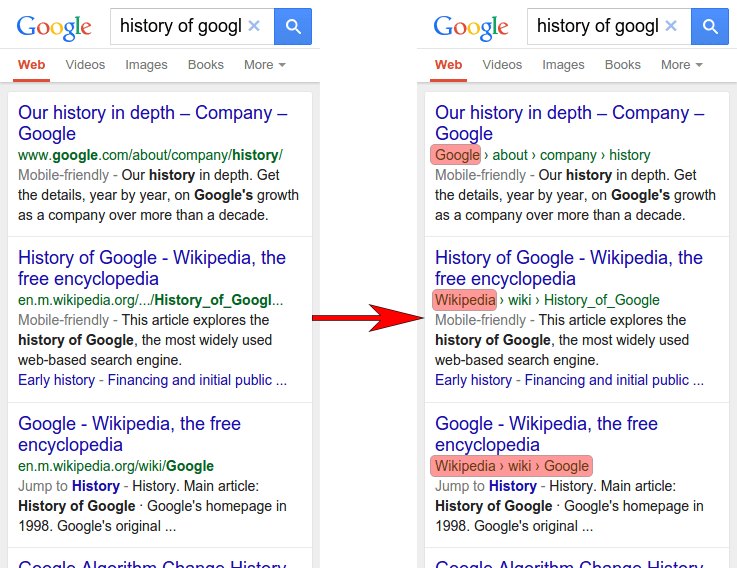
This plugin adds the JSON-LD schema.org markup for including the Site Name in Search Results on the homepage.
This new feature was presented on the Official Google Webmaster Central Blog (Thursday, April 16, 2015 ). There is more info on the Google Developers Website.
Use structured data markup on your public website to indicate the preferred name you want Google to display in Search results. You can also provide more than one possible name for your site, and let Google Search algorithms choose between them. Once Google has crawled and indexed the updated page, we can use the provided name in Search results as shown in the screenshot.
If you use WordPress SEO by Yoast version 1.6 or newer, you don’t need to use this plugin, as this feature has been included in the version 1.6 update. There is more information in the FAQ section of the plugin.
What can I do with this plugin?
This plugin adds the JSON-LD schema.org markup for including the Site Name in Search Results on the homepage.
After activating the plugin you have to configure the Name you want Google to display in your search results instead of the domain name.
When Google next crawls your page, its indexing algorithms will process the site name specified by your markup and make it eligible to be used in Search results. Note: It can take some time before you see a change to the presentation of your site in Search results. Also, Google’s algorithms might choose not to use the name you provided, or not might choose to show the domain name instead.
INCLUDE SITENAME IN SEARCH RESULTS in your Language!
This first release is avaliable in English and Spanish. In the languages folder we have included the necessary files to translate this plugin.
If you would like the plugin in your language and you’re good at translating, please drop us a line at Contact us.
Further Reading
You can access the description of the plugin in Spanish at: Include Sitename in Search Results en castellano.
Contact
For further information please send us an email.
Translating WordPress Plugins
The steps involved in translating a plugin are:
- Run a tool over the code to produce a POT file (Portable Object Template), simply a list of all localizable text. Our plugins allready havae this POT file in the /languages/ folder.
- Use a plain text editor or a special localization tool to generate a translation for each piece of text. This produces a PO file (Portable Object). The only difference between a POT and PO file is that the PO file contains translations.
- Compile the PO file to produce a MO file (Machine Object), which can then be used in the theme or plugin.
In order to translate a plugin you will need a special software tool like poEdit, which is a cross-platform graphical tool that is available for Windows, Linux, and Mac OS X.
The naming of your PO and MO files is very important and must match the desired locale. The naming convention is: language_COUNTRY.po and plugins have an additional naming convention whereby the plugin name is added to the filename: pluginname-fr_FR.po
That is, the plugin name name must be the language code followed by an underscore, followed by a code for the country (in uppercase). If the encoding of the file is not UTF-8 then the encoding must be specified.
For example:
- en_US – US English
- en_UK – UK English
- es_ES – Spanish from Spain
- fr_FR – French from France
- zh_CN – Simplified Chinese
A list of language codes can be found here, and country codes can be found here. A full list of encoding names can also be found at IANA.