In2 Cart Recovery & Notifications
v0.1.7iN2 LLC · 2026年5月21日 上架
Connect WooCommerce to WPP Marketing for cart recovery, transactional notifications, customer segmentation, and WhatsApp automations.
- 正在使用
- 10 以下
- 评分
- 暂无
- 累计下载
- 481
- 最近更新
- 2026年9月14日
贡献者
 iN2 LLC
截图


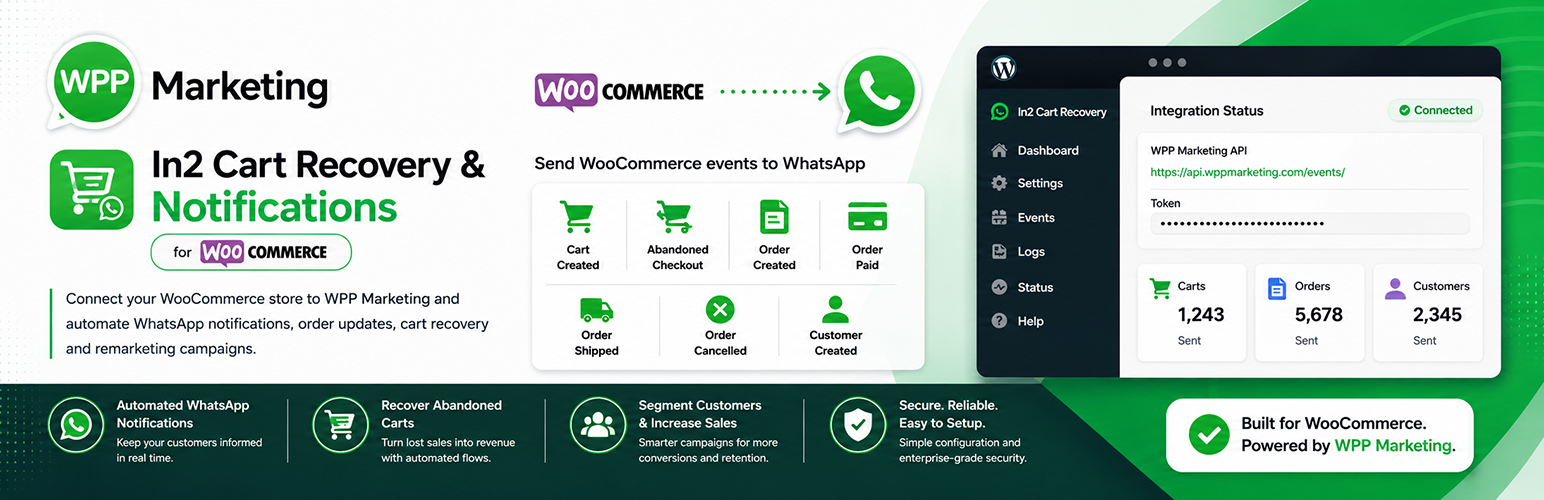
Turn WooCommerce activity into timely WhatsApp automations with WPP Marketing. The plugin securely sends selected cart, checkout, order, and customer events from your store to your WPP Marketing account.
Use these events to build workflows for abandoned cart recovery, order and delivery notifications, customer segmentation, post-purchase communication, and remarketing campaigns.
The plugin does not send messages by itself. WPP Marketing receives the enabled WooCommerce events and uses them as triggers for the automations configured in your account.
Key benefits:
- Recover abandoned carts using real checkout events
- Trigger order-created, payment, shipping, completion, and cancellation updates
- Keep WooCommerce customer data available for segmentation and automation
- Choose which event types your store sends
- Test the API connection from the WordPress settings screen
- Use WooCommerce High-Performance Order Storage (HPOS)
You need an active WPP Marketing account. Create an account at https://wppmarketing.com and obtain the API URL and token from your WPP Marketing integration settings.
How it works
- Install and activate the plugin.
- Connect it with the API URL and token from your WPP Marketing account.
- Select the WooCommerce events you want to send.
- Configure the corresponding automations in WPP Marketing.
Supported events:
- Cart created
- Abandoned checkout
- Order created
- Order paid
- Order shipped/completed
- Order cancelled
- Customer created
The plugin sends event data to the WPP Marketing Events API using the token configured by the store administrator.
External services
This plugin connects to the WPP Marketing service to send WooCommerce event data for WhatsApp marketing automation.
The plugin sends data only after the store administrator configures an API URL, enters a WPP Marketing token, and enables the integration in the plugin settings.
Data sent to WPP Marketing may include event type, cart ID, order ID, order number, order total, currency, payment method, payment or tracking links when available, customer name, phone, email, country, state, and city.
Service endpoint used by default: https://api.wppmarketing.com/events/
WPP Marketing service information: https://en.wppmarketing.com/developer
WPP Marketing privacy policy: https://en.wppmarketing.com/privacy-policy
WPP Marketing terms of use: https://es.wppmarketing.com/terms-of-use
WhatsApp is a trademark of Meta Platforms, Inc. This plugin is not affiliated with, endorsed by, sponsored by, or otherwise connected to WhatsApp or Meta Platforms, Inc.