

Ignore Or Disable Plugin Update
v1.8.1JFG Media · 2024年1月20日 上架
Allows to ignore a single plugin update for a certain number of days, or until its next version.
- 正在使用
- 200+
- 评分
- 5.0 / 5
- 累计下载
- 5,469
- 最近更新
- 2026年10月8日
贡献者
 JFG Media
截图
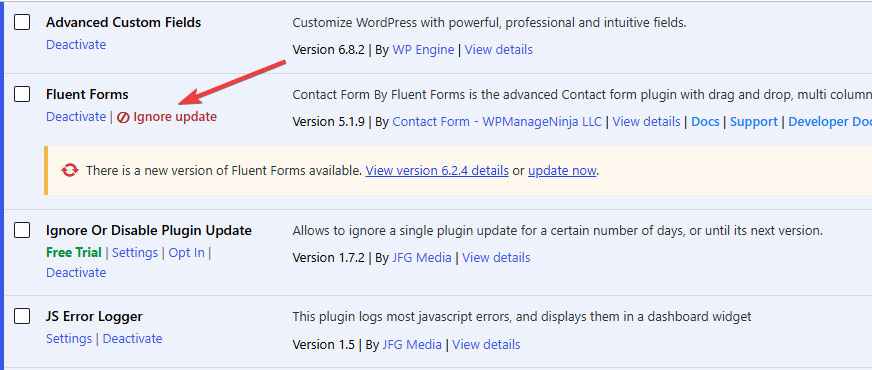


There are cases where we might not want to update a plugin right away.
- It can be a major version jump, possibly with edge-case bugs or deprecated features.
- It can be a minor version jump, which doesn’t always justify a diff to make sure custom hooks still work.
- It can just be because we want to wait a few days, to let other people confirm that everything works correctly (or to check that nobody is screaming “broken site” in the support forum).
Whatever the reason, it could be helpful to temporarily hide these updates. Unlike other update management plugins, Ignore Or Disable Plugin Update works on a version-per-version basis.
Ignore Or Disable Plugin Update adds an “Ignore update” link in the WP Plugins listing page, and on the WP Updates page.
You will be able to:
- Ignore a plugin update for a chosen amount of days
- Ignore a plugin update until the next version
- Permanently ignore all future updates for any plugin
- Completely disable all plugin updates
- Unignore plugin updates at any time by going in the “Plugins”->”Ignored Updates” WP menu
- Control admin notifications
- [Premium] Automatically delay the apparition of plugin updates
- [Premium] Integrate WordFence to get security warnings on your installed plugins (WordFence plugin and plan not required)
- [Premium] See warnings from the “Plugins” and “Updates” pages
- [Premium] Automatically unignore vulnerable versions
- [Premium] Prevent ignoring vulnerable versions
- [Premium] Get informed in real time by email
Multisite
The free version of the plugin is not compatible with multisite. For multisite compatibility, you will need the Premium Business Plan.
Plugin auto-updates
Our plugin will respect your plugin auto-update settings. You won’t be able to ignore specific plugin versions if auto-updates are activated.