
Idunara Product Search Details for WooCommerce
v1.0.0idunara · 2026年10月27日 上架
Shows price, billing period, product ID and status in the WooCommerce admin product search, so you always pick the right product.
- 正在使用
- 10 以下
- 评分
- 暂无
- 累计下载
- 186
- 最近更新
- 2026年10月27日
贡献者
 idunara
截图
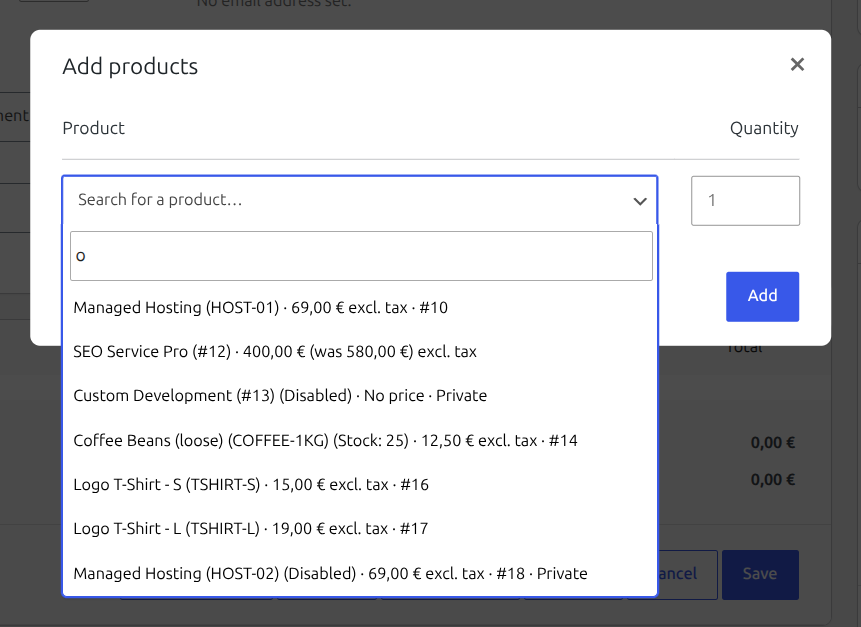
When you add products to an order in the WooCommerce admin, the product search only shows the product name and SKU. If several products have similar names, or a product was duplicated, it is hard to tell which one is the right one.
Idunara Product Search Details adds the information you need to every search result:
- Price in the store currency, including sale prices (“49,00 € (was 69,00 €)”) and price ranges of variable products (“from 15,00 €”)
- Billing period and sign-up fee for WooCommerce Subscriptions products (“69,00 € / month”)
- Tax hint (excl. tax / incl. tax), if taxes are enabled
- Product ID, so even products with identical names and prices can be told apart
- Status for products that are not public, e.g. “Private”
Example:
Managed Hosting (HOST-01) · 69,00 € / month excl. tax · #4133
The details appear wherever WooCommerce uses its admin product search: adding products to orders, coupon product restrictions, upsells and cross-sells.
There are no settings. The plugin works right after activation, stores no data and adds nothing to your shop front end.
Developer hooks
psdfw_label_parts– filter the appended details. Receives an array of plain-text parts keyed byprice,idandstatus, plus theWC_Product. Remove a key to hide that detail or add your own.psdfw_label_separator– change the separator (default:·).
Example: hide the product ID.
add_filter( 'psdfw_label_parts', function ( $parts ) { unset( $parts['id'] ); return $parts; } );
Compatibility
- WooCommerce High-Performance Order Storage (HPOS)
- WooCommerce Subscriptions (optional)
- Decimal Product Quantity for WooCommerce: that plugin ends the product search request early, which would hide the details. Idunara Product Search Details takes over its decimal stock display in the product search, so both keep working.