

ice Scanner Security
v1.26.11.1icecodero · 2026年11月2日 上架
Read-only security scanner: checks core and plugins against the official checksums and finds hidden code, risky settings and new admins.
- 正在使用
- 10 以下
- 评分
- 暂无
- 累计下载
- 388
- 最近更新
- 2026年11月2日
贡献者
 icecodero
截图
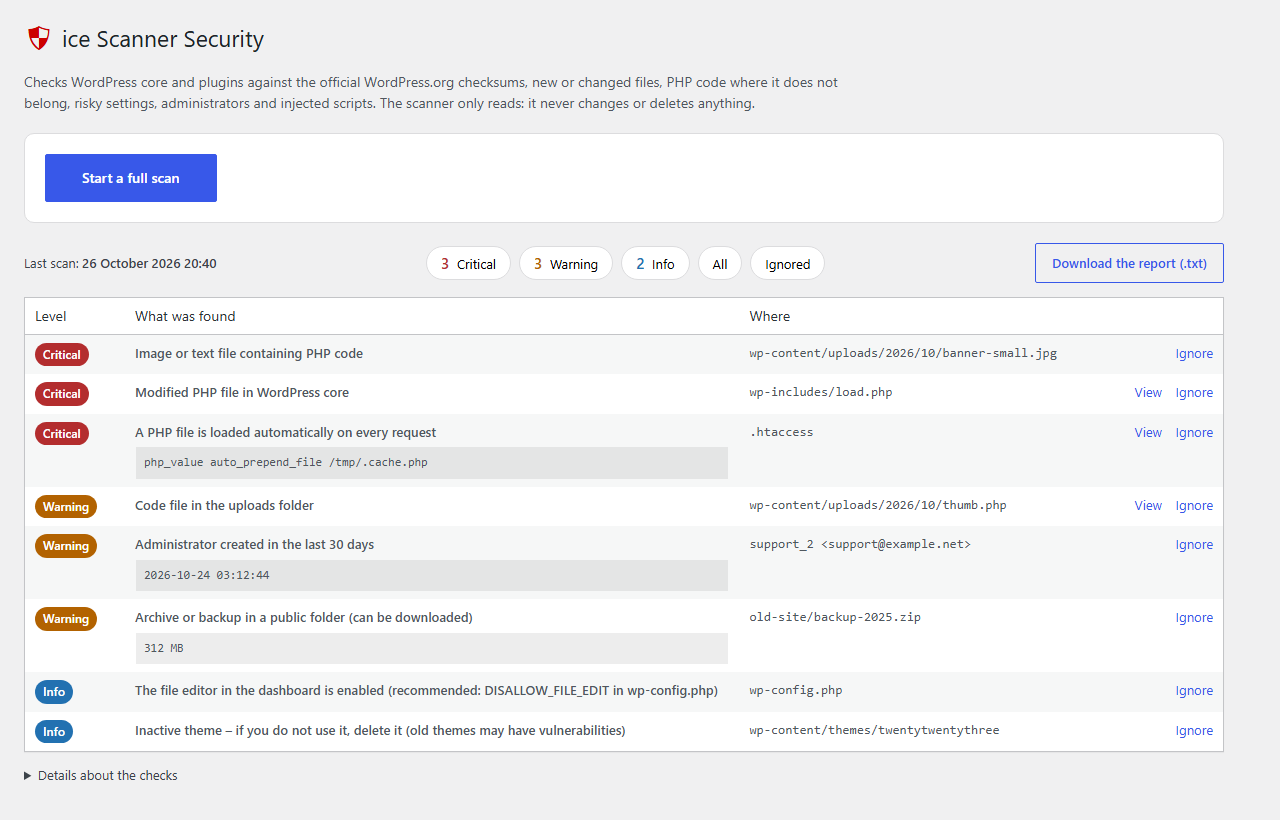


ice Scanner Security checks your whole WordPress site and shows you, in plain words, what looks wrong and where. It only reads: it never changes, moves or deletes anything, so it is safe to run on a live site.
What it checks
- WordPress core – every core file is compared with the official WordPress.org checksums for your version and language. Modified files and unknown PHP files inside wp-admin and wp-includes are reported.
- Plugins – plugins hosted on WordPress.org are compared with their official checksums. Premium or custom plugins are checked with code heuristics.
- Themes – theme files are checked with code heuristics; inactive themes are listed so you can remove them.
- Hidden code – code executed from encoded or user-supplied data, chained decoding, very long encoded strings, PHP code hidden in images or .ico files, code that creates administrators.
- Uploads folder – PHP or other executable files, images containing PHP, SVG files with scripts, and whether running PHP from uploads is blocked.
- Outside WordPress – unknown folders, public archives, database dumps and logs that anyone could download, leftover installers.
- Configuration – .htaccess, .user.ini and php.ini rules that load PHP on every request, run images as PHP or redirect search engine visitors; drop-ins, must-use plugins, the file editor and WP_DEBUG.
- Database – administrators (new ones are highlighted), open registration with a high default role, scripts or iframes saved in options and posts.
- Changes – new or changed files since the previous scan.
Built for shared hosting
Large steps run in short slices, so a scan never hits the hosting time limit, even on big sites. You can set the time per slice, the largest file read and the folders to skip.
Easy to act on
- Results are grouped as Critical, Warning and Info.
- Every finding shows the file and, for code, the line – click “View” to see the code around it.
- “Ignore” findings you have checked; they stay ignored in future scans.
- Download the report as a text file.
- Optional automatic scan (twice a day, daily or weekly) with an email only when new problems appear.
Translations
The plugin is ready for translation through translate.wordpress.org.
Developed by Poienariu Alin – iceCode.
External services
To check the integrity of your files, the plugin downloads the official checksums from WordPress.org:
api.wordpress.org/core/checksums/– checksums of the WordPress core files, for your WordPress version and language (through the WordPress function get_core_checksums()).downloads.wordpress.org/plugin-checksums/– checksums of each installed plugin, for the installed version.
Only the WordPress version, the site language and the plugin slugs and versions are sent – the same information WordPress itself sends when it checks for updates. No data about your site content, users or visitors is sent anywhere. These requests happen only when a scan runs (started by you or by the optional automatic scan).
WordPress.org Privacy Policy.