

HTML Special Characters Helper
v2.2Scott Reilly · 2009年7月15日 上架
Admin widget on the Add/Edit Post pages for inserting HTML encodings of special characters into the post.
- 正在使用
- 200+
- 评分
- 5.0 / 5
- 累计下载
- 3.9 万
- 最近更新
- 2017年2月22日
贡献者
 Scott Reilly
截图
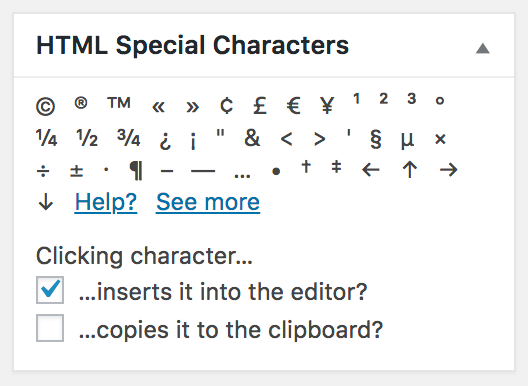


Add an admin widget labeled “HTML Special Characters” that is present in the admin Add/Edit Post and Add/Edit Page pages. Clicking on any special character in the widget causes its character encoding to be inserted into the post body text field at the current cursor location (or at the end of the post if the cursor isn’t located in the post body field). Hovering over any of the special characters in the admin widget causes hover text to appear that shows the HTML entity encoding for the character as well as the name of the character.
Note that when used in the visual editor mode the special character itself is added to the post body. Also note that the visual editor has its own special characters popup helper accessible via the advanced toolbar, which depending on your usage, may make this plugin unnecessary for you. In truth, the plugin is intended more for the non-visual (aka HTML) mode as that is the mode I (the plugin author) use.
Links: Plugin Homepage | Plugin Directory Page | Author Homepage
Filters
The plugin exposes two filters for hooking. Typically, code making use of filters should ideally be put into a mu-plugin or site-specific plugin (which is beyond the scope of this readme to explain).
c2c_html_special_characters (filter)
The ‘c2c_html_special_characters’ hook allows you to remove existing characters or entire groups of characters, and/or add new characters or groups of characters.
Arguments:
- $codes (array) : An association array in which the keys are a grouping name and the values are associative arrays themselves with the code as the key and the human-friendly descriptions as the values.
Example:
/**
 * Add a new grouping of characters (accented 'A's).
 *
 * @param array $characters Default HTML special characters.
 * @return array
 */
function more_html_special_characters( $characters ) {
    $characters['accented_a'] = array(
        'name'     => 'Accented A',
        'À' => 'A grave accent',
        'Á' => 'A accute accent',
        'Â'  => 'A circumflex',
        'Ã' => 'A tilde',
        'Ä'   => 'A umlaut',
        'Å'  => 'A ring',
        'Æ'  => 'AE ligature',
    );
    return $characters; // Important!
}
add_filter( 'c2c_html_special_characters', 'more_html_special_characters' );
c2c_html_special_characters_post_type (filter)
The ‘c2c_html_special_characters_post_type’ hook allows you to specify which post_types for which the HTML Special Characters metabox should be shown.
Arguments:
- $post_types (array) : An array of post types. By default, this value is
array( 'page', 'post' )
Example:
/**
 * Show HTML Special Characters Helper for additional post_types.
 *
 * @param array $post_types Arry of post types.
 * @return array
 */
function more_html_special_characters_post_types( $post_types ) {
    $post_types[] = 'products'; // Show for products
    unset( $post_types['page'] ); // Don't show for pages
    return $post_types;
}
add_filter( 'c2c_html_special_characters_post_types', 'more_html_special_characters_post_types' );