

HDWebmobile Order Export
v1.0.1HDWebMobile · 2026年10月28日 上架
Export WooCommerce orders to CSV, filtered by date range and status -- built entirely on WooCommerce's own query and export classes.
- 正在使用
- 10 以下
- 评分
- 暂无
- 累计下载
- 240
- 最近更新
- 2026年11月15日
贡献者
 HDWebMobile
截图


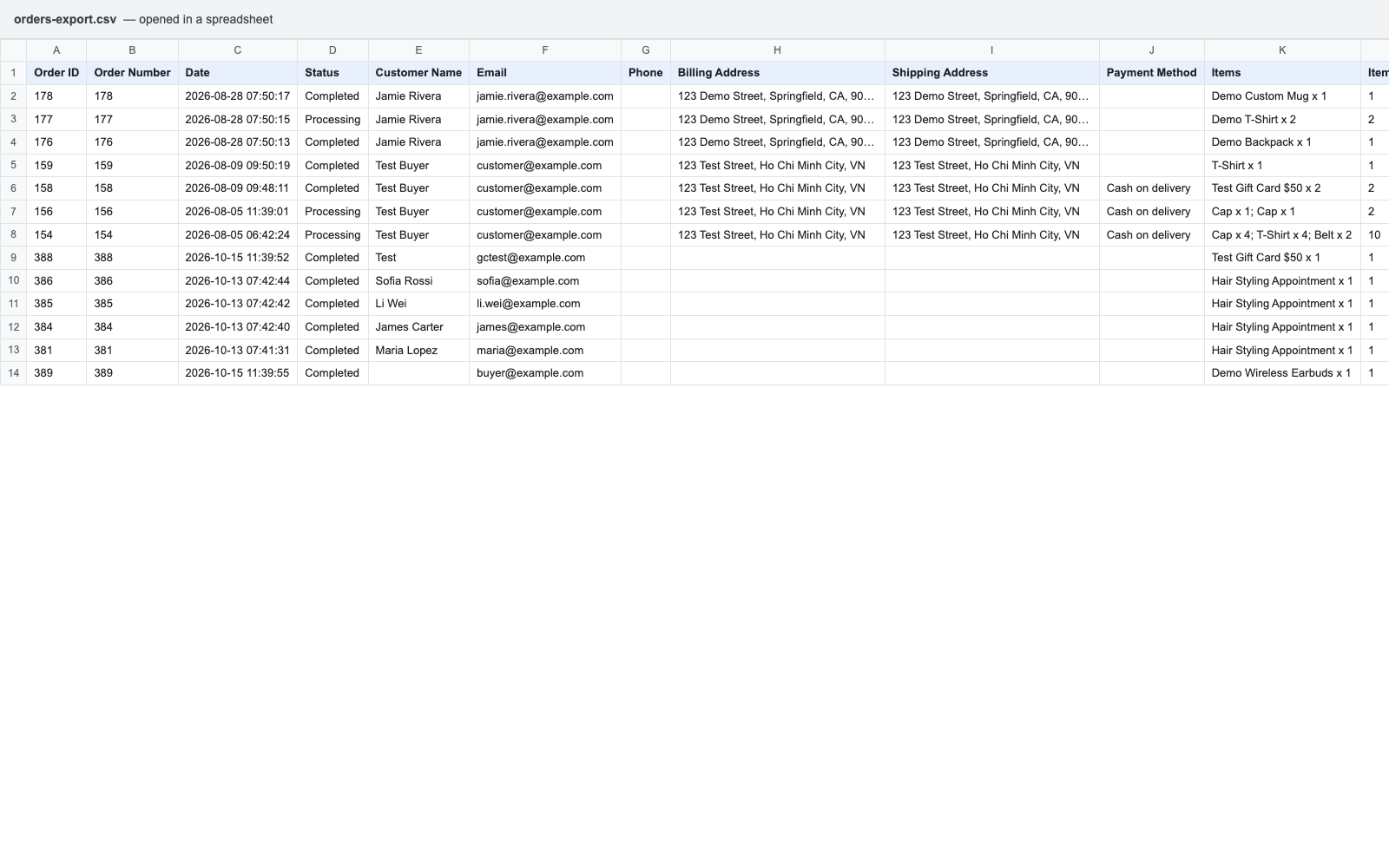
HDWebmobile Order Export adds a simple “Order Export” screen where you pick a date range and one or more order statuses, then download a CSV with order ID, customer details, addresses, items, totals, and coupon codes — ready for accounting, shipping, or any spreadsheet workflow.
Two vulnerability classes are common in order-export tools: SQL injection, caused by a request parameter (such as a sort direction) concatenated straight into a raw query, and CSV/formula injection, where an exported cell value starting with =, +, -, or @ executes as a formula when the file is opened in Excel or Sheets. This plugin closes both by construction rather than by bolted-on sanitization: every order is fetched through WooCommerce’s own wc_get_orders() (never a raw SQL string), and every CSV cell is written through WooCommerce core’s own WC_CSV_Exporter base class, which already implements the OWASP-recommended formula-injection escaping — this plugin reuses WooCommerce’s own trusted, already-audited code instead of writing a new CSV writer from scratch.
Key Features
- Filter by date range and/or one or more order statuses before exporting
- One-click CSV download — no file is ever written to the server, the export streams directly to your browser
- Every order fetched through WooCommerce’s own order-query API — no raw SQL anywhere in this plugin
- Every exported cell escaped through WooCommerce core’s own CSV exporter class — closes the formula-injection class by construction
- Order status filter is validated against WooCommerce’s own registered statuses — no request parameter ever reaches a query unvalidated
- Zero configuration — no settings to save, nothing persisted in the database
Columns included
Order ID, Order Number, Date, Status, Customer Name, Email, Phone, Billing Address, Shipping Address, Payment Method, Items, Item Count, Subtotal, Shipping, Tax, Discount, Order Total, Coupon(s).
Limitations (please read before installing)
- Fixed column set in this version — no column picker
- Single-request export, not a background/batch job — suited to date-range-scoped exports rather than exporting an entire multi-year order history in one click
- CSV format only, no XLSX
Enjoying this plugin?
If it helps your site, please consider leaving an honest review on WordPress.org — it helps other WordPress users find it. Found a problem or have an idea? Please open a support topic first so it can be fixed.
How to Use
1. Open the Order Export tab
WooCommerce > HDWebmobile > Order Export (Screenshot 1).
2. Choose your filters
Pick a from/to date (leave either blank for an open-ended range) and check any order statuses you want included (Screenshot 2). Leave every status unchecked to export all of them.
3. Download
Click “Download CSV” — the file downloads immediately, nothing is saved on the server (Screenshot 3).