

GS Variation Swatches for WooCommerce
v3.0.6GS Plugins · 2018年2月10日 上架
Replace WooCommerce variation dropdowns with color, image, button and radio swatches, on product pages and shop cards.
- 正在使用
- 10+
- 评分
- 3.7 / 5
- 累计下载
- 1.9 万
- 最近更新
- 2026年11月24日
 GS Plugins
 Md. Sarwar Zaman
 GS Plugins
截图


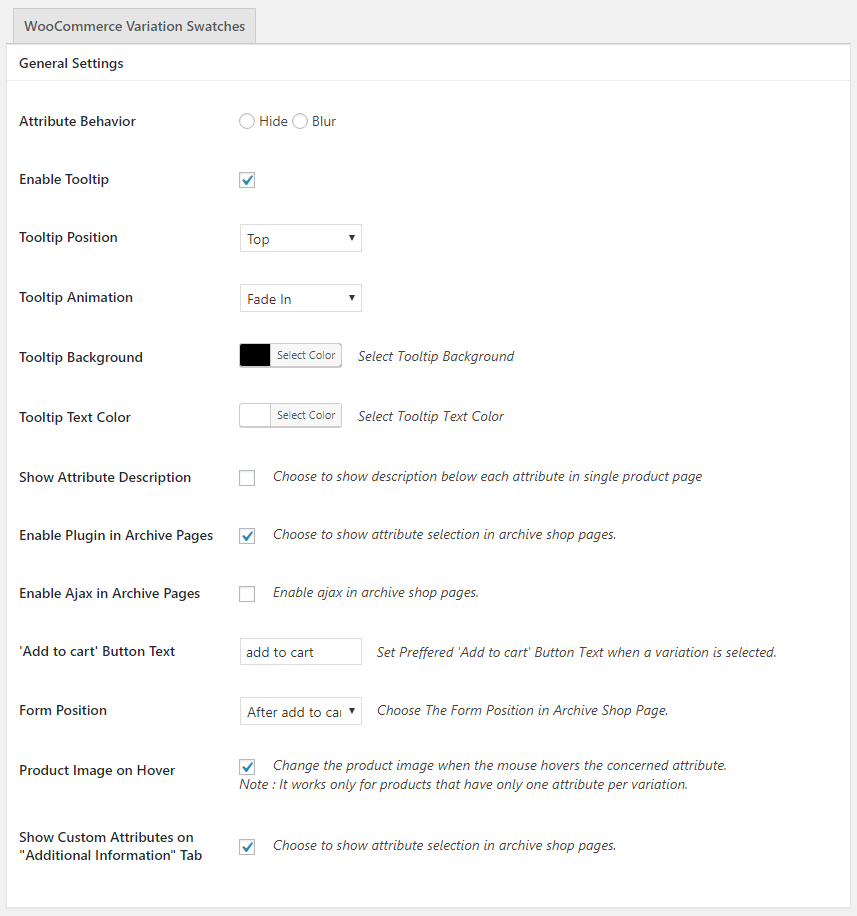
GS Variation Swatches for WooCommerce turns the dropdowns on your variable products into swatches shoppers can see and tap: color chips for Color, photos for patterns and materials, buttons for sizes, and radio lists for plans or bundles. Set a color or image once for each attribute option, and every product that uses it shows swatches.
A setup wizard gets your first swatches working in a few minutes, and the Look & feel screen shows every change in a live preview before you save.
👉 Live demo · Documentation · Pro features
Who it’s for
- Clothing and shoe stores: colors and sizes shoppers can see at a glance.
- Furniture, fabric and home stores: photo swatches for materials, finishes and patterns.
- Stores with many variations: buttons and radio lists that are faster than long dropdowns.
- Anyone tired of “Choose an option”: shoppers see every option before they pick.
Why store owners choose GS Variation Swatches
- Quick to set up: a setup wizard fills in colors from your option names and can create a sample product.
- See it before you save: pick a style preset, then adjust colors and sizes with a live preview.
- Works with your store: WooCommerce order storage (HPOS), the Cart and Checkout blocks, and theme quick views.
- Accessible: screen readers hear which swatch is selected.
Free features
Swatch types
- Color swatches in 4 styles, round or square.
- Image swatches in 3 styles, round or square.
- Button / label swatches in 3 styles, round or square.
- Radio swatches: classic list, stacked buttons or inline buttons, one per line or side by side.
- A color or image for each option under Products > Attributes.
- Turn plain dropdown attributes into buttons.
Look & feel
- One-click style presets with a live preview.
- Colors for the check mark, cross, background, border, text and the picked and disabled states.
- Swatch width, height and font size.
- Tooltips on hover, with their own colors.
Product page
- Attribute name below, above or to the left of the swatches.
- Show the picked value next to the name (“Color: Green”) with your own separator.
- Clear a swatch by clicking it again.
- Image size for image swatches.
- Works in product quick views (Flatsome and similar themes).
Shop and catalog
- A swatch preview of one attribute on product cards; picking a swatch swaps the card image.
- Plugin product cards and catalog page styling (title, sorting, pagination).
Setup and tools
- Setup wizard and a setup checklist.
- Optional deletion of all plugin data on uninstall.
- Translation ready.
Pro features
GS Variation Swatches Pro adds:
- Full swatches on shop cards: every attribute, with add to cart without opening the product.
- One-click card looks and more card options: layout, frame, corners, image area, title, button and price color.
- Long option lists: a maximum per attribute, with a “+N more” link or a ‹ › slider.
- Out-of-stock handling: disable sold-out options and show them crossed out, faded or hidden.
- Categories that skip swatches and keep their dropdowns.
- Choose which attributes and terms show, and in which order.
- Extra swatch styles: photo + name pill, searchable dropdown and two-color swatches.
- A larger image preview on hover and shareable links for the picked variation.
- Per-product swatch settings.
- Shortcode builder with a live preview, a Gutenberg block and an Elementor widget.
- Priority email support.
Plans start at $49 per year, with a 7-day money-back guarantee. Compare Pro plans.
How it works
- Go to Products > Attributes, then create or edit an attribute such as Color or Size and set its Type to Color, Image, Button or Radio.
- Click Configure terms and pick a color or upload an image for each option.
- Add the attribute to a variable product, create the variations and save. The product page now shows swatches.
- Go to Woo Swatches > Settings to pick a look, and turn on shop swatches under Shop & Catalog if you want them on product cards.
Or open Woo Swatches > Setup Wizard, which does most of this for you.
Support
Free users get help in the WordPress.org support forum. Pro users get priority email support through our help desk. We reply as soon as we can, excluding holidays.
More plugins from GS Plugins
- GS Logo Slider: client, partner and sponsor logos in sliders, carousels, tickers and grids.
- Solid Testimonials: customer reviews and quotes in sliders, grids and masonry layouts.
- GS Team Members: team pages and staff directories with profiles and social links.
- GS Portfolio: show your work in grid, slider, list and filterable layouts.
- GS Projects Showcase: case studies with client, dates, value and project links.
- GS Books Showcase: books with covers, ISBN and publication details in a grid or slider.
- GS Coaches: coach and trainer profiles with skills and certifications.
- GS Posts Grid: blog posts in 50+ grid, list and slider styles.
- GS Product Slider for WooCommerce: product sliders and carousels for your shop.
- GS Brands for WooCommerce: brand logos on product and shop pages, plus brand sliders.
- GS Pinterest Portfolio: embed Pinterest pins and boards.
- GS YouTube Gallery: YouTube videos, playlists and channels in galleries.
- PowerUp: redirects, restrictions and admin tools for WordPress.
External services
GS Variation Swatches connects to these outside services. Nothing is sent until the step described happens.
Appsero (api.appsero.com)
Used for optional usage statistics and the deactivation survey. Nothing is sent unless an administrator clicks Allow on the “help make Variation Swatches even more awesome” notice; after that the site URL, site name, administrator name and email, WordPress, PHP and server versions, number of users, active and inactive plugins, the plugin version and the server IP address are sent, and again about once a week. Without Allow, only the answers to the optional deactivation survey are sent (with the site URL and technical details, not your email, name or IP address). Appsero privacy policy
Google Fonts (fonts.googleapis.com, fonts.gstatic.com)
The plugin’s Help, GS Plugins Pro and GS Plugins Lite admin pages load the DM Sans font from Google Fonts. Only an administrator viewing those pages makes the request, which sends their IP address and browser details to Google, as any web font request does. Google Fonts privacy FAQ · Google privacy policy
CDN Fonts (fonts.cdnfonts.com)
The same three admin pages load the Gotham font from CDN Fonts. Only an administrator viewing those pages makes the request, which sends their IP address and browser details. CDN Fonts (terms and privacy policy linked from their site)
GS Plugins (gsplugins.com)
The GS Plugins Pro admin page downloads the list of GS Plugins products from gsplugins.com to show them, and keeps it for a few days. The request carries the site’s address and WordPress version, which WordPress adds to every outgoing request, and the server’s IP address. GS Plugins privacy policy
The storefront makes no outside requests: swatches, fonts and scripts load from your own site.
Development source
Every minified file in this plugin is built from the readable source included in the download:
dev/holds the source of the admin dashboard (Vue), the Welcome page, and the front-end scripts and styles.includes/gs-common-pages/assets/holds the source of the Help, GS Plugins Pro and GS Plugins Lite page styles next to their.min.cssfile.webpack.mix.jsandpackage.jsonhold the build setup.
To rebuild: run npm install, then npm run production. Third-party libraries in assets/libs/ (Tippy.js, Font Awesome and a prefixed Bootstrap grid) are the releases from their projects.