

Real Time Validation For Gravity Forms
v1.0.7PluginsCafe · 2023年11月4日 上架
Instant, inline validation for Gravity Forms. Users see errors while filling the form, including Repeater fields and custom regular expressions.
- 正在使用
- 500+
- 评分
- 5.0 / 5
- 累计下载
- 7,328
- 最近更新
- 2026年11月24日
 PluginsCafe
 Kaisar Ahmmed
截图

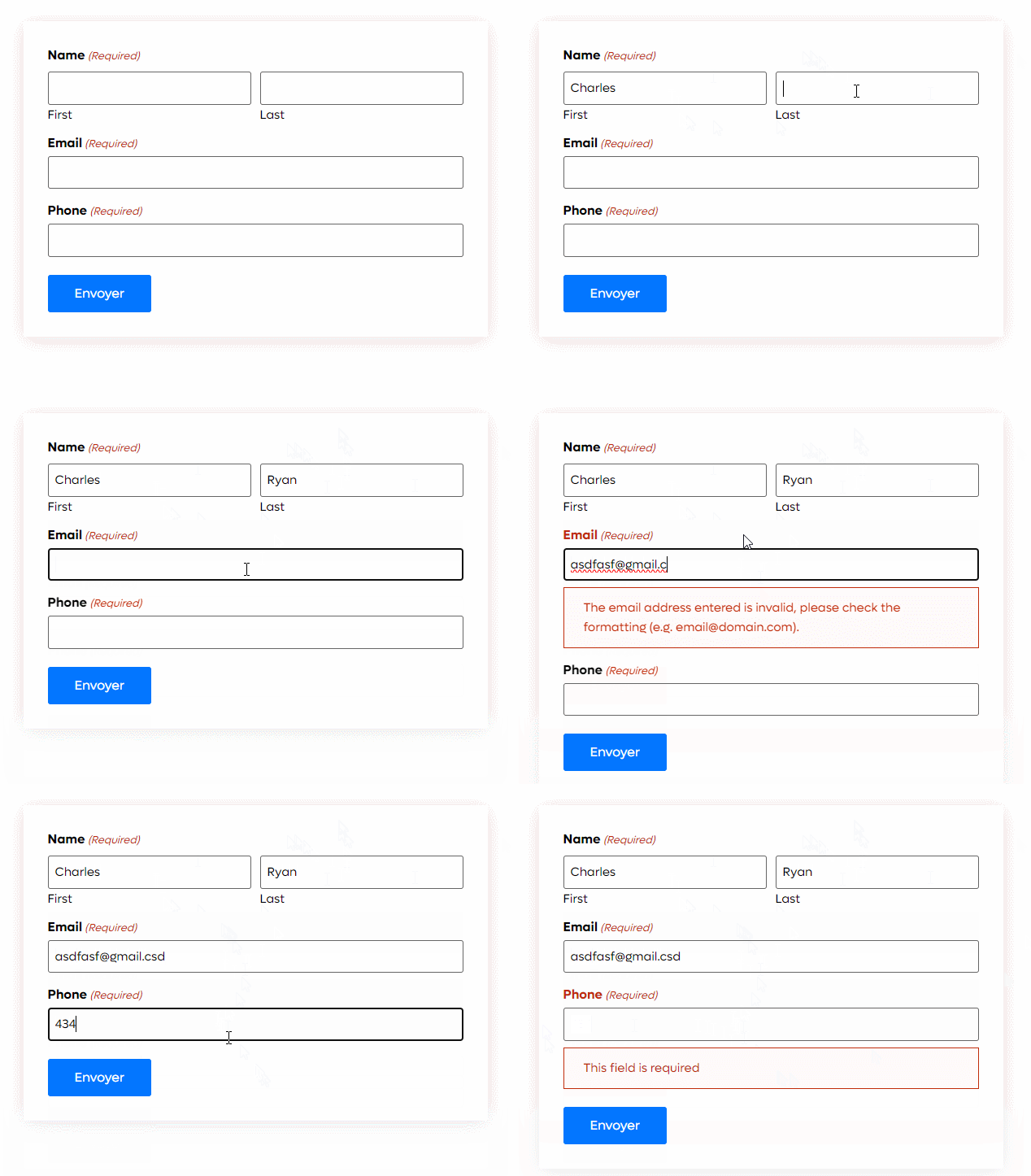


Real Time Validation For Gravity Forms checks every field the moment a user leaves it, instead of waiting for the form to be submitted. Mistakes are shown right below the field, so users fix them on the spot.
The result: fewer failed submissions, faster form completion and cleaner, more accurate data.
Watch the Pro version in action:
Try the Pro live demo | Contact support
✨ Features
- Instant feedback – errors appear as soon as a field loses focus.
- Regular expression validation – add your own pattern and error message to Text and Number fields.
- Repeater field support – works on every row, including rows added with “Add Row”. (New in 1.0.5)
- Per form switch – turn real time validation on or off for each form.
- Custom messages – uses each field’s custom validation message when set.
- Multi-step forms – works on every page of a multi-page form.
- AJAX and non-AJAX – works in both modes.
- Conditional logic – plays nicely with fields shown or hidden by conditional logic.
- Multiple forms – supports several forms on the same page.
🧩 Supported fields
Standard: Single Line Text, Paragraph Text, Drop Down, Number, Checkboxes, Radio Buttons, Image Choice, Multiple Choice
Advanced: Name, Date, Time, Phone, Address, Website, Email, Consent, Repeater
Pricing: Product, Quantity, Option, Shipping
More fields are coming soon.
🔍 Regular expression validation
Regular expressions are available for Single Line Text and Number fields. The same pattern is checked in the browser while typing and again on the server when the form is submitted.
How to set it up
- Open the form editor and select a Single Line Text or Number field.
- Go to the Advanced tab and check Enable Real Time Validation.
- Enter your pattern in Enter RegEx pattern.
- Enter the message to show when the value does not match in Validation failed message. If left empty, “Validation Failed.” is shown.
Pattern format
- Write the pattern on its own, for example
^[A-Z]{3}$. - Optionally wrap it in slashes to add flags, for example
/^[a-z]{3}$/ifor a case-insensitive match. Supported flags:i,m,s,u. - A
/inside the pattern is fine, for example^\d{2}/\d{2}$. - Use
^and$to match the whole value. Without them the pattern only has to match part of it. - If the field is not required, an empty value is accepted. The pattern is only checked once something is entered.
Examples
Copy only the pattern itself, without the surrounding backticks.
- Phone number:
^(\+?\d{1,4}[\s-]?)?(\(?\d{3,4}\)?[\s-]?)?\d{3}[\s-]?\d{3,4}$ - Only letters and spaces:
^[A-Za-z ]+$ - Exactly 5 digits (ZIP code):
^\d{5}$ - Date as DD/MM/YYYY:
^\d{2}/\d{2}/\d{4}$ - Starts with “INV-” (any case):
/^inv-\d+$/i
⭐ Pro features
Need more than required fields and regular expressions? Real Time Validation For Gravity Forms Pro includes the free features and adds a rule builder with 18 rule types, with no code required.
- Rule builder – add as many rules as a form needs in Form Settings Real Time Validation.
- Checked twice – rules run instantly in the browser and again on the server when the form is submitted.
- Blocks Next / Submit – visitors can’t continue while a real time rule fails.
- Conditional logic – apply any rule only when other fields have certain values.
- Custom error messages – with placeholders such as
{label},{value},{min},{max},{count}and{fields}. - Dynamic required marker – fields made required by a rule show the form’s required marker only while they are required.
Logic rules
- Conditional Required – required only when conditions are met, e.g. “Company” when “Type” is “Business”.
- Required Based on Other Fields – required when other fields are filled or empty, e.g. “Extension” once “Phone” is filled.
- Field Group: Either / Or – at least or at most N fields of a group, e.g. Mobile OR Home phone.
- Compare Fields – =, ≠, >, ≥, <, ≤ against another field or a fixed value. Works with numbers, dates, times and text.
Date & number rules
- Age – minimum and/or maximum age from a date of birth.
- Date Range – earliest / latest date, fixed or relative (today, +3 days, -18 years).
- Number Range – minimum, maximum, whole numbers only and maximum decimal places.
- Sum of Fields – compare the total of several fields with a value, e.g. percentages must total 100.
Text rules
- Character Length – minimum and/or maximum number of characters.
- Word Count – minimum and/or maximum number of words.
- Format – ready-made formats such as letters, username, URL, IP address, UUID, hex color, US ZIP, UK postcode, IBAN and card number.
- Contains / Starts With / Ends With – require or forbid a text, or an exact value.
- Blocked Words – reject spam keywords, profanity or competitor names.
- Regular Expression – use a pattern on any field type that holds text.
- Email Domain – allow or block domains, free providers (business email only) and disposable email services.
- Password Strength – minimum length, uppercase, lowercase, number and symbol.
Choice & uniqueness rules
- Number of Selected Choices – minimum / maximum for Checkboxes, Multi Select, Multiple Choice and Image Choice.
- Unique Value – reject a value that already exists in a previous entry, checked live.
Pro rules do not apply to fields inside a Repeater. Repeater fields still get the free required and regular expression validation.
See all rules in the live demo
📋 Requirements
- PHP 7.4 or higher
- Gravity Forms 3.0.0 or higher
🚀 Our other plugins
- Alpha Addons for Gravity Forms
- Smart Phone Field for Gravity Forms
- Smart Phone Field for Fluent Forms
- Smart Phone Field for Contact Form 7
- Smart Phone Field for Elementor Form
- Image Picker for Gravity Forms
- Range Slider for Gravity Forms
- Address AutoComplete for Gravity Forms
- Restrict Dates for Gravity Forms