

Genesis Columns Advanced
v2.0.5Nick Diego · 2015年2月1日 上架
Adds shortcodes to easily create up to 42 different columned layouts.
- 正在使用
- 9,000+
- 评分
- 4.8 / 5
- 累计下载
- 14 万
- 最近更新
- 2024年6月23日
贡献者
 Nick Diego
 Outermost
截图
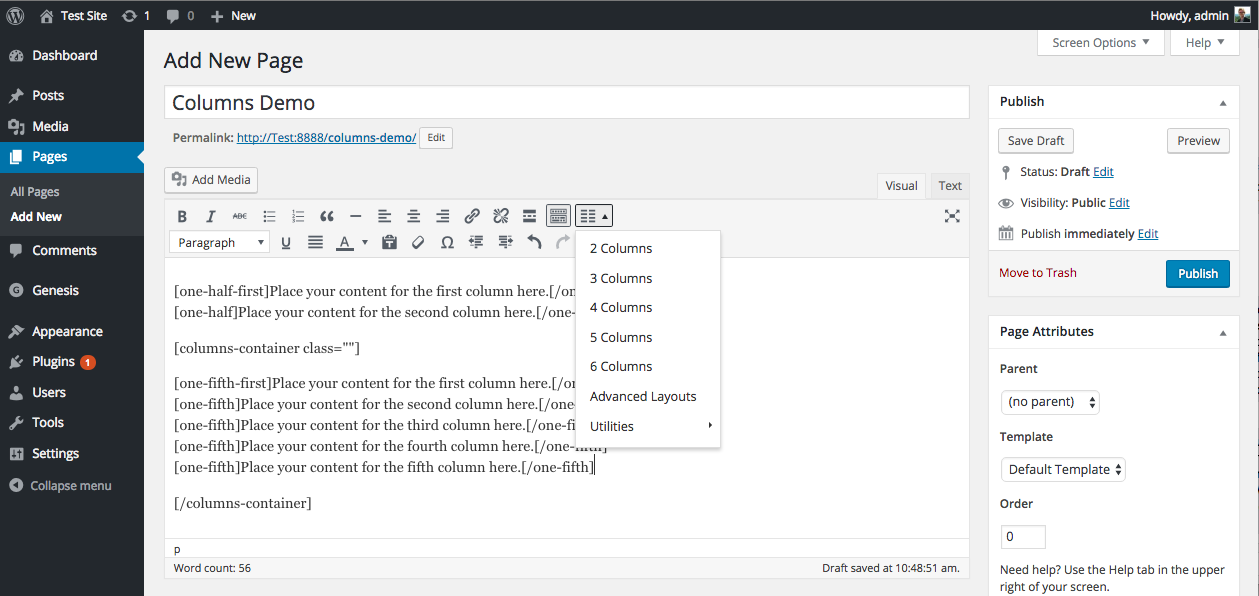


Genesis Columns Advanced is nearing the end of its life. The plugin was built for the Classic Editor and is not needed in the block Editor (Gutenberg). Critical support will still be provided in the support forum, but the plugin is no longer being actively developed. Consider transitioning to the native WordPress Columns block.
This plugin was originally designed to generate shortcodes for every column configuration available with the column classes provided by the Genesis Framework, hence the name. We are pleased to announce that as of version 2.0, the plugin is completely standalone and does not require Genesis. The plugin now loads its own CSS styles, which can be disabled if you desire. See the FAQ for more details. By moving away from Genesis, we have been able to add new features, such as the inclusion of fifths, and it opens the door to more enhancements in the future!
Shortcodes are easily added using a custom button in your WordPress editor. They can also be added manually if you so choose. See the FAQ for more details. Check out the video below for a short demo on the plugin.
Plugin highlights
- Plugin is fully translatable, .pot file included
- Plugin loads its own CSS column classes and does not require Genesis
- Plugin includes fifths so you can finally add 5 even columns!
- 42 different responsive column configurations available
- Add custom CSS classes to any column
- Includes three utility shortcodes to assist with layout, see the FAQ for more info
- Only adds one button to your WordPress editor
- No plugin settings to configure
- Custom button and TinyMCE popup design integrates seamlessly with the core WordPress aesthetic
If you have questions or would like to request additional features, such as additional utility shortcodes, please let me know in the plugin support forum.