

f(x) Editor
v1.4.0David Chandra Purnama · 2016年2月3日 上架
Power-up Your WordPress Visual Editor with Boxes, Buttons, Columns, and more...
- 正在使用
- 1,000+
- 评分
- 5.0 / 5
- 累计下载
- 1.7 万
- 最近更新
- 2016年12月9日
 David Chandra Purnama
截图


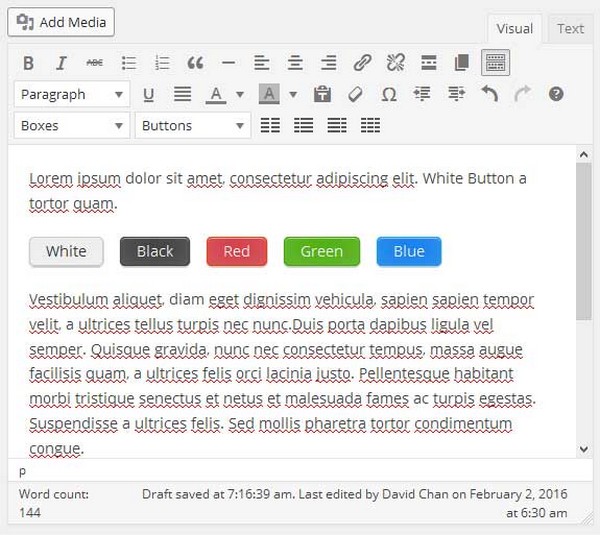

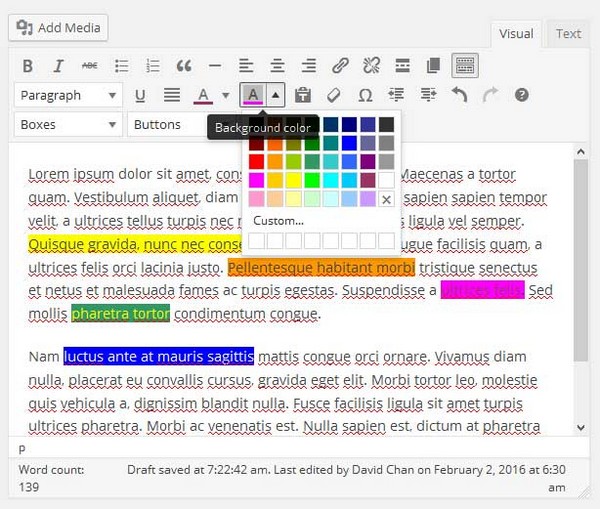


f(x) Editor is a plugin to enhance your content editing experience by enabling WordPress features such as Page Break and Text Background Color/Highlight.
You can also easily create information boxes, colorful buttons, and columns to make your content richer and engage to your audience more.
After installation of this plugin, you can enable each features by navigating to “Settings > Visual Editor” menu in your administration panel.
Features:
- Easy settings to disable/enable features.
- Create boxes (Note, Alert, Error, Downloads) via visual editor.
- Create buttons (White, Black, Red, Green, Blue) via visual editor.
- Create columns ( up to 3 columns: “1/2 – 1/2” ; “1/3 – 2/3” ; “2/3 – 1/3” ; “1/3 – 1/3 – 1/3” ) via visual editor.
- Add page break button.
- Add line break <br/> button.
- Enable text background color option (not only text color).
- Switch paragraph to BR(line break).
- Easy to use. No shortcode to remember.
- The GPL v2.0 or later license. 🙂 Use it to make something cool.
- Support available at Genbu Media.
Notes for developer:
Github
Development of this plugin is hosted at GitHub. Pull request and bug reports are welcome.
Options
This plugin save the options in single option name: fx-editor.
Scripts
This plugin load one CSS in site front-end and one css in editor. If you are a theme author and want to override the styling it is recommended to remove the CSS and add the CSS in your theme stylesheet and editor style CSS.
To disable the front end CSS, add this code in your theme functions.php:
add_filter( 'fx_editor_load_front_css', '__return_false' );
and then you can copy the CSS “css/front.css” to your theme style.css and make adjustment as needed.
To disable the back-end/editor CSS, add this code in your theme functions.php:
add_filter( 'fx_editor_load_editor_css', '__return_false' );
And then you can copy the CSS “css/editor.css” to your theme editor styles and make adjustment as needed. Note: You need to make sure all the needed elements such as “remove icon” and “columns info” are styled properly to make sure user can properly edit the content.
For coder module, there are separate filters to disable it:
add_filter( 'fx_editor_load_coder_editor_css', '__return_false' );
add_filter( 'fx_editor_load_coder_front_css', '__return_false' );
add_filter( 'fx_editor_load_coder_front_js', '__return_false' );