Float menu – awesome floating side menu
v7.2.5Wow-Company · 2017年4月7日 上架
Easily create floating menus of varying complexity. Use its capabilities to place unique navigation on the site.
- 正在使用
- 3 万+
- 评分
- 4.4 / 5
- 累计下载
- 85 万
- 最近更新
- 2026年8月25日
贡献者
 Wow-Company
 DmtLo
截图
Try Free Demo | 🚀 Try Pro Demo | Documentation
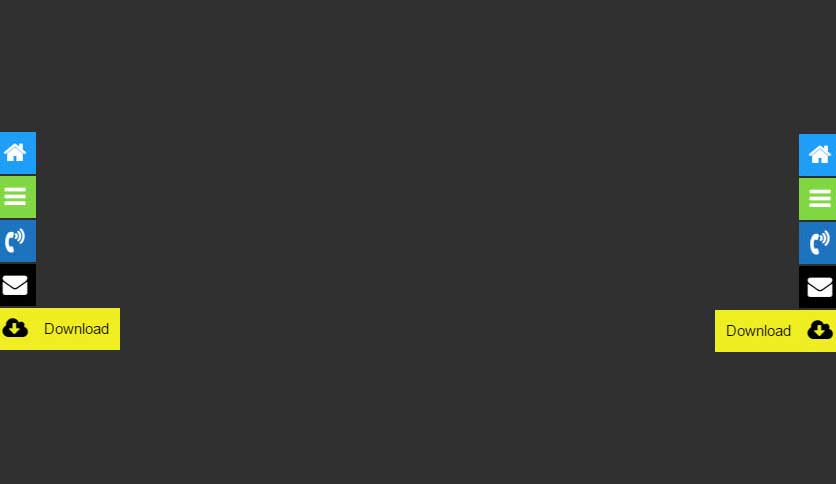
Float Menu is a free WordPress plugin to create and place a unique floating menu on your website. The extension allows users to get access to the functions of the panel regardless of its position on the resource. The menu moves along with the scrolling of the page and always remains in visibility.
🌟 Features:
- Floating menu that stays on the screen.
- Lightweight & fast – does not slow down your site.
- Easy customization – change colors, icons, and position.
- Works with any WordPress theme.
✅ Enhance usability and user experience with Float Menu!
—
Main features
The Float Menu makes user interaction with the site more comfortable. It can increase the conversion by improving the functionality of the web resource. Among the capabilities of the tool:
🎨 Customization & Design
- Create unlimited menus.
- Horizontal or vertical menu layout.
- Position menu left or right.
- Choose from 4 button shapes: Square, Round, Rounded, Rounded-out.
- Adjust spacing between menu items.
- Set custom colors for buttons and icons.
- Use 2000+ Font Awesome 7 icons.
- Load demo configuration – get started quickly with pre-made examples.
- Test Mode – show the menu only to administrators while configuring settings.
🔗 Link & Accessibility Options
- Open links in a new window.
- Set custom attributes:
ID,Class,rel,aria-label. - Hide the menu on small or large devices.
⚡ Performance & SEO
- Lightweight and fast – does not slow down your site.
- SEO-friendly structure for better indexing.
—
🚀 Ideal Uses
Float Menu is highly versatile and can be used for various scenarios:
– Instant Messaging: Add quick-access buttons for WhatsApp, Telegram, Skype, or Messenger.
– Floating CTA: Keep “Book Now” or “Get a Quote” buttons always visible to boost sales.
– Mobile App Experience: Create a professional bottom or side navigation bar for mobile users.
– Quick Support: Provide easy access to your Help Center, FAQs, or Support tickets.
– Anchor Navigation: Build a floating table of contents to navigate between long page sections.
– Social Presence: Link to your Instagram, Facebook, LinkedIn, or TikTok profiles.
– Membership Access: Quick links for Login, Register, and User Account pages.
– Special Offers: Highlight time-limited promotions or discount codes.
—
Pro Version
Unlock advanced features and take your floating menus to the next level with Float Menu Pro!
🎨 More Customization
- Create submenus – supports a single submenu level.
- Hold label open – keep menu labels visible.
- Vertical alignment – align menus precisely.
- Extra text & label fonts – display detailed descriptions with custom fonts.
- Custom icons – upload your own icons.
- Icon settings – rotate, flip, and customize icons.
🔗 More Functional Links
- Translate page – one-click website translation.
- Social sharing – share content via Facebook, Twitter, etc.
- Next/Previous Post – quick navigation between posts.
- Forced download – enable direct file downloads.
- Smooth scrolling – scroll to sections effortlessly.
- Scroll to top/bottom – quick page navigation.
- Print page – allow users to print the current page.
- Search integration – add search functionality to the menu.
🎯 More Display Rules
- Show/hide based on scroll – smart visibility control.
- User role permissions – restrict menu by user role.
- Multilingual support – adjust menus per language.
- Schedule menu display – control when menus appear.
- Activate by URL – display menus only on specific pages based on URL parameters.
- Activate by referrer URL – show menus based on where users came from.
📊 Analytics & Performance
- Google Analytics tracking – track menu interactions and clicks.
- Browser compatibility control – hide menus for outdated browsers.
🔥 Bonus Feature: Built-in Popup System
- Create popups – trigger popups when clicking menu items.
👉 Upgrade to Pro and unlock all premium features!
—
🚀 Maximize Results with Complementary Plugins
Enhance your website’s functionality and user engagement by combining Float Menu with these powerful tools from Wow-Company:
- Popup Box (Modal Windows) – Create stunning popups and triggers for your menu items to boost conversions.
- Counter Box – Easily add counters, timers, and countdowns to highlight urgency and events.
- Calculator Builder – Build custom interactive calculators for lead generation or user utility.
- WP Coder – Add custom HTML, CSS, PHP, and JS code snippets to your site and menus easily.
- Herd Effects – Use social proof notifications to increase user trust and performance.
👉 Explore all plugins by Wow-Company
Support
Search for answers and ask your questions at support center