
Filter Page by Template
v3.1Md Jahidul Islam · 2016年3月8日 上架
Filter the list of pages, posts and custom post-type based on the used page template. A dropdown and a column to show page template names.
- 正在使用
- 2,000+
- 评分
- 5.0 / 5
- 累计下载
- 6.5 万
- 最近更新
- 2024年5月24日
贡献者
 Md Jahidul Islam
截图


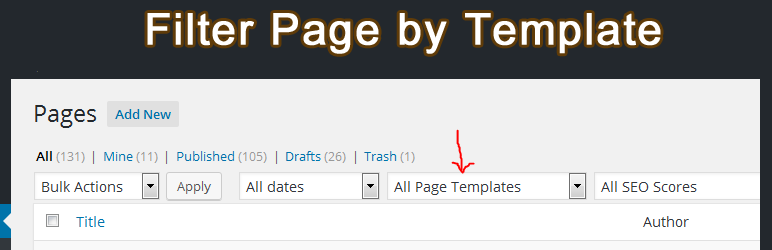
If your WordPress website has hundreds of pages and your theme has many page templates then sometimes you want to see the pages that are using a specific template. But by default, there is no way in WordPress admin to search posts or pages associated with a template. “Filter Page by Template” plugin helps you to do this. It adds a dropdown list of page templates above the post/page list. You can filter posts/pages by selecting a template from the dropdown. Also, you can filter and see pages that are using missing templates. There is a new column Template in the page list table. This Template column shows the name of the page template that is being used for a particular page. If a template file is not exist then that will be shown in red color. On the Template column you will see the template’s display name. To see the php file name mouse over on the template name.
Using this plugin you can do:
- Filter page list according to page template.
- See which page is using which template.
- See which page template is being used by which pages.
- See which pages are using missing templates.
- Know the PHP file name of templates.
- You can do the same things above for posts and any custom post-type posts.