
File Upload For WPForms – Filenzo
v1.1.1wpdebuglog · 2025年2月2日 上架
Enhance WPForms with a secure file upload field, allowing users to upload files directly through forms.
- 正在使用
- 1,000+
- 评分
- 5.0 / 5
- 累计下载
- 1.3 万
- 最近更新
- 2026年8月25日
25 条评价需要 WordPress 6.6+已测试到 7.1.5PHP 7.0+
贡献者
 wpdebuglog
截图


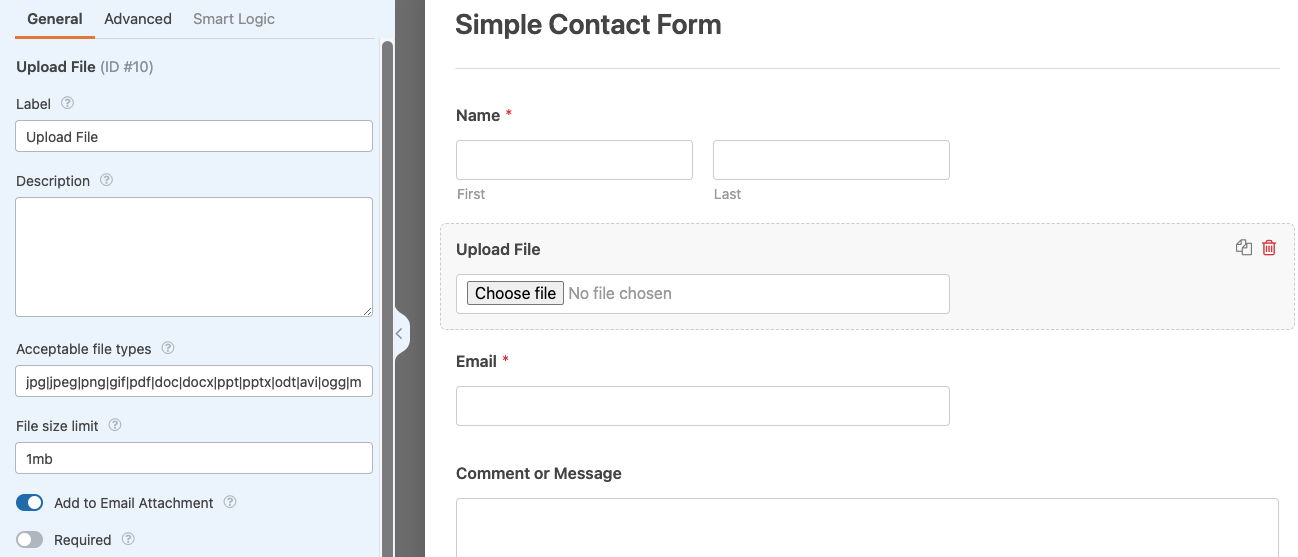
This plugin adds a custom File Upload Field to WPForms, enabling users to:
– Upload files (e.g., PDF, images, documents) via frontend forms.
– Restrict file types and sizes.
– Securely store uploaded files in the WordPress uploads directory.
– Attach files to email notifications (optional).
Usage
-
Add the File Upload Field to a Form:
- Edit or create a WPForm.
- Drag and drop the “File Upload” field into your form.
-
Configure Field Settings:
- Allowed File Types: Specify extensions (e.g.,
pdf, jpg, png). - Max File Size: Set a limit (e.g., 10MB).
- Storage Location: Files are saved to
/wp-content/uploads/wpxform-uploads/.
- Allowed File Types: Specify extensions (e.g.,
-
Attach Files to Email Notifications (Optional):
- Enable the “Attach Files to Email” option in the form’s Notifications settings.
🤝 Real Human Support
Need help? Contact us anytime.
- 📧 Email: support@wpdebuglog.com
- 💬 Live Chat: wpdebuglog.com
I can help with customizations, plugin and theme compatibility, WooCommerce, bug fixes, and any WordPress development or support.
🎥 Demo
Features
- Drag-and-drop file upload support.
- Server-side validation for file types and sizes.
- Unique filenames to prevent conflicts.
- Compatible with WPForms Lite/Pro.
Pro Addons
- Advanced Filedrop For WPForms
Add Drag and Drop File Uploads to WPForms