

Executive VIP Transfer Service
v1.3.9Gksoft Dev Team · 2025年8月26日 上架
Professional VIP transfer and chauffeur booking system with Google Maps routing, vehicle selection, distance-based pricing, and WooCommerce payments.
- 正在使用
- 10+
- 评分
- 暂无
- 累计下载
- 2,136
- 最近更新
- 2026年10月2日
贡献者
 Gksoft Dev Team
截图


Executive VIP Transfer Service is a complete booking solution for chauffeur companies, airport transfer businesses, limousine services, private drivers, and executive transportation providers.
It provides a modern three-step booking experience where customers can:
- Select pickup and drop-off locations
- Review available vehicles and route-based prices
- Enter passenger details and complete payment
The plugin integrates with Google Maps services for address autocomplete, distance calculation, route information, and travel duration. Bookings are processed through WooCommerce, giving site owners access to established payment gateways, order management, and customer notifications.
WooCommerce is required.
View the live booking experience
Key Features
- Modern three-step transfer booking form
- Google Places address autocomplete
- Pickup and drop-off route calculation
- Distance and estimated travel duration
- Distance-based pricing
- Minimum service price and maximum distance controls
- Passenger and luggage capacity validation
- One-way and return journey support
- Pickup date and time scheduling
- Minimum advance booking time rules
- Responsive vehicle selection cards
- Live booking summary and price updates
- Card and manual/cash payment options
- WooCommerce order and payment integration
- Booking confirmation and tracking workflow
- Responsive layout for desktop, tablet, and mobile
- Theme-independent front-end styling
- Modern plugin settings, reservations, and vehicle management screens
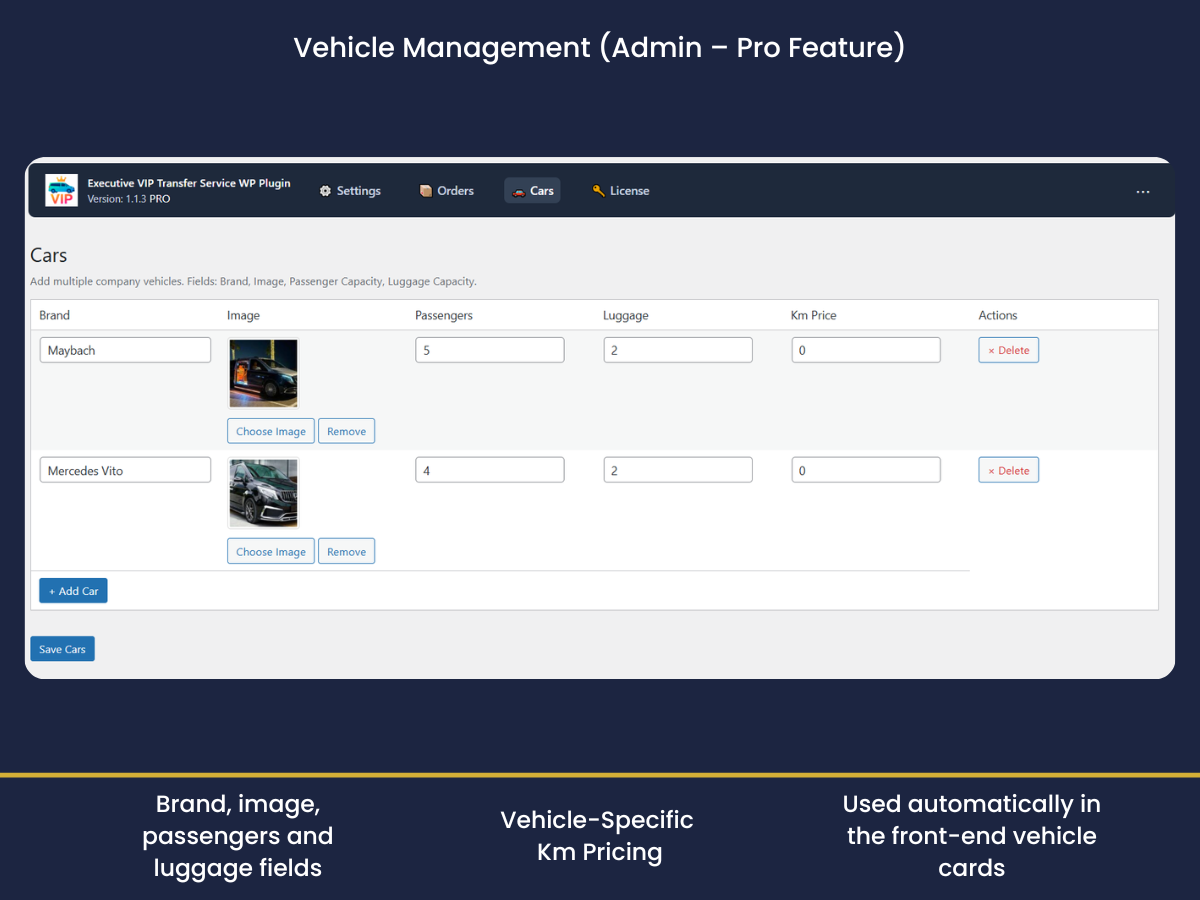
Vehicle Management
Create and manage a professional fleet directly from WordPress:
- Vehicle name, image, and description
- Passenger and luggage capacity
- Distance-based vehicle pricing
- Vehicle features and service badges
- Active and inactive vehicle status
- Automatic availability filtering by passenger and luggage requirements
- Route-based price preview before vehicle selection
Booking Experience
The booking form is designed to keep the reservation process clear and focused:
- Step 1 — Route: Pickup, drop-off, date, time, passengers, luggage, return journey, map, distance, and duration
- Step 2 — Vehicle: Vehicle images, capacity, features, route-based pricing, and selection
- Step 3 — Details & Payment: Passenger contact details, flight information, special requests, payment method, and final booking summary
The optional booking header can be enabled globally from the plugin settings or for an individual shortcode.
Admin Dashboard
The plugin includes dedicated admin screens for:
- General booking configuration
- Google Maps API settings
- Currency and pricing rules
- Booking form options
- Payment methods
- Email notifications
- Vehicle management
- Reservation management
- Reservation status and payment review
Free and Pro
The free version provides the core transfer booking workflow, Google-powered address selection, global distance-based pricing, WooCommerce integration, and booking management.
The Pro version adds advanced business features such as:
- Vehicle management
- Vehicle-specific route pricing
- Live route map and directions
- Advanced pickup scheduling
- Capacity-based vehicle filtering
- Enhanced booking summaries
- Priority support
Compare features and view the Pro version
Live Demo
See the complete booking flow in action:
Requirements
- WordPress 5.6 or later
- PHP 7.2 or later
- WooCommerce installed and active
- A valid Google Maps Browser API key with billing enabled
- The following Google Cloud APIs enabled for current installations:
- Maps JavaScript API
- Places API (New)
- Routes API
- Strongly recommended for production: a separate Server API key for server-side route verification
For better security, restrict the Browser key by website HTTP referrers. For production sites—especially sites taking online payments—configure a separate Server API key and restrict it by server IP. This lets the plugin verify route distance and pricing on the server instead of relying only on browser-submitted values. Legacy Places, Distance Matrix and Directions services are used only as compatibility fallbacks on older installations when available.
Shortcodes
Display the booking form:
[execvitr_form]
Display the booking form with the optional booking header:
[execvitr_form show_hero="yes"]
Force the booking header to remain hidden:
[execvitr_form show_hero="no"]
The plugin automatically creates the required booking and tracking pages during activation. Customers are redirected to a secure booking or payment flow after submitting the reservation form.
How It Works
For Customers
- Select pickup and drop-off addresses from Google suggestions.
- Choose the pickup date, time, passenger count, and luggage count.
- Review the calculated distance, duration, and starting price.
- Select an available vehicle.
- Enter passenger and optional flight information.
- Select a payment method and confirm the booking.
- Complete payment through WooCommerce when online payment is selected.
For Administrators
- Configure the Google API key, country restriction, currency, and pricing rules.
- Add vehicles with images, capacities, features, and distance rates.
- Configure available payment methods and notification settings.
- Review, edit, filter, and manage reservations from the plugin dashboard.
- Track payments and booking status through WooCommerce.
Privacy
The plugin sends location-related requests to Google Maps services to provide address suggestions, route distance, and estimated travel duration.
Reservation and customer information is stored and processed through WordPress and WooCommerce according to the configuration and privacy policy of the website owner.
The plugin does not include its own advertising analytics or independent visitor-tracking system.
External services: