

EP Admin Messages
v0.1.6Pär Thernström · 2013年8月21日 上架
Show messages in WP Admin. Different messages can be shown at different places, for different people.
- 正在使用
- 10+
- 评分
- 3.3 / 5
- 累计下载
- 3,673
- 最近更新
- 2013年11月5日
 Earth People
 Pär Thernström
截图
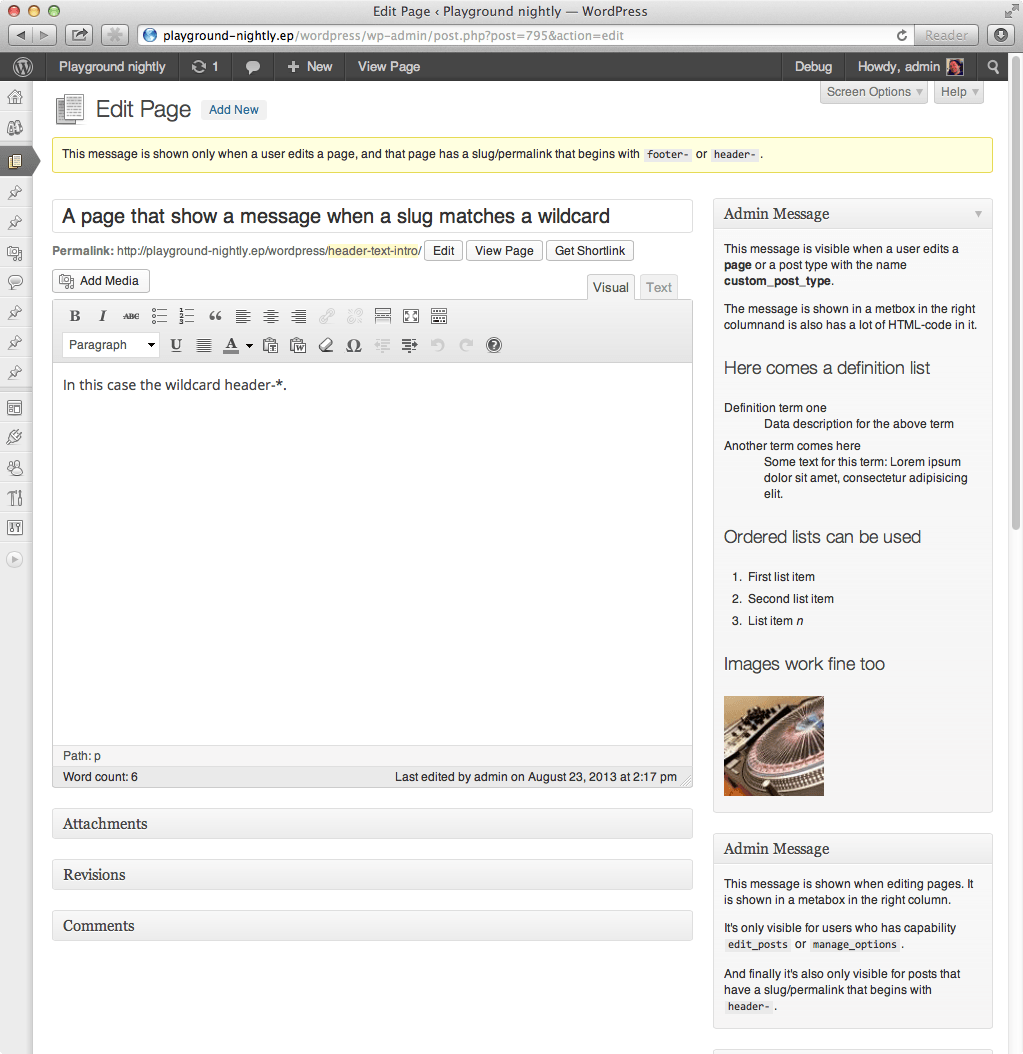

With EP Admin Messages you can show messages in the admin area of WordPress. Each message can be shown at multiple places and can be limited to only be shown to specific user groups using capabilities.
This plugin requires that you add a config file to your themes folder. It’s mostly useful for theme developers that want tho show messages in the admin to the users of their site.
Plugin features
- Show messages in WordPress Admin
- Show messages in different places
- Show different messages for different users
- Format messages using HTML
- Stores settings in a JSON-file. No config screen!
- Suitable for website and theme developers that want to push message changes automatically.
Messages are shown where you want them to be shown
You have full control over where your messages will be shown.
Each message can be placed in one or several of the following places:
- dashboard
- overview screen for posts, pages, and custom post types
- edit screen for posts, pages and custom post types
- posts with a specific slug or a slug based on a wildcard
- user overview screen and on user profiles
- plugin install/update page
Messages are only shown to the users that you choose
Each message can be limited to be shown only to users with a specific capability or role.
You can for example show one message to your editors, i.e. users with the capability “edit_posts”, and another message to your admins, i.e. users with the capability “manage_options”.
Messages can be selectd to be shown only on the posts you choose
Messages can be limited to only be shown on posts that match a specific slug, or a slug that matches a wildcard.
This way it’s easy to for example show page specific information, letting a user know what a page is for, what they should put in in, and so on.
JSON-based config file
All settings are configured with a config file (view example config) that uses JSON and that you put in the themes directory.
This means that there are no settings for the user to change. This also means that you can add messages using your regular deploy method. Just upload an updated config file and you’re done. No database syncing needed; hooray!
Usage scenarios
To give you an idea what this plugin may be used for, I’ll give you a list of what I do with it.
EP Simple Messages can be used to…
- … write documentation for users and developers.
- … show users what Mustache tags are available for a specific post. You know, things like
{{user.firstname}}or{{campaign.name}}. - … show a message on the dashboard with support info, like who made the site and who they should contact for support questions.
- … let the user know what shortcodes that are available for all posts.
Open source
The source code for EP Admin Messages is available at GitHub.