

EC Intelligent Log Auditor
v1.0.1Entangle Commerce · 2026年11月6日 上架
Activity logging, daily email reports, retention, CSV export, and optional GeoIP lookup for WordPress administrators.
- 正在使用
- 10 以下
- 评分
- 暂无
- 累计下载
- 458
- 最近更新
- 2026年11月23日
 Entangle Commerce
截图
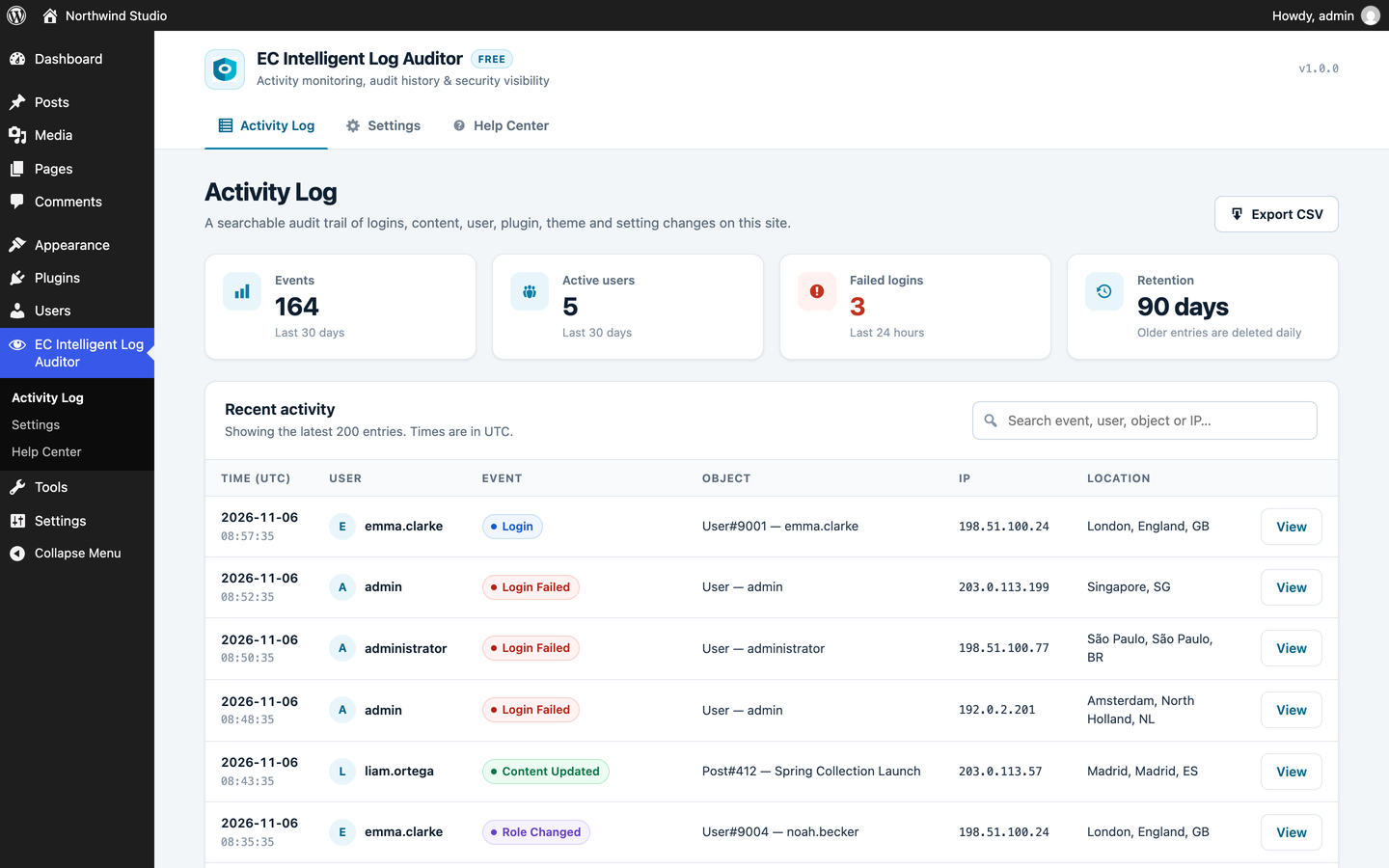
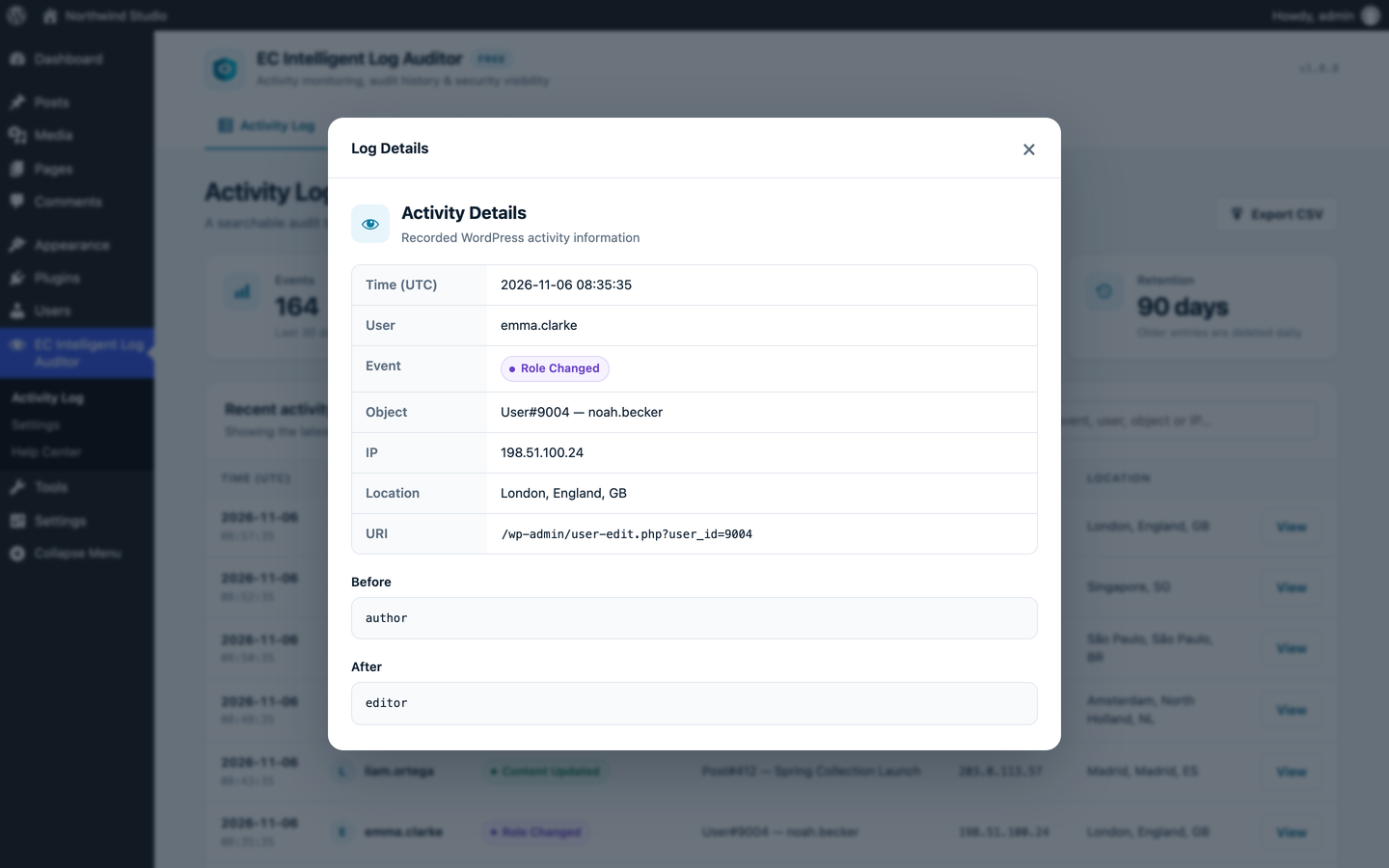


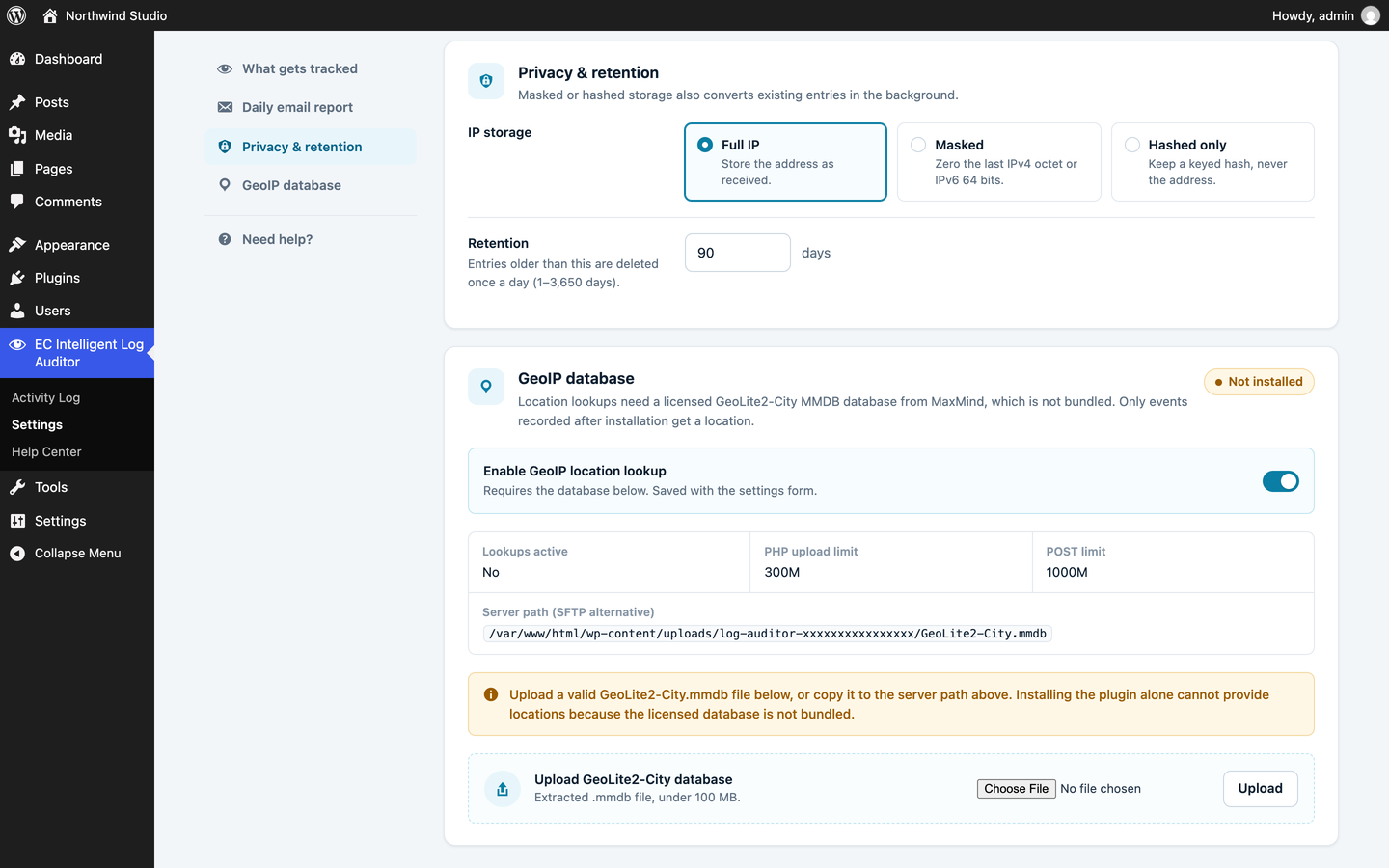


EC Intelligent Log Auditor records administrative activity on your site and gives administrators a searchable audit trail.
What gets logged
- Logins, logouts and failed login attempts
- Content created, updated and status changes (any post type; revisions and autosaves are skipped, the static homepage is flagged)
- Users created, deleted, profile updates, password and email changes, role changes (including added and removed roles and capabilities written directly to user meta), and application passwords created or revoked
- Plugin activation, deactivation and deletion; theme switches and deletion; saves from the built-in plugin and theme file editor
- Core, plugin, theme and translation updates and installs
- Changes to selected WordPress settings with before/after values (off by default; secret-looking options are never logged)
- Changes to EC Intelligent Log Auditor’s own settings and its deactivation (always logged, so the audit trail cannot be switched off unnoticed)
- Report delivery results
Each entry stores the time (UTC), user and role, event, object, IP address, location (with GeoIP), user agent and request URI. Secrets in the URL query string (nonces, tokens, passwords, keys) are redacted.
Activity Log screen
- Summary cards: events and active users in the last 30 days, failed logins in the last 24 hours, and the retention period
- Paginated activity table (50 per page), searchable by event, username, object or IP
- A details dialog for each entry
- CSV export by range (today, yesterday, last month, last year, or custom dates), capped at 5,000 entries
Help Center
A built-in Help Center (EC Intelligent Log Auditor > Help Center) answers common questions about logging, reports, privacy, proxies and GeoIP, with search.
Daily email report
An HTML summary of the last 24 hours, sent at a time you choose (site timezone) to one or more recipients: event counts, most active users and recent high-value events (failed logins, user and role changes, plugin/theme activity, setting changes). A test report can be sent at any time.
Privacy and retention
- IP storage: full, masked (last IPv4 octet / last 64 IPv6 bits zeroed) or a keyed HMAC-SHA256 hash only. Switching to masked or hashed also converts entries already stored, in the background.
- Automatic deletion after a configurable number of days (default 90)
- Failed logins are rate limited (10 per IP and 60 site-wide per minute by default), with a single summary entry when a limit is reached
- Integrates with Tools > Export / Erase Personal Data, and adds suggested text to the privacy policy guide
Sites behind a proxy or CDN
By default the IP address is taken from the connection (REMOTE_ADDR), because forwarding headers can be forged by any visitor. If your site sits behind a load balancer, reverse proxy or CDN, list the proxy addresses in wp-config.php:
define( 'LOG_AUDITOR_TRUSTED_PROXIES', '10.0.0.0/8, 2001:db8::/32' );
The client IP is then read from X-Forwarded-For, skipping trusted hops from the right. For Cloudflare, list Cloudflare’s IP ranges and also add:
define( 'LOG_AUDITOR_CLIENT_IP_HEADER', 'HTTP_CF_CONNECTING_IP' );
Both values can also be set with the log_auditor_trusted_proxies and log_auditor_client_ip_header filters.
GeoIP
Location lookups need a GeoLite2-City or GeoIP2-City MMDB database from MaxMind, which is not included. Upload it from Settings, or copy it over SFTP to the path shown there. Previously recorded entries are not backfilled.
Languages
The plugin follows the site language. The plugin name, admin screens, Help Center, report emails and log labels are translated. Bundled translations: Dutch, English (UK), French (France), German, Italian, Japanese, Polish, Portuguese (Brazil) and Spanish (Spain). WordPress language packs, when installed, take precedence.