
EngageBay for Gravity Forms
v3.1.8engagebay · 2019年4月22日 上架
This plugin integrates Gravity Forms with EngageBay allowing form submissions to be automatically sent to user’s EngageBay account.
- 正在使用
- 40+
- 评分
- 暂无
- 累计下载
- 8,179
- 最近更新
- 2026年5月22日
贡献者
 engagebay
截图
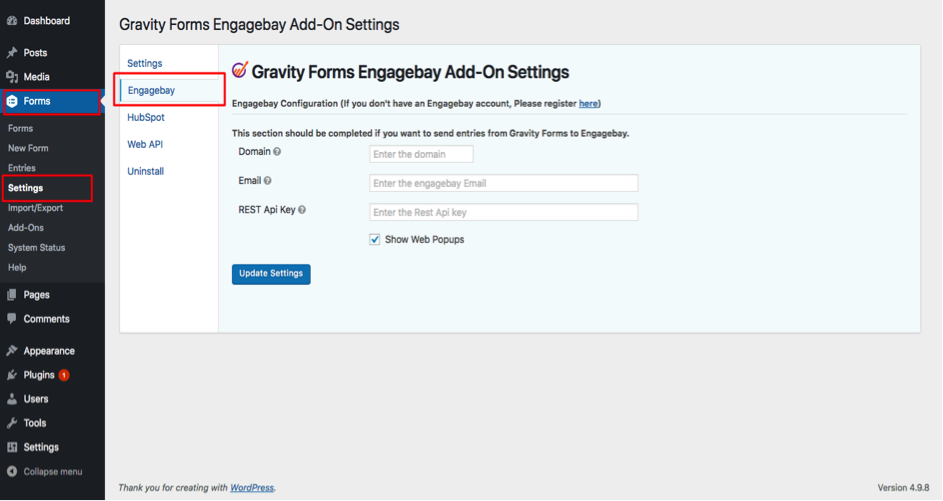

Connecting EngageBay account
Enter the Engagebay Domain, Email and REST API Key (Admin Settings->API and then copy REST API Key). If you want to enable Web Popups for your site, Check/Uncheck Show Web Popups.
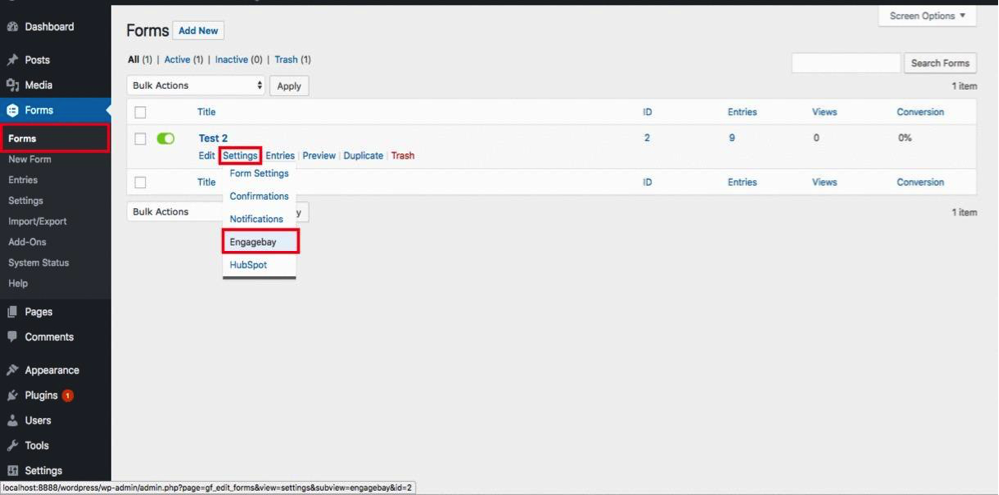
Map EngageBay fields with Gravity Form fields
In the Form Settings tab, choose the Gravity Form that you’d like to integrate with EngageBay. Map the Gravity Form fields to the EngageBay fields (email, contacts, company etc). After mapping all the fields, save the details.
EngageBay system is simple and refreshing.
Melinda – WordPress Consultant
Here’s why smart business owners, designers, and developers love EngageBay, and you will too!
How EngageBay Can Help Your Business Grow
- All-in-one CRM, Marketing, Sales and Support software
- Increase web visitor engagement
- Capture more leads
- Grow email lists
- Convert more subscribers and sales
- Increase trust and brand value of your business
Support
Check out our support page for help documentation and access other support channels or simply send us an email to support@engagebay.com.