
Editor Block Outline
v1.4.3Kalimah Apps · 2020年12月23日 上架
Add outline around Gutenberg blocks while editing
- 正在使用
- 1,000+
- 评分
- 4.9 / 5
- 累计下载
- 3.8 万
- 最近更新
- 2026年2月2日
23 条评价需要 WordPress 5.0+已测试到 6.9.12PHP 7.0+
 Kalimah Apps
 Thorsten Frommen
 Joe Bailey-Roberts
截图

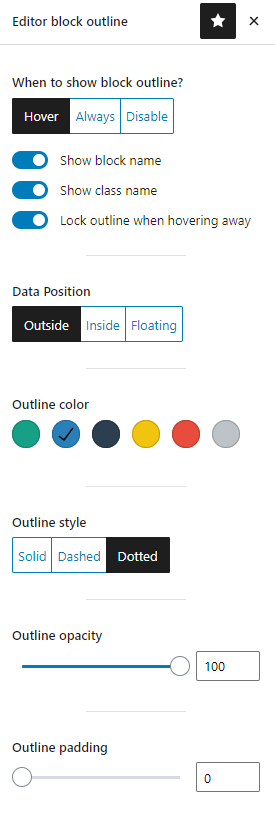
This a Gutenberg plugin that adds an outline around each block. Outline settings are based on user meta. Each user can
change the settings according to their needs and it will applied only to their account.
Users can change:
- When to show outline. On hover or always displayed.
- Lock outline for a single block.
- Disable outline completely.
- Show data (name and class) outside block, inside or floating when hovering over block
- Change outline color.
- Change outline style to solid, dashed or dotted line
- Change padding size
- Show/hide block name
Filters
- editor_outline_default_user_meta
You can override the default user meta by using this filter. The filter will receive the default user meta as an array and
you can return a modified array.
Check github repo for more information. https://github.com/kalimahapps/Editor-Block-Outline#filters