
Easy Symbols & Icons
v1.2.5FARN Labs · 2026年3月12日 上架
Upload, manage, and use custom icon fonts in WordPress in a centralized and performance-oriented way. Add icons via Gutenberg block or shortcode, with …
- 正在使用
- 20+
- 评分
- 暂无
- 累计下载
- 1,229
- 最近更新
- 2026年7月23日
贡献者
 FARN Labs
截图


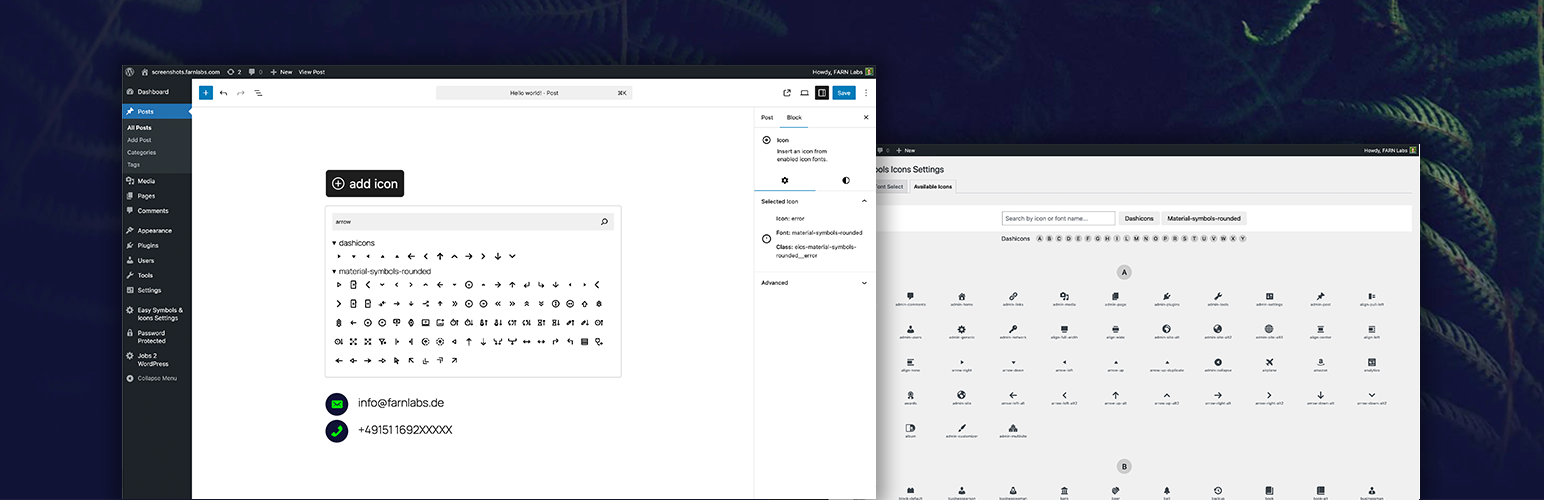
“Easy Symbols & Icons” is a plugin for managing and using icon fonts in a centralized and performance-oriented manner. This is achieved through a centralized design to handle fonts instead of leaving each to their own usage format, thereby introducing chaos. Fonts are parsed, icon names are extracted, and fonts are subsetted to include only used icons.
Perfect for developers, designers, and agencies who want a scalable and efficient icon system in WordPress.
Key Advantages
Dynamic font subsetting – only loads the icons used on the page
Centralized icon font management – control all fonts from one place
Single icon block workflow – simple and consistent usage
Native React-based Gutenberg block
Legacy shortcode support
Built-in icon picker with search
Reduces chaos from each icon font using its own usage format – replaced by centralized handling for all
Features
Upload custom icon fonts (.ttf, .otf)
Centralized management of all icon fonts
Enable or disable fonts globally
Gutenberg icon block with picker UI
Shortcode for selecting hardcoded icons
Search icons by name inside the editor
Dynamic subsetting for minimal file size on the frontend
Instant availability after upload
Usage
- Navigate to “Easy Symbols & Icons Settings” -> “Font Select”
- Upload .ttf or .otf icon font files
- Enable the fonts you want to use
- Save your changes
To add icons:
- Open the WordPress block editor
- Add the “Icon” block or use the
[eics-icon]shortcode - Click the block to open the icon picker
- Search or browse icons
- Select an icon and customize styling