
DynaMaker CAD Configurator Integration
v2.5.0Kristofer Skyttner · 2020年3月13日 上架
With the DynaMaker Plugin for Wordpress you can easily display your Online CAD onfigurators in a Wordpress page or post, with very few clicks and shor …
- 正在使用
- 20+
- 评分
- 暂无
- 累计下载
- 4,024
- 最近更新
- 2026年9月16日
 Kristofer Skyttner
截图


With the DynaMaker Plugin for WordPress you can easily display your Online CAD onfigurators in a WordPress page or post, with very few clicks and short setup time.
DynaMaker CAD Configurator features
– Embed your DynaMaker CAD Configurator on your WordPress
– Open your DynaMaker CAD Configurator with a button
– Include page specific meta and preselected choices in url
– Use wordpress login and registration to limit access and enable save / load of configurations in DynaMaker (optional)
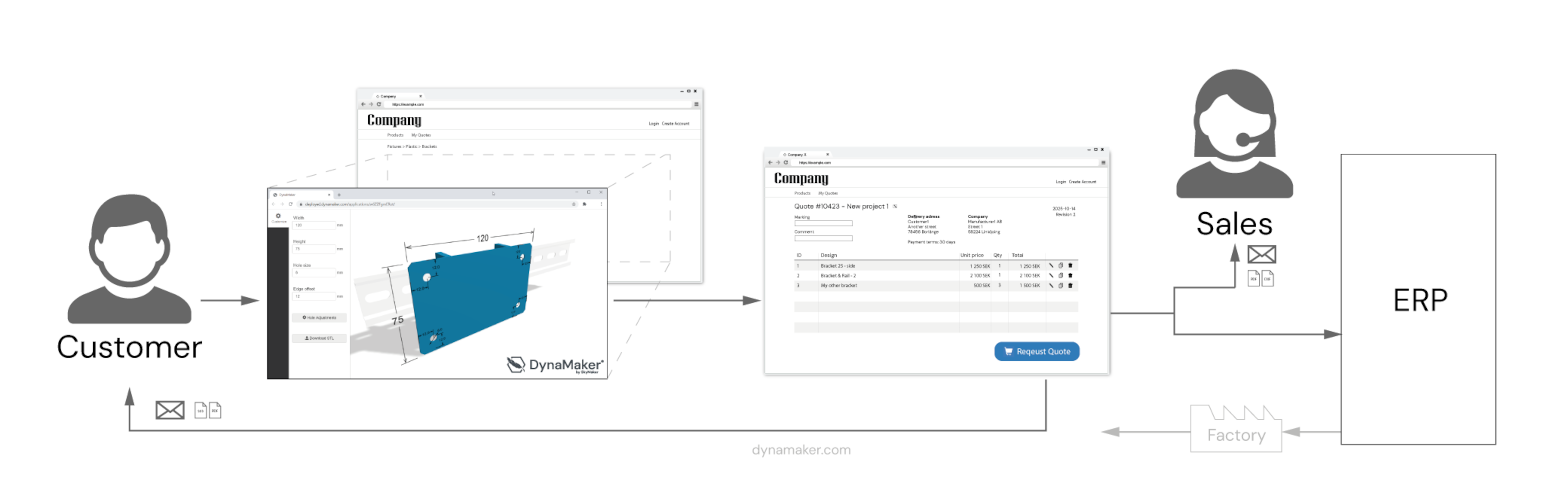
– Connect DynaMaker with other services like SendGrid to enable Quotation Requests direct to the sales teams inbox
Request for Quote (RFQ) Portal
– Useful features for logged in WordPress users to submit a quotation request with data from their CAD Configurators
– Checkout of several configurations as individual rows before submit
– Form fields for what information to include with the request (JSONForm)
– History of users requested quotes (optional)
– Send Request trigger endpoint (eg Microsoft Power Automate) to forward request