

Disable Right Click – Content Copy Protection, Prevent Copy & No Right Click
v2.0.4rbplugins · 2022年1月3日 上架
Disable right click, text selection and copy paste. Content copy protection for WordPress: protect text and images, prevent copying, add watermarks.
- 正在使用
- 600+
- 评分
- 4.2 / 5
- 累计下载
- 1 万
- 最近更新
- 2026年11月6日
贡献者
 rbplugins
截图




Worried about your text and images being copied without permission? Disable Right Click RB is a lightweight content copy protection plugin for WordPress. It lets you disable right click, disable text selection, block copy and paste shortcuts and stop image dragging — so visitors can’t simply copy your articles, save your photos or grab your product descriptions.
Unlike most “no right click” plugins with a single on/off switch, every protection here is independent. Turn on only what your site needs, protect the whole site or only selected posts, pages and custom post types, and exempt your own team by user role, so editors and administrators keep copying, quoting and editing as usual.
📖 Plugin Overview | 📚 Documentation | 💎 Pricing & PRO
🔒 Why protect your content?
Original writing, photography, recipes, course material and product images take time and money to create. Copy-paste theft and image scraping turn up as duplicate content elsewhere, hurt your search rankings and put your work on someone else’s site. Disable Right Click RB adds a practical anti-copy layer that discourages content theft without slowing your site down or breaking navigation, links and scrolling.
It is a good fit for:
- ✍️ Bloggers and publishers — prevent copying of articles and protect text content from scrapers and copy-paste
- 📸 Photographers and artists — disable right click on images, block “Save image as” and image dragging, and watermark photos with PRO
- 🛒 Online stores — protect product descriptions and product photos from competitors
- 🎓 Course creators and membership sites — protect lessons and premium pages from casual copying
- 🍲 Recipe, news and niche sites — keep your unique content on your own site
Version 2.0.0 is a complete rewrite: a new settings screen, per-content-type scope, role exceptions, a customizable notice message and an optional PRO add-on for real image watermarking and advanced protection rules. Settings from version 1.0.x are migrated automatically.
🛡️ Free Features
- 🖱️ Block the right-click / context menu
- 🔤 Block text selection
- ⌨️ Block copy, cut, paste and select-all keyboard shortcuts (Ctrl/⌘+C/X/V/A)
- 🖼️ Block dragging images out of the page
- 🎯 Apply protection everywhere, or only on selected content types (posts, pages, custom post types)
- 👤 Exempt specific user roles (editors, admins) from all restrictions, so your own team keeps working normally
- 💬 Show a short, customizable message when a blocked action is attempted
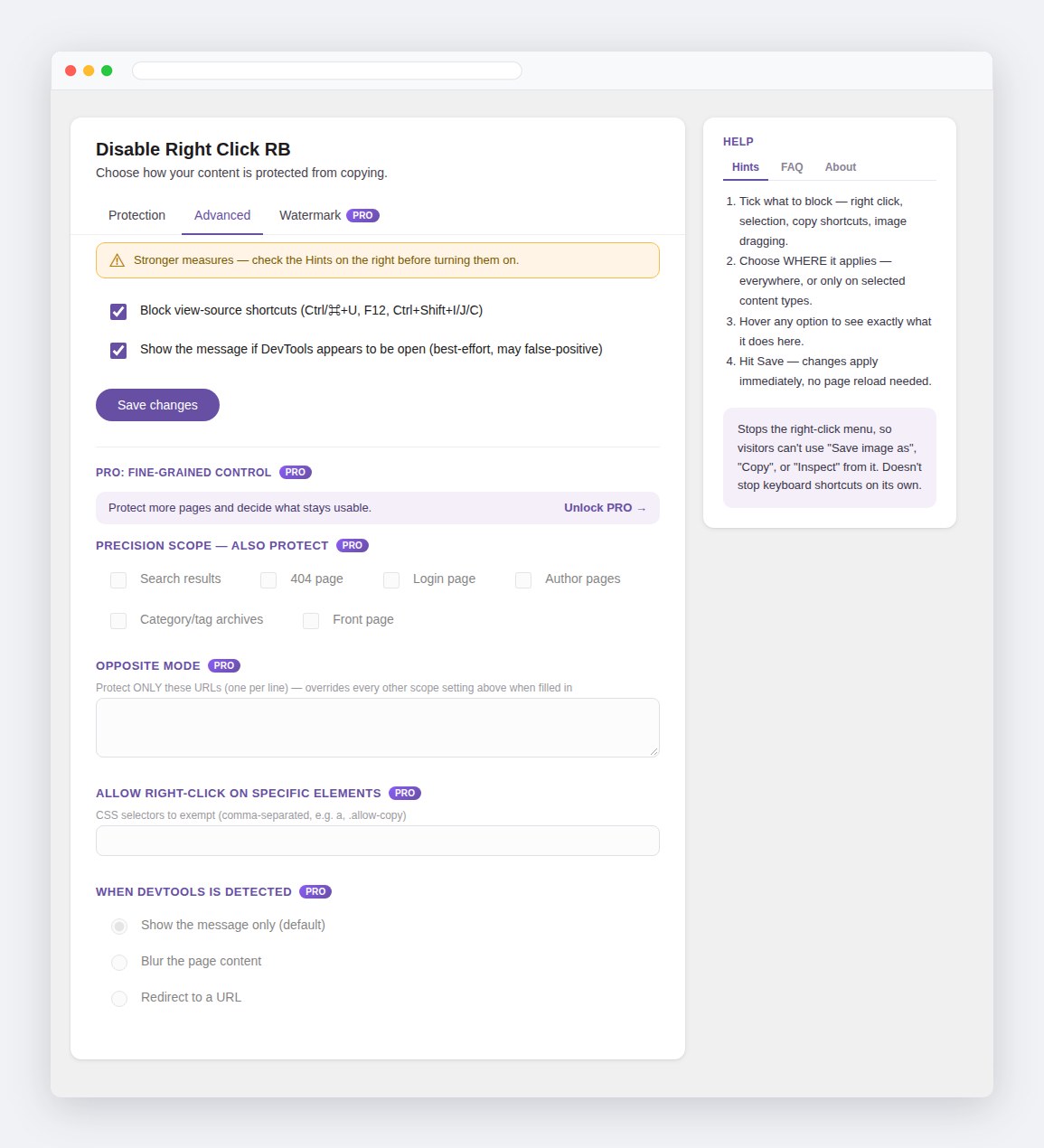
- 🕵️ Advanced: best-effort blocking of view-source shortcuts (Ctrl/⌘+U, F12, Ctrl+Shift+I/J/C) and a DevTools-open indicator
No page reload needed to save settings, no heavy scripts, and no theme or template edits required.
💎 PRO Features
The PRO add-on (a separate, sold-separately plugin) unlocks:
- 🖼️ Real image watermarking — tile your logo or site text across every image, either as a fast CSS overlay or a real server-side embed
- 💾 Embedded mode survives downloads — the watermark is baked into the image file itself, not just drawn on top, so it survives “Save image as”
- 🎯 Exclude images from watermarking by filename pattern or minimum size
- 🌐 Precision scope — extend protection to search results, the 404 page, the login screen, author pages, category/tag archives, and the front page
- 🔒 Opposite Mode — protect only a specific list of URLs instead of the whole site
- 🔗 Element allowlist — keep specific links, buttons, or code blocks copyable with a CSS selector, while everything else stays protected
- 🛠️ DevTools reaction — go beyond a passive indicator: blur the page content or redirect the visitor away while DevTools is open
- 📴 NoScript fallback — a baseline CSS protection layer for visitors with JavaScript disabled
📖 Plugin Overview | 📚 Documentation | 💎 Pricing & PRO
🔌 Also by rbPlugins