
Disable Directory Listings
v2.0Scott Reilly · 2011年7月29日 上架
Prevent virtual directory listing services from listing the contents of directories, and/or show a page in place of a directory's listing.
- 正在使用
- 90+
- 评分
- 5.0 / 5
- 累计下载
- 7,690
- 最近更新
- 2011年7月29日
贡献者
 Scott Reilly
截图
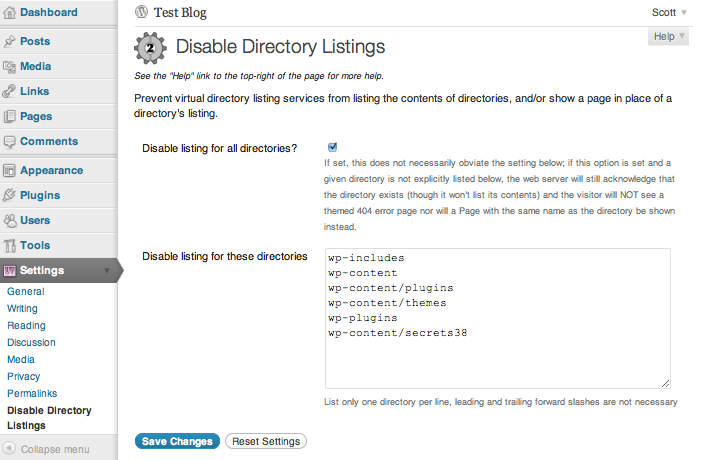
Prevent virtual directory listing services from listing the contents of directories, and/or show a page in place of a directory’s listing.
The Apache web server can be configured to automatically display the listings of the contents of a web site’s file directory if no index file (i.e. index.html or index.php) is present. This can expose files and information to visitors. Of course the web server could be configured to not do this (the recommended approach), but sometimes you don’t have permission (you’re on a shared host), the know-how, or you want to selectively disallow virtual directory listings. That’s where this plugin can help.
If you want to test if your site has virtual directory listings enabled, try visiting http://www.YOURSITE.com/wp-includes (obviously, change the domain to match your own). If you see a listing of PHP files then virtual directory listing is enabled for your site.
This plugin can prevent visitors from seeing the contents of certain (or all) directories on your site (assuming your web server generates virtual directory listings). It also allows you to use a WordPress page as the index for a directory
By default, the following directories are protected:
- wp-includes/
- wp-content/
- wp-content/plugins/
- wp-content/themes/
It does NOT protect any other directory by default. You can change this via the plugin’s admin settings page.
TIP: When this plugin is activated (and more specifically, ater the permalink structure is updated as per the instructions below), WordPress will generate the themed 404 – Not Found page. If you were to create a Page with the same name as one of the directories being disabled (i.e. ‘wp-includes’ or ‘wp-content’) then that page will be displayed instead of the 404 error message. If you want to display a page for the ‘plugins’ and ‘themes’ directory, you must create them as children pages of a ‘wp-content’ page.
NOTE: This plugin only works for the Apache web server.
Links: Plugin Homepage | Author Homepage