

Date Picker For Contact Form 7
v2.0theme funda · 2023年2月15日 上架
Easily add a customizable Date Picker to Contact Form 7. Restrict dates, disable specific days, and improve your booking forms.
- 正在使用
- 4,000+
- 评分
- 3.9 / 5
- 累计下载
- 2 万
- 最近更新
- 2026年10月25日
贡献者
 theme funda
截图
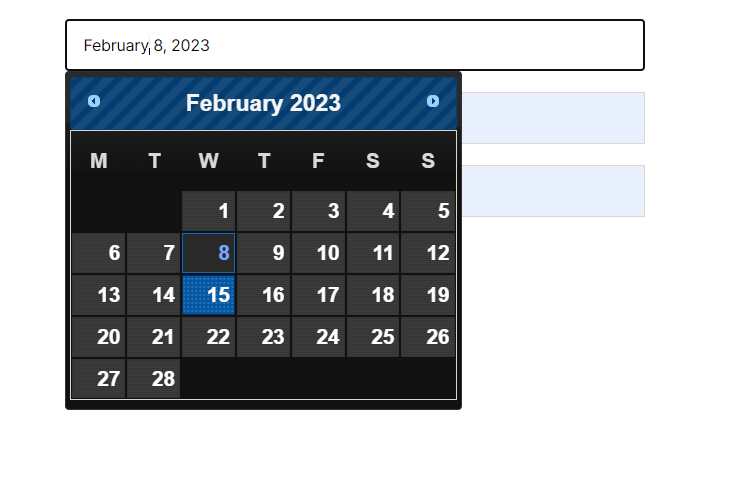


Date Picker For Contact Form 7 is a lightweight yet powerful Contact Form 7 datepicker alternative that adds a flexible, mobile-friendly calendar field to your CF7 forms — no coding required. If you’ve been searching for a simple way to stop users from typing dates by hand, this plugin gives you a clean calendar widget in just a few clicks.
Whether you need a Contact Form 7 calendar booking system for appointments, an Arrival/Departure date range, a Check-in/Check-out flow for a rental or hotel site, or a simple Appointment Booking form, this plugin gives you full control over how dates are selected and displayed.
Popular use cases
- Setting a Contact Form 7 date min today so customers can’t book dates in the past.
- Building a Contact Form 7 booking calendar for hotels, clinics, salons, and consultants.
- Adding a Contact Form 7 datepicker placeholder so users instantly know the expected date format.
- Looking to disable past dates in Contact Form 7 without writing custom JavaScript.
- Restricting bookings to a specific date range for events, rentals, or reservations.
Why choose this Date Picker?
- User Experience: Faster date selection leads to higher form conversion rates.
- Data Accuracy: Forces a consistent date format, making data management easy.
- Scheduling Control: Perfect for businesses that need to restrict weekends, holidays, or past dates.
- No Coding Needed: Configure everything from the CF7 tag generator — set the minimum date to today, add a placeholder, and pick a skin, all from the admin screen.
Main Features
- Multiple Date Pickers: Add multiple unique date fields to a single form.
- Custom Date Formats: Choose how the date appears (e.g., dd/mm/yy, mm-dd-yy).
- Min/Max Date Restrictions: Set the Contact Form 7 date min to today, or set a max date, to disable past dates or limit how far ahead users can book.
- Custom Skins: Change the design and look of the calendar to match your site.
- Placeholder Support: Add a custom Contact Form 7 datepicker placeholder text inside the date field.
[Pro] Advanced Features
- Disable Specific Days: Blackout holidays, weekends, or specific dates where you are unavailable — ideal for a booking calendar.
- Advanced Logic: Perfect for complex Contact Form 7 calendar booking requirements.